GoAnywhere MFT Connector Guide
The GoAnywhere MFT connector lets Tealfabric workflows trigger managed file transfer processes and retrieve transfer activity from GoAnywhere. It is useful for automating secure partner exchanges, scheduled file delivery, and transfer-status driven workflows.
Document information
| Field | Value |
|---|---|
| Canonical URL | /docs/04_connecting-systems/connectors/g/goanywhere-mft |
| Version (published date) | 2026-05-08 |
| Tags | connectors, reference, goanywhere-mft |
| Connector ID | goanywhere-mft-1.0.0 |
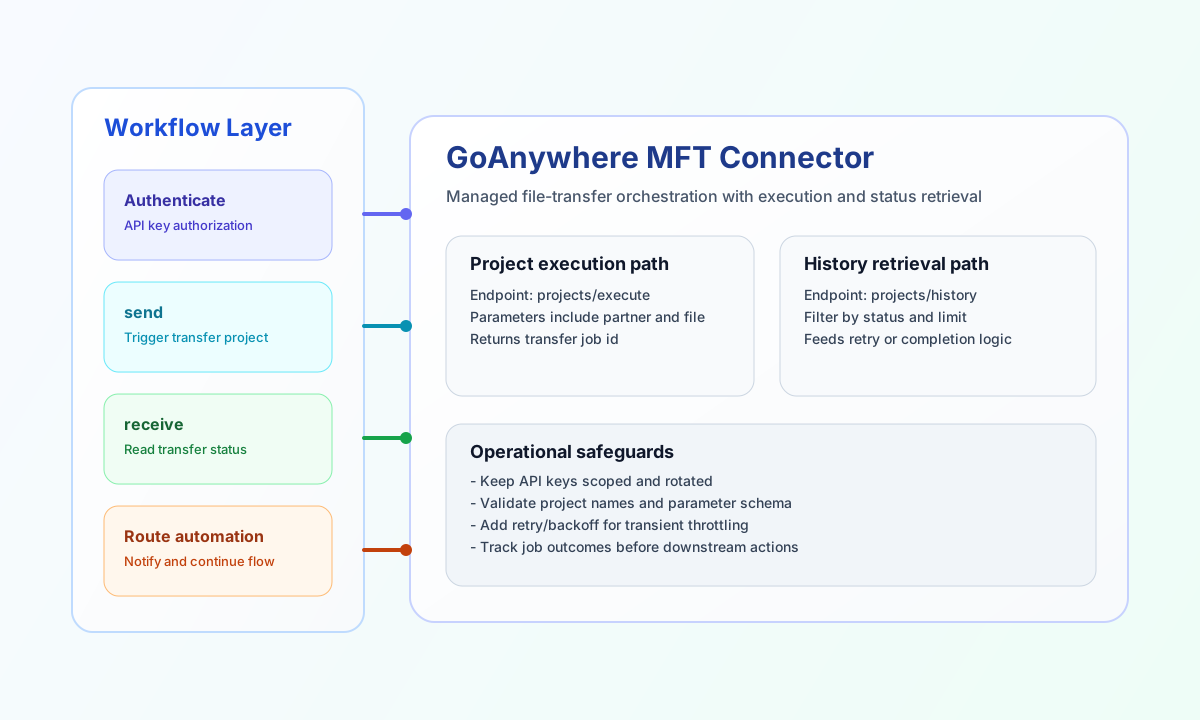
Configure access
Set base_url to your GoAnywhere instance (for example https://your-instance.goanywhere.com) and provide api_key with permission to run projects and read transfer results. Use timeout_seconds to match expected project runtime and API responsiveness in your environment.
Keep API keys scoped and rotated as part of security operations. Before production use, verify that GoAnywhere endpoints are reachable from your Tealfabric runtime network.
Trigger transfers with send
Use send to call GoAnywhere API paths with a JSON body. send requires endpoint (path segment after {base_url}/api/) and defaults to HTTP POST when method is omitted. Provide the JSON body in data; when data is omitted, the connector serializes the remaining callData fields (excluding integration config) as the body, matching legacy connector behavior.
const baseUrl = "https://api.example.com/api/v1";
const tenantId = "<TENANT_ID>";
const apiKey = "<API_KEY>";

async function triggerWorkflow(integrationId: string) {
  const response = await fetch(`${baseUrl}/integrations/${encodeURIComponent(integrationId)}/execute`, {
    method: "POST",
    headers: {
      "X-API-Key": apiKey,
      "X-Tenant-ID": tenantId,
      "Content-Type": "application/json",
    },
    body: JSON.stringify({
      operation: "send",
      endpoint: "workflows",
      method: "POST",
      data: {
        name: "PartnerOutboundTransfer",
        parameters: {
          partnerId: "northwind",
          fileName: "invoice_2026_05_08.csv"
        }
      }
    }),
  });
  if (!response.ok) throw new Error(`Request failed: ${response.status}`);
  return response.json();
}
curl -X POST "https://api.example.com/api/v1/integrations/<ENTITY_ID>/execute" \
-H "X-API-Key: <API_KEY>" \
-H "X-Tenant-ID: <TENANT_ID>" \
-H "Content-Type: application/json" \
-d '{
"operation": "send",
"endpoint": "workflows",
"method": "POST",
"data": {
"name": "PartnerOutboundTransfer",
"parameters": {
"partnerId": "northwind",
"fileName": "invoice_2026_05_08.csv"
}
}
}'
{
  "success": true,
  "data": {
    "message": "GoAnywhere operation completed successfully",
    "result": {
      "jobId": "GA-20260508-1942",
      "status": "Running"
    }
  }
}
Retrieve transfer status with receive
Use receive to GET a GoAnywhere API path with optional query parameters. The connector returns items from response.workflows, else response.transfers, else a one-element array wrapping the full response. workflow_count is the length of items.
const baseUrl = "https://api.example.com/api/v1";
const tenantId = "<TENANT_ID>";
const apiKey = "<API_KEY>";

async function getTransferHistory(integrationId: string) {
  const response = await fetch(`${baseUrl}/integrations/${encodeURIComponent(integrationId)}/execute`, {
    method: "POST",
    headers: {
      "X-API-Key": apiKey,
      "X-Tenant-ID": tenantId,
      "Content-Type": "application/json",
    },
    body: JSON.stringify({
      operation: "receive",
      endpoint: "transfers",
      query: {
        limit: 10,
        status: "Completed"
      }
    }),
  });
  if (!response.ok) throw new Error(`Request failed: ${response.status}`);
  return response.json();
}
curl -X POST "https://api.example.com/api/v1/integrations/<ENTITY_ID>/execute" \
-H "X-API-Key: <API_KEY>" \
-H "X-Tenant-ID: <TENANT_ID>" \
-H "Content-Type: application/json" \
-d '{
"operation": "receive",
"endpoint": "transfers",
"query": {
"limit": 10,
"status": "Completed"
}
}'
{
  "success": true,
  "data": {
    "message": "GoAnywhere data retrieved successfully",
    "workflow_count": 1,
    "items": [
      {
        "jobId": "GA-20260508-1942",
        "status": "Completed",
        "endTime": "2026-05-08T16:59:00Z"
      }
    ]
  }
}
Test connectivity with test
Use test to validate base_url and api_key. Only test enforces required configuration validation (matching legacy connector behavior). The connector probes GET api/workflows and returns data.details.workflows_found.
{
  "success": true,
  "data": {
    "message": "GoAnywhere connection test successful",
    "details": {
      "base_url": "https://your-instance.goanywhere.com",
      "workflows_found": 3
    }
  }
}
When configuration is invalid, test returns success: false with error message Configuration validation failed.
Reliability guidance
Most failures come from invalid API keys, endpoint-path mismatches, or request payloads that do not match GoAnywhere API expectations. When calls fail, verify credentials first and then validate endpoint names and request fields.
For production reliability, add retry/backoff handling for transient throttling and monitor transfer job outcomes before triggering dependent workflow steps. This keeps managed file transfer automations predictable and auditable.