Generic Incoming Webhook Connector Guide
The Generic Incoming Webhook connector lets external systems push event payloads into Tealfabric workflows through an HTTP endpoint. It is commonly used for event-driven automation such as alerts, order updates, and callback-triggered processing.
Document information
| Field | Value |
|---|---|
| Canonical URL | /docs/04_connecting-systems/connectors/g/generic-webhook-incoming |
| Version (published date) | 2026-05-08 |
| Tags | connectors, reference, generic-webhook-incoming |
| Connector ID | generic-webhook-incoming-1.0.0 |
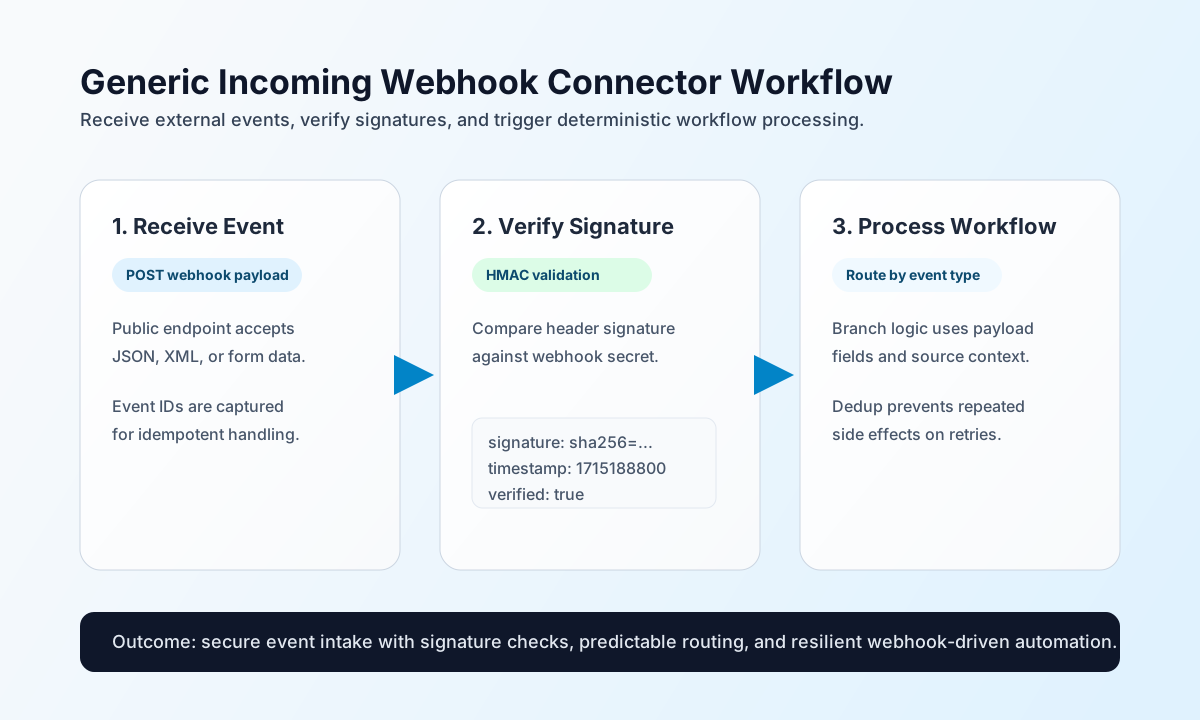
Configuration and reception model
Configure the connector to expose a stable webhook path and optional signature secret so external systems can send events safely.
webhook_secret(optional): Shared secret for HMAC-SHA256 hex signature verification (X-Signatureheader onreceive, orsignature/X-Signatureonverify).webhook_path(optional): URL path metadata returned bytest(not enforced by the connector runtime).timeout_seconds(optional): Loaded from integration config (default30); legacy parity keeps this unused duringreceive/verify/test.
When webhook_secret is configured and the inbound headers map includes an X-Signature key, receive verifies the signature before accepting the payload. An empty X-Signature value still triggers verification and fails when the digest does not match (legacy isset behavior).
Receive webhook events with receive
Use receive to normalize a captured webhook payload for downstream workflow steps. Provide payload or body, optional headers, and optional method (defaults to POST). Payload values rejected by PHP empty() semantics ("", "0", 0, false, null, [], {}) raise a validation error.
const baseUrl = "https://api.example.com/api/v1";
const tenantId = "<TENANT_ID>";
const apiKey = "<API_KEY>";

async function receiveWebhookEvent(integrationId: string) {
  const response = await fetch(`${baseUrl}/integrations/${encodeURIComponent(integrationId)}/execute`, {
    method: "POST",
    headers: {
      "X-API-Key": apiKey,
      "X-Tenant-ID": tenantId,
      "Content-Type": "application/json",
    },
    body: JSON.stringify({
      operation: "receive",
      payload: {
        event_type: "payment.succeeded",
        event_id: "<ENTITY_ID>",
        amount: 12500,
        currency: "USD",
      },
      headers: {
        "X-Signature": "<HMAC_SHA256_HEX>",
        "Content-Type": "application/json",
      },
      method: "POST",
    }),
  });
  if (!response.ok) throw new Error(`Request failed: ${response.status}`);
  return response.json();
}
curl -X POST "https://api.example.com/api/v1/integrations/<ENTITY_ID>/execute" \
-H "X-API-Key: <API_KEY>" \
-H "X-Tenant-ID: <TENANT_ID>" \
-H "Content-Type: application/json" \
-d '{
"operation": "receive",
"payload": {
"event_type": "payment.succeeded",
"event_id": "<ENTITY_ID>",
"amount": 12500,
"currency": "USD"
},
"headers": {
"X-Signature": "<HMAC_SHA256_HEX>",
"Content-Type": "application/json"
},
"method": "POST"
}'
{
  "success": true,
  "data": {
    "webhook_count": 1,
    "payload": {
      "event_type": "payment.succeeded",
      "event_id": "<ENTITY_ID>",
      "amount": 12500,
      "currency": "USD"
    },
    "headers": {
      "X-Signature": "<HMAC_SHA256_HEX>",
      "Content-Type": "application/json"
    },
    "method": "POST"
  }
}
Verify request integrity with verify
Use verify to validate an HMAC-SHA256 hex signature against the configured webhook_secret. Provide payload or body plus signature or X-Signature. Requires a configured secret and a non-empty signature (PHP empty() semantics).
const baseUrl = "https://api.example.com/api/v1";
const tenantId = "<TENANT_ID>";
const apiKey = "<API_KEY>";

async function verifyWebhookSignature(integrationId: string) {
  const response = await fetch(`${baseUrl}/integrations/${encodeURIComponent(integrationId)}/execute`, {
    method: "POST",
    headers: {
      "X-API-Key": apiKey,
      "X-Tenant-ID": tenantId,
      "Content-Type": "application/json",
    },
    body: JSON.stringify({
      operation: "verify",
      payload: { event_type: "payment.succeeded" },
      signature: "<HMAC_SHA256_HEX>",
    }),
  });
  if (!response.ok) throw new Error(`Request failed: ${response.status}`);
  return response.json();
}
curl -X POST "https://api.example.com/api/v1/integrations/<ENTITY_ID>/execute" \
-H "X-API-Key: <API_KEY>" \
-H "X-Tenant-ID: <TENANT_ID>" \
-H "Content-Type: application/json" \
-d '{
"operation": "verify",
"payload": { "event_type": "payment.succeeded" },
"signature": "<HMAC_SHA256_HEX>"
}'
{
  "success": true,
  "data": {
    "webhook_count": 0,
    "verified": true
  }
}
Validate configuration with test
Use test to confirm integration settings without processing a webhook. Returns webhook_path and whether webhook_secret enables signature verification.
const baseUrl = "https://api.example.com/api/v1";
const tenantId = "<TENANT_ID>";
const apiKey = "<API_KEY>";

async function testWebhookConfiguration(integrationId: string) {
  const response = await fetch(`${baseUrl}/integrations/${encodeURIComponent(integrationId)}/execute`, {
    method: "POST",
    headers: {
      "X-API-Key": apiKey,
      "X-Tenant-ID": tenantId,
      "Content-Type": "application/json",
    },
    body: JSON.stringify({
      operation: "test",
    }),
  });
  if (!response.ok) throw new Error(`Request failed: ${response.status}`);
  return response.json();
}
curl -X POST "https://api.example.com/api/v1/integrations/<ENTITY_ID>/execute" \
-H "X-API-Key: <API_KEY>" \
-H "X-Tenant-ID: <TENANT_ID>" \
-H "Content-Type: application/json" \
-d '{
"operation": "test"
}'
{
  "success": true,
  "data": {
    "message": "Generic Incoming Webhook configuration test successful",
    "details": {
      "webhook_path": "/webhooks/incoming",
      "signature_verification": true
    }
  }
}
Reliability guidance
Most webhook issues come from unsigned requests, malformed payloads, or endpoint exposure misconfiguration. If processing fails, validate signature checks first, then confirm payload schema assumptions, and finally inspect timeout and network access settings.
For production stability, treat webhook handling as idempotent by tracking external event IDs and rejecting duplicates. This protects workflows from retry storms and duplicate event side effects.