Generic Outgoing Webhook Connector Guide
The Generic Outgoing Webhook connector sends workflow events from Tealfabric to any external HTTP endpoint. It is useful when a target system does not have a dedicated connector but can receive structured webhook requests.
Document information
| Field | Value |
|---|---|
| Canonical URL | /docs/04_connecting-systems/connectors/g/generic-webhook-outgoing |
| Version (published date) | 2026-05-08 |
| Tags | connectors, reference, generic-webhook-outgoing |
| Connector ID | generic-webhook-outgoing-1.0.0 |
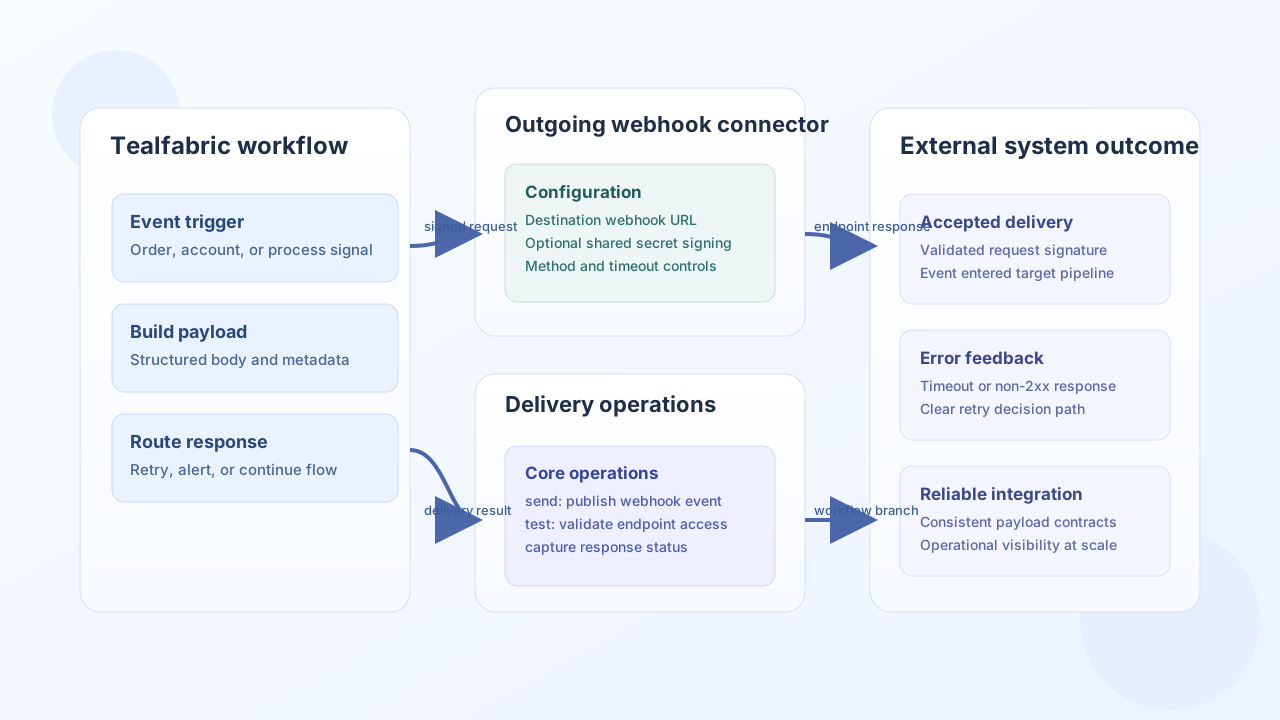
Configuration and delivery model
Configure this connector with the destination URL and an optional shared secret for request signing. Use deterministic payload shapes and stable request headers so receiving systems can validate and process events reliably.
webhook_url(required): Destination endpoint URL.webhook_secret(optional): Shared secret for signature generation.method(optional): HTTP method, typicallyPOST,PUT, orPATCH.timeout_seconds(optional): Request timeout in seconds.
Send webhook events with send
Use send to deliver event payloads to external systems. Provide payload or body explicitly, or omit both to send the full call data object as the JSON body (legacy parity). Per-call url and method override integration defaults. When webhook_secret is configured, the connector adds an X-Signature header (HMAC-SHA256 hex digest of the serialized request body).
const baseUrl = "https://api.example.com/api/v1";
const tenantId = "<TENANT_ID>";
const apiKey = "<API_KEY>";

async function sendOrderCreatedWebhook(integrationId: string) {
  const response = await fetch(`${baseUrl}/integrations/${encodeURIComponent(integrationId)}/execute`, {
    method: "POST",
    headers: {
      "X-API-Key": apiKey,
      "X-Tenant-ID": tenantId,
      "Content-Type": "application/json",
    },
    body: JSON.stringify({
      operation: "send",
      payload: {
        event_type: "order.created",
        event_id: "<ENTITY_ID>",
        occurred_at: "2026-05-08T14:09:00Z",
        order_id: "<ENTITY_ID>",
        customer_id: "<ENTITY_ID>",
        total: 129.5,
      },
      headers: {
        "X-Webhook-Source": "tealfabric",
      },
    }),
  });
  if (!response.ok) throw new Error(`Request failed: ${response.status}`);
  return response.json();
}
curl -X POST "https://api.example.com/api/v1/integrations/<ENTITY_ID>/execute" \
-H "X-API-Key: <API_KEY>" \
-H "X-Tenant-ID: <TENANT_ID>" \
-H "Content-Type: application/json" \
-d '{
"operation": "send",
"payload": {
"event_type": "order.created",
"event_id": "<ENTITY_ID>",
"occurred_at": "2026-05-08T14:09:00Z",
"order_id": "<ENTITY_ID>",
"customer_id": "<ENTITY_ID>",
"total": 129.5
},
"headers": {
"X-Webhook-Source": "tealfabric"
}
}'
{
  "success": true,
  "data": {
    "webhook_count": 1,
    "response": {
      "status_code": 202,
      "data": { "accepted": true },
      "raw_response": "{\"accepted\":true}"
    },
    "data": {
      "status_code": 202,
      "data": { "accepted": true },
      "raw_response": "{\"accepted\":true}"
    }
  }
}
Validate endpoint readiness with test
Use test before go-live and after endpoint changes. The connector validates webhook_url, sends { test: true, timestamp } using the configured HTTP method, and fails on HTTP status >= 400.
const baseUrl = "https://api.example.com/api/v1";
const tenantId = "<TENANT_ID>";
const apiKey = "<API_KEY>";

async function testWebhookEndpoint(integrationId: string) {
  const response = await fetch(`${baseUrl}/integrations/${encodeURIComponent(integrationId)}/execute`, {
    method: "POST",
    headers: {
      "X-API-Key": apiKey,
      "X-Tenant-ID": tenantId,
      "Content-Type": "application/json",
    },
    body: JSON.stringify({
      operation: "test",
    }),
  });
  if (!response.ok) throw new Error(`Request failed: ${response.status}`);
  return response.json();
}
curl -X POST "https://api.example.com/api/v1/integrations/<ENTITY_ID>/execute" \
-H "X-API-Key: <API_KEY>" \
-H "X-Tenant-ID: <TENANT_ID>" \
-H "Content-Type: application/json" \
-d '{
"operation": "test"
}'
{
  "success": true,
  "data": {
    "message": "Generic Outgoing Webhook connection test successful",
    "details": {
      "webhook_url": "https://hooks.example.com/events",
      "method": "POST",
      "response_status": 200
    }
  }
}
Reliability guidance
Webhook delivery problems usually come from endpoint downtime, signature mismatches, or aggressive timeout settings. Keep payloads compact, verify receiver expectations for headers and content type, and use retry/backoff patterns for temporary failures. These controls make webhook-based integrations stable under load.