MySQL Connector Guide
The MySQL connector lets Tealfabric workflows run parameterized SQL operations against MySQL databases for transactional updates and reporting reads. It is best suited for use cases where workflow automation must write operational data and immediately query records for downstream steps.
Document information
| Field | Value |
|---|---|
| Canonical URL | /docs/04_connecting-systems/connectors/m/mysql |
| Version (published date) | 2026-05-08 |
| Tags | connectors, reference, mysql |
| Connector ID | mysql-1.0.0 |
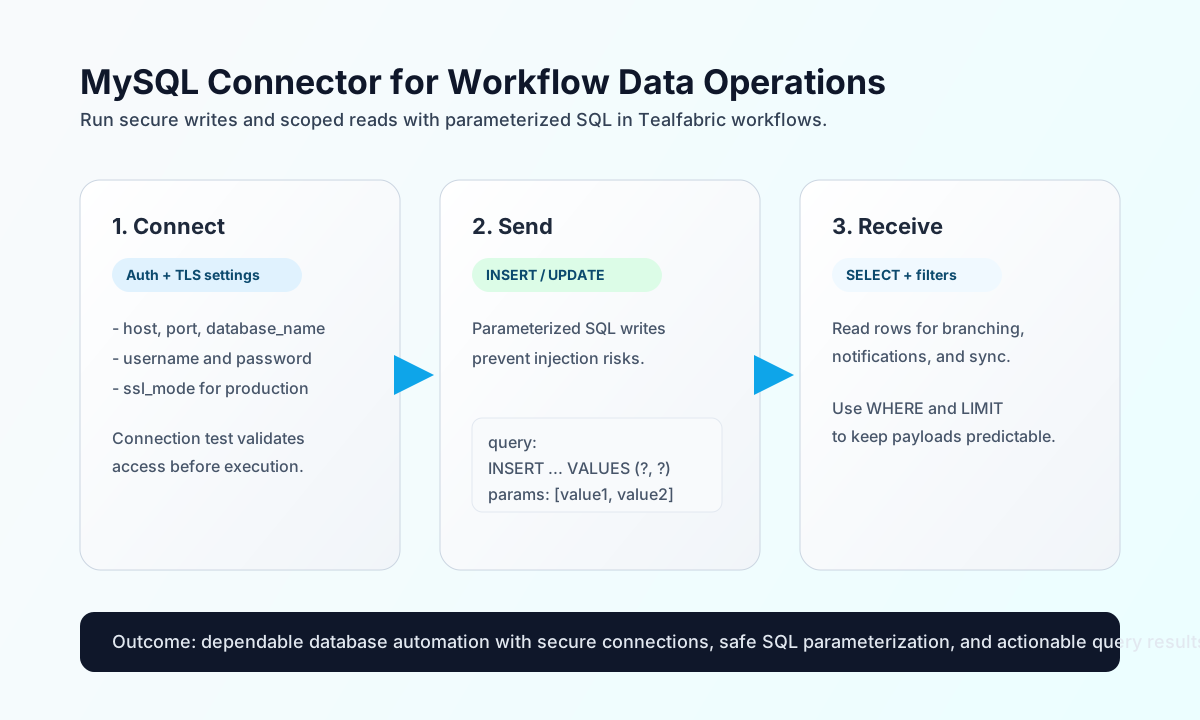
Configure and validate the connection
Start by configuring database host access so workflows can authenticate and run SQL safely without embedding credentials in each step payload. This model keeps connection details centralized and easier to rotate.
Required settings are host, username, password, and database_name. Optional settings include port (default 3306), ssl_mode, ssl_ca_pem, and timeout_seconds. Run test after setup to confirm authentication and database reachability before enabling production flows. The test operation validates required configuration and returns Configuration validation failed when any required field is missing.
Use ssl_mode: disable when non-encrypted transport is required in trusted private networks.
Use ssl_mode: require for encrypted transport without certificate verification.
Use ssl_mode: verify-ca or ssl_mode: verify-full with ssl_ca_pem to validate the server certificate chain.
Write data with send
Use send for arbitrary SQL write or DDL statements. Always pass values through params so statements remain parameterized and resistant to SQL injection.
const baseUrl = "https://api.example.com/api/v1";
const tenantId = "<TENANT_ID>";
const apiKey = "<API_KEY>";

async function insertOrderAudit(integrationId: string) {
  const response = await fetch(`${baseUrl}/integrations/${encodeURIComponent(integrationId)}/execute`, {
    method: "POST",
    headers: {
      "X-API-Key": apiKey,
      "X-Tenant-ID": tenantId,
      "Content-Type": "application/json",
    },
    body: JSON.stringify({
      operation: "send",
      query: "INSERT INTO order_audit (order_id, status, created_at) VALUES (?, ?, NOW())",
      params: ["<ENTITY_ID>", "processed"]
    }),
  });
  if (!response.ok) throw new Error(`Request failed: ${response.status}`);
  return response.json();
}
curl -X POST "https://api.example.com/api/v1/integrations/<ENTITY_ID>/execute" \
-H "X-API-Key: <API_KEY>" \
-H "X-Tenant-ID: <TENANT_ID>" \
-H "Content-Type: application/json" \
-d '{
"operation": "send",
"query": "INSERT INTO order_audit (order_id, status, created_at) VALUES (?, ?, NOW())",
"params": ["<ENTITY_ID>", "processed"]
}'
{
  "success": true,
  "data": {
    "message_count": 1,
    "affected_rows": 1,
    "last_insert_id": "4821"
  }
}
Read data with receive
Use receive for arbitrary SQL reads and metadata queries that feed approvals, enrichment, and branching logic. Keep queries scoped with explicit filters and LIMIT clauses to prevent large responses from slowing workflow execution.
const baseUrl = "https://api.example.com/api/v1";
const tenantId = "<TENANT_ID>";
const apiKey = "<API_KEY>";

async function getRecentOrders(integrationId: string) {
  const response = await fetch(`${baseUrl}/integrations/${encodeURIComponent(integrationId)}/execute`, {
    method: "POST",
    headers: {
      "X-API-Key": apiKey,
      "X-Tenant-ID": tenantId,
      "Content-Type": "application/json",
    },
    body: JSON.stringify({
      operation: "receive",
      query: "SELECT id, customer_email, status FROM orders WHERE status = ? ORDER BY created_at DESC LIMIT 25",
      params: ["pending_review"]
    }),
  });
  if (!response.ok) throw new Error(`Request failed: ${response.status}`);
  return response.json();
}
curl -X POST "https://api.example.com/api/v1/integrations/<ENTITY_ID>/execute" \
-H "X-API-Key: <API_KEY>" \
-H "X-Tenant-ID: <TENANT_ID>" \
-H "Content-Type: application/json" \
-d '{
"operation": "receive",
"query": "SELECT id, customer_email, status FROM orders WHERE status = ? ORDER BY created_at DESC LIMIT 25",
"params": ["pending_review"]
}'
{
  "success": true,
  "data": {
    "message_count": 1,
    "data": [
      {
        "id": 9001,
        "customer_email": "buyer@example.com",
        "status": "pending_review"
      }
    ],
    "total_size": 1
  }
}
Bidirectional SQL with sync
Use sync when a workflow needs both a write leg (outbound) and a read leg (inbound) in one call. Each leg uses the same callData shape as send or receive. Empty or omitted legs are skipped (PHP empty() semantics).
{
  "operation": "sync",
  "outbound": {
    "query": "UPDATE order_audit SET status = ? WHERE order_id = ?",
    "params": ["shipped", "ORD-10492"]
  },
  "inbound": {
    "query": "SELECT order_id, status FROM order_audit WHERE order_id = ?",
    "params": ["ORD-10492"]
  }
}
{
  "success": true,
  "data": {
    "message_count": 2,
    "results": {
      "outbound": {
        "success": true,
        "message_count": 1,
        "affected_rows": 1,
        "last_insert_id": null
      },
      "inbound": {
        "success": true,
        "message_count": 1,
        "data": [{ "order_id": "ORD-10492", "status": "shipped" }],
        "total_size": 1
      }
    }
  }
}
Transactional batches with batch
Use batch to run multiple SQL statements in one transaction. All statements commit only when every entry succeeds; otherwise the transaction rolls back. Each entry defaults to operation: "send"; set operation: "receive" to return row data.
{
  "operation": "batch",
  "queries": [
    {
      "query": "INSERT INTO order_audit (order_id, status) VALUES (?, ?)",
      "params": ["ORD-10500", "pending"]
    },
    {
      "operation": "receive",
      "query": "SELECT order_id, status FROM order_audit WHERE order_id = ?",
      "params": ["ORD-10500"]
    }
  ]
}
Test connectivity with test
Run test with no callData to validate configuration and confirm MySQL connectivity. On success the connector returns server database and user details.
{
  "success": true,
  "data": {
    "message": "MySQL connection test successful",
    "details": {
      "host": "db.example.com",
      "port": 3306,
      "database": "orders",
      "user": "tf_connector"
    }
  }
}
Reliability and security guidance
Most MySQL connector failures come from connection issues, permission mismatches, and malformed SQL. If a run fails, verify host and credentials first, then confirm schema/table permissions, and finally validate that parameter counts match statement placeholders.
For production reliability, enforce TLS (ssl_mode: require or stronger), keep statements parameterized, and use transactional batch operations only for truly atomic changes. These practices improve consistency and reduce operational risk as workflow volume grows.