Microsoft Dynamics 365 Business Central Connector Guide
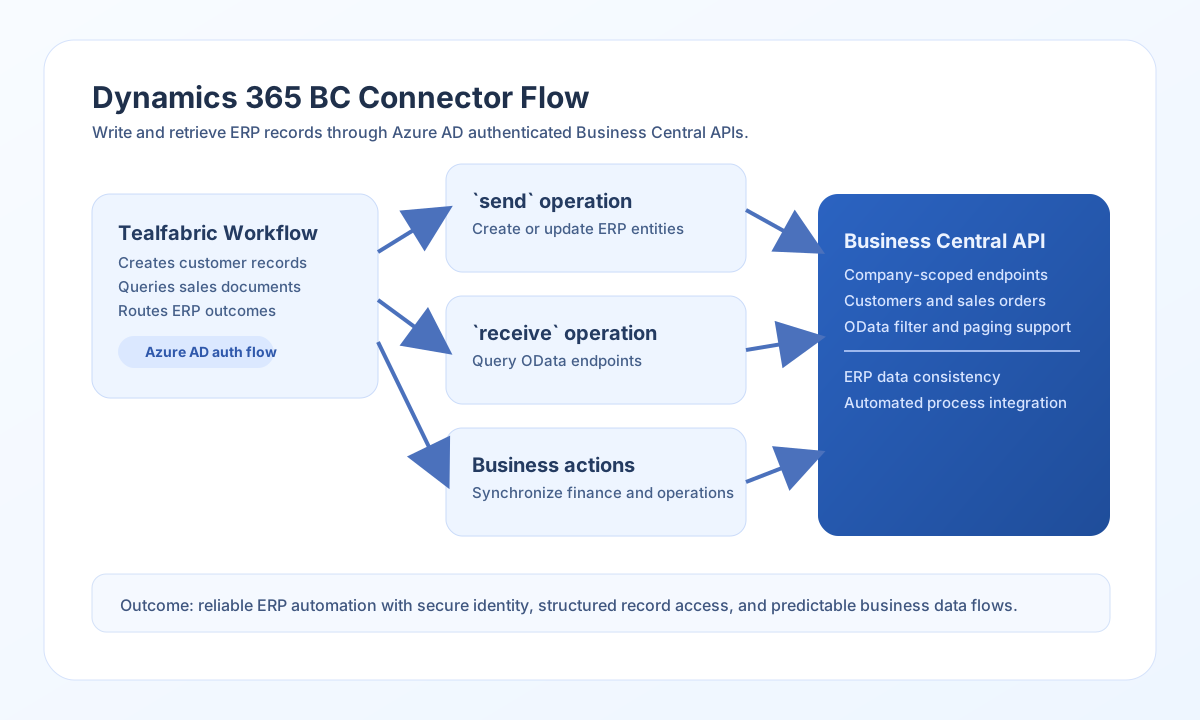
The Microsoft Dynamics 365 Business Central connector helps Tealfabric workflows exchange ERP data such as customers, sales orders, and items. It is designed for secure API-based integration with Business Central environments using Azure AD client-credentials authentication.
Document information
| Field | Value |
|---|---|
| Canonical URL | /docs/04_connecting-systems/connectors/m/microsoft-dynamics-bc |
| Version (published date) | 2026-05-08 |
| Tags | connectors, reference, microsoft-dynamics-bc |
| Connector ID | microsoft-dynamics-bc-1.0.0 |
When to use this connector
Use this connector when workflows must create or update Business Central entities, query OData collections, or call custom API pages. Typical use cases include customer onboarding, sales-order synchronization, and inventory lookups. The connector uses Business Central API v2.0 paths relative to base_url.
Configuration
Set these values in the integration profile:
base_url(required): Business Central environment URL (for examplehttps://api.businesscentral.dynamics.com/v2.0/{tenant}/{environment}).tenant_id(required): Microsoft Entra tenant identifier.client_id(required): Azure AD application client ID.client_secret(required): Azure AD application client secret.timeout_seconds(optional): Request timeout in seconds (default60).
The connector requests an access token from https://login.microsoftonline.com/{tenant_id}/oauth2/v2.0/token using the client-credentials grant with scope {base_url}/.default.
Validate connectivity with test
Run test before production deployment to confirm Azure AD authentication and API reachability. The connector calls GET api/v2.0/companies and reports how many companies were returned.
{
  "success": true,
  "data": {
    "message": "Business Central connection test successful",
    "details": {
      "base_url": "https://api.businesscentral.dynamics.com/v2.0/<tenant>/<environment>",
      "tenant_id": "<TENANT_ID>",
      "companies_found": 2
    }
  },
  "metadata": {
    "processing_time_ms": 842
  }
}
Create or update ERP records with send
Use send to create or update Business Central entities such as customers or sales documents. Provide endpoint (path relative to base_url), method (default POST), and data for the JSON body.
const baseUrl = "https://api.example.com/api/v1";
const tenantId = "<TENANT_ID>";
const apiKey = "<API_KEY>";

async function createCustomer(integrationId: string) {
  const response = await fetch(`${baseUrl}/integrations/${encodeURIComponent(integrationId)}/execute`, {
    method: "POST",
    headers: {
      "X-API-Key": apiKey,
      "X-Tenant-ID": tenantId,
      "Content-Type": "application/json",
    },
    body: JSON.stringify({
      operation: "send",
      endpoint: "api/v2.0/companies(<COMPANY_ID>)/customers",
      method: "POST",
      data: {
        displayName: "Fabrikam Wholesale",
        type: "Company",
        email: "ap@fabrikam.example"
      }
    }),
  });
  if (!response.ok) throw new Error(`Request failed: ${response.status}`);
  const payload = await response.json();
  if (!payload.success) throw new Error(payload.error?.message ?? "send failed");
  return payload.data.result;
}
curl -X POST "https://api.example.com/api/v1/integrations/<ENTITY_ID>/execute" \
-H "X-API-Key: <API_KEY>" \
-H "X-Tenant-ID: <TENANT_ID>" \
-H "Content-Type: application/json" \
-d '{
"operation": "send",
"endpoint": "api/v2.0/companies(<COMPANY_ID>)/customers",
"method": "POST",
"data": {
"displayName": "Fabrikam Wholesale",
"type": "Company",
"email": "ap@fabrikam.example"
}
}'
{
  "success": true,
  "data": {
    "message": "Business Central operation completed successfully",
    "result": {
      "id": "<ENTITY_ID>",
      "displayName": "Fabrikam Wholesale"
    }
  }
}
Retrieve records with receive
Use receive to query Business Central entities through OData-style endpoints. Provide endpoint and optional query (object map or raw query string). Collection responses expose rows in data.items with data.record_count.
const baseUrl = "https://api.example.com/api/v1";
const tenantId = "<TENANT_ID>";
const apiKey = "<API_KEY>";

async function listOpenSalesOrders(integrationId: string) {
  const response = await fetch(`${baseUrl}/integrations/${encodeURIComponent(integrationId)}/execute`, {
    method: "POST",
    headers: {
      "X-API-Key": apiKey,
      "X-Tenant-ID": tenantId,
      "Content-Type": "application/json",
    },
    body: JSON.stringify({
      operation: "receive",
      endpoint: "api/v2.0/companies(<COMPANY_ID>)/salesOrders",
      query: {
        "$top": 25,
        "$filter": "status eq 'Open'"
      }
    }),
  });
  if (!response.ok) throw new Error(`Request failed: ${response.status}`);
  const payload = await response.json();
  if (!payload.success) throw new Error(payload.error?.message ?? "receive failed");
  return payload.data.items;
}
curl -X POST "https://api.example.com/api/v1/integrations/<ENTITY_ID>/execute" \
-H "X-API-Key: <API_KEY>" \
-H "X-Tenant-ID: <TENANT_ID>" \
-H "Content-Type: application/json" \
-d '{
"operation": "receive",
"endpoint": "api/v2.0/companies(<COMPANY_ID>)/salesOrders",
"query": {
"$top": 25,
"$filter": "status eq '\''Open'\''"
}
}'
{
  "success": true,
  "data": {
    "message": "Business Central data retrieved successfully",
    "record_count": 1,
    "items": [
      {
        "id": "<ENTITY_ID>",
        "number": "SO-10045",
        "status": "Open"
      }
    ]
  }
}
Call custom API pages with execute
Use execute for arbitrary HTTP calls when you need a non-default method or custom API page path. Body fields are read from body first, then data (default [] when both are omitted).
{
  "operation": "execute",
  "endpoint": "api/v2.0/companies(<COMPANY_ID>)/dimensionValues",
  "method": "GET"
}
Reliability guidance
Most integration issues come from invalid app permissions, wrong company endpoints, or schema mismatches across Business Central environments. Validate scopes and target company IDs before enabling automation in production.
For reliable operation, use pagination ($top / $skip), limit selected fields ($select), and implement retry/backoff for 429 and transient 5xx responses. This keeps ERP workflows responsive and easier to maintain.