MicroStrategy BI Connector Guide
The MicroStrategy connector helps Tealfabric workflows run analytics operations against MicroStrategy projects, including report execution and dataset retrieval. It is designed for teams that need to move BI insights into automated business workflows with consistent authentication and response handling.
Document information
| Field | Value |
|---|---|
| Canonical URL | /docs/04_connecting-systems/connectors/m/microstrategy |
| Version (published date) | 2026-05-08 |
| Tags | connectors, reference, microstrategy |
| Connector ID | microstrategy-1.0.0 |
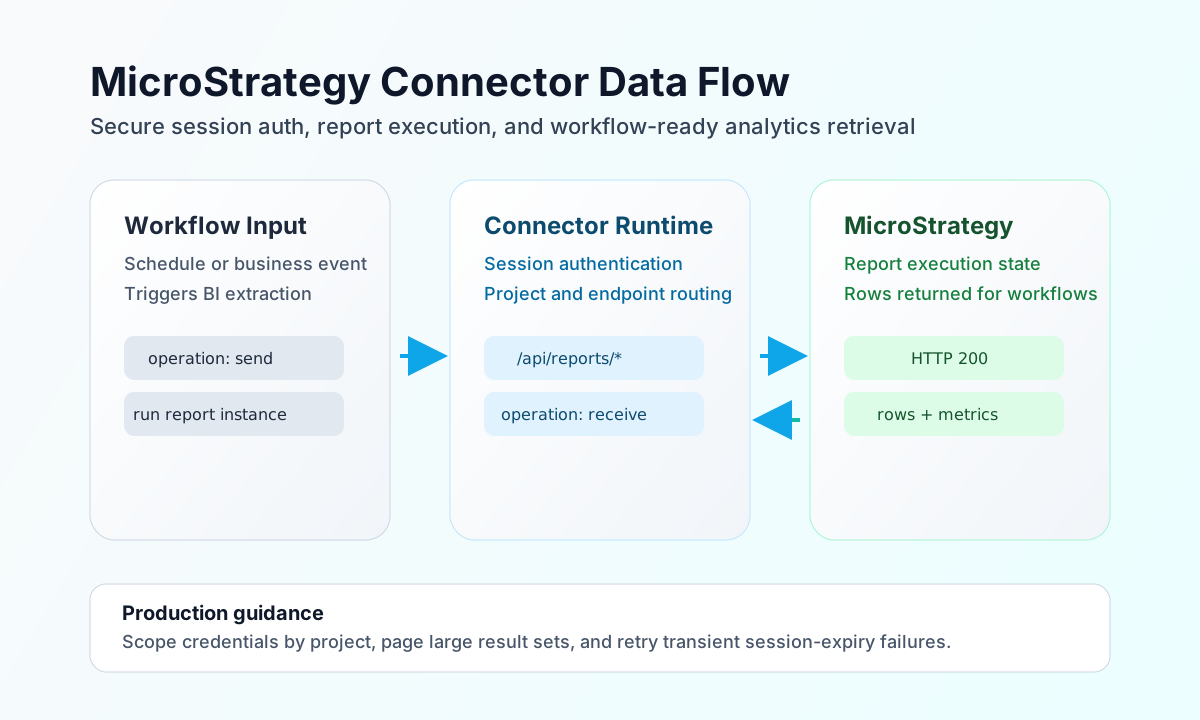
Configure instance access
Set base_url to your MicroStrategy environment URL and provide the integration username and password used to establish sessions. If your workflows are limited to a single project, set project_id so operations resolve in the expected project context.
Set timeout_seconds based on expected report runtime, especially for large datasets or high-concurrency windows. Run test before enabling production schedules so you can verify connectivity, credentials, and project visibility.
Execute report workflows with send
Use send when a workflow should trigger an operation such as report execution or object updates. Keep the endpoint and payload aligned to your MicroStrategy REST pattern so execution and parsing remain predictable.
const baseUrl = "https://api.example.com/api/v1";
const tenantId = "<TENANT_ID>";
const apiKey = "<API_KEY>";

async function runReport(integrationId: string) {
  const response = await fetch(`${baseUrl}/integrations/${encodeURIComponent(integrationId)}/execute`, {
    method: "POST",
    headers: {
      "X-API-Key": apiKey,
      "X-Tenant-ID": tenantId,
      "Content-Type": "application/json",
    },
    body: JSON.stringify({
      operation: "send",
      endpoint: "api/reports/<ENTITY_ID>/instances",
      method: "POST",
      data: {
        project_id: "<ENTITY_ID>",
        execution_mode: "shared"
      }
    }),
  });
  if (!response.ok) throw new Error(`Request failed: ${response.status}`);
  return response.json();
}
curl -X POST "https://api.example.com/api/v1/integrations/<ENTITY_ID>/execute" \
-H "X-API-Key: <API_KEY>" \
-H "X-Tenant-ID: <TENANT_ID>" \
-H "Content-Type: application/json" \
-d '{
"operation": "send",
"endpoint": "api/reports/<ENTITY_ID>/instances",
"method": "POST",
"data": {
"project_id": "<ENTITY_ID>",
"execution_mode": "shared"
}
}'
{
  "success": true,
  "data": {
    "instance_id": "<ENTITY_ID>",
    "status": "running"
  }
}
Retrieve report data with receive
Use receive to read instance status or fetch report data for downstream actions such as notifications, CRM enrichment, or operational dashboards. Query only the fields and row scope needed for the workflow so execution remains efficient.
const baseUrl = "https://api.example.com/api/v1";
const tenantId = "<TENANT_ID>";
const apiKey = "<API_KEY>";

async function getReportRows(integrationId: string) {
  const response = await fetch(`${baseUrl}/integrations/${encodeURIComponent(integrationId)}/execute`, {
    method: "POST",
    headers: {
      "X-API-Key": apiKey,
      "X-Tenant-ID": tenantId,
      "Content-Type": "application/json",
    },
    body: JSON.stringify({
      operation: "receive",
      endpoint: "api/reports/<ENTITY_ID>/instances/<ENTITY_ID>/data",
      query: {
        offset: 0,
        limit: 50
      }
    }),
  });
  if (!response.ok) throw new Error(`Request failed: ${response.status}`);
  return response.json();
}
curl -X POST "https://api.example.com/api/v1/integrations/<ENTITY_ID>/execute" \
-H "X-API-Key: <API_KEY>" \
-H "X-Tenant-ID: <TENANT_ID>" \
-H "Content-Type: application/json" \
-d '{
"operation": "receive",
"endpoint": "api/reports/<ENTITY_ID>/instances/<ENTITY_ID>/data",
"query": {
"offset": 0,
"limit": 50
}
}'
{
  "success": true,
  "data": {
    "rows": [
      {
        "region": "North",
        "revenue": 184200
      }
    ],
    "count": 1
  }
}
Operate reliably
MicroStrategy sessions expire, so workflows should tolerate token renewal and retry transient authentication failures where appropriate. Keep credentials scoped to the minimum required project and object permissions so BI access remains controlled and auditable.
Large report responses can increase runtime and payload size, especially during peak scheduling windows. Limit columns and row windows, apply paging, and test long-running queries during implementation to keep production automations stable.
Related resources
For API endpoint details and object model guidance, see the MicroStrategy REST API documentation.