Mailgun Connector Guide
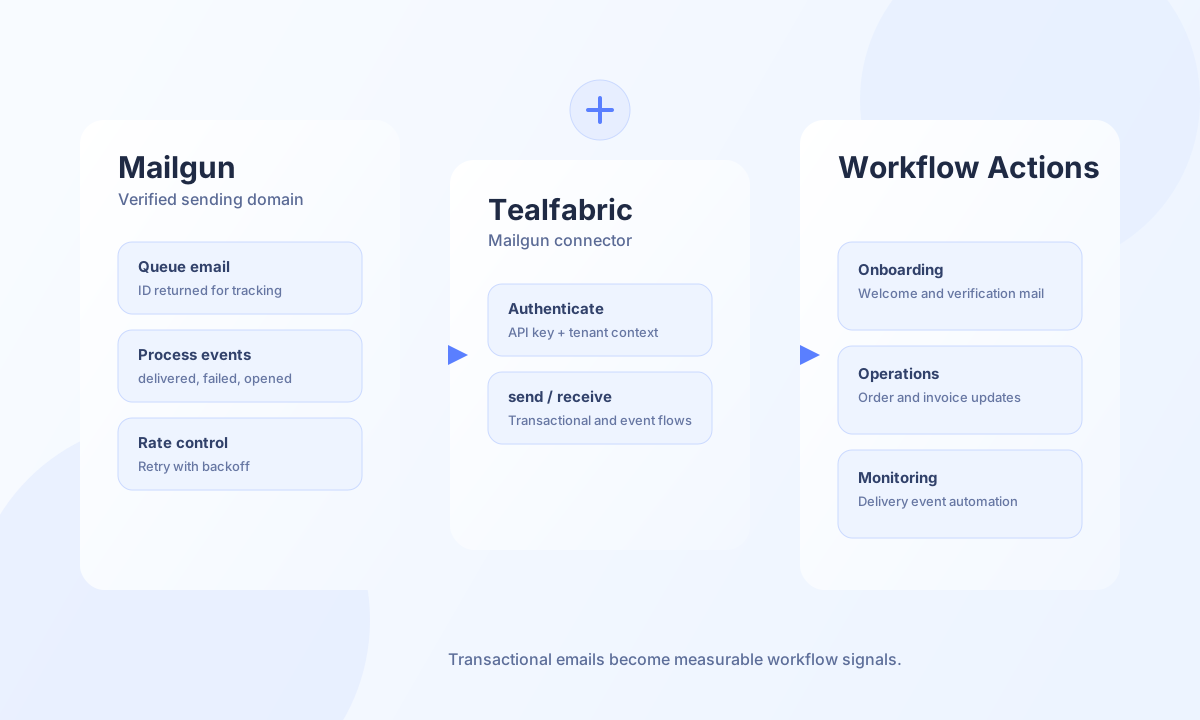
The Mailgun connector lets Tealfabric workflows send transactional email and read Mailgun API resources with predictable authentication and payload formats. It is best suited for onboarding emails, password resets, order notifications, and delivery-status automation where message outcomes need to feed workflow logic.
Document information
| Field | Value |
|---|---|
| Canonical URL | /docs/04_connecting-systems/connectors/m/mailgun |
| Version (published date) | 2026-05-08 |
| Tags | connectors, reference, mailgun |
| Connector ID | mailgun-1.0.0 |
Prerequisites and configuration
Before you enable the connector, verify your Mailgun sending domain and create an API key with sending permissions. A verified domain and stable sender identity improve deliverability and reduce rejection risk. Store credentials in the integration profile so workflows can send emails without embedding secrets in step payloads.
api_key(required fortest): Mailgun API key (HTTP Basic auth usernameapi, password = key).from_email(required fortest): Default sender email address on a verified domain.domain(optional): Mailgun sending domain such asmg.example.com. When omitted, the domain is derived from the part after@infrom_email.base_url(optional): Defaulthttps://api.mailgun.net/v3.from_name(optional): Default sender display name.timeout_seconds(optional): Request timeout in seconds, default30.rate_limit_per_minute(optional): Local client-side throttle, default16.
Only the test operation validates api_key, from_email, and derived domain. Runtime operations (send, receive, sync, batch) rely on integration-stored configuration without repeating that validation gate.
Send transactional email with send
Use send for single-recipient or small multi-recipient messages where each send should return a Mailgun message ID for tracking. Include both HTML and plain text content in production templates to support clients that block rich content. Pass multiple messages in one call with an emails array (each element uses the same fields as a single send).
const baseUrl = "https://api.example.com/api/v1";
const tenantId = "<TENANT_ID>";
const apiKey = "<API_KEY>";

async function sendWelcomeEmail(integrationId: string, toEmail: string) {
  const response = await fetch(`${baseUrl}/integrations/${encodeURIComponent(integrationId)}/execute`, {
    method: "POST",
    headers: {
      "X-API-Key": apiKey,
      "X-Tenant-ID": tenantId,
      "Content-Type": "application/json",
    },
    body: JSON.stringify({
      operation: "send",
      to: toEmail,
      subject: "Welcome to Acme",
      html: "<h1>Welcome</h1><p>Your account is ready.</p>",
      text: "Welcome. Your account is ready.",
      reply_to: "support@example.com",
    }),
  });
  if (!response.ok) throw new Error(`Request failed: ${response.status}`);
  const payload = await response.json();
  if (!payload.success) throw new Error(payload.error?.message ?? "Send failed");
  return payload.data?.data?.id ?? payload.data?.response?.id;
}
curl -X POST "https://api.example.com/api/v1/integrations/<ENTITY_ID>/execute" \
-H "X-API-Key: <API_KEY>" \
-H "X-Tenant-ID: <TENANT_ID>" \
-H "Content-Type: application/json" \
-d '{
"operation": "send",
"to": "customer@example.com",
"subject": "Welcome to Acme",
"html": "<h1>Welcome</h1><p>Your account is ready.</p>",
"text": "Welcome. Your account is ready.",
"reply_to": "support@example.com"
}'
{
  "success": true,
  "data": {
    "message_count": 1,
    "data": {
      "id": "<message-id>",
      "message": "Queued. Thank you."
    },
    "response": {
      "id": "<message-id>",
      "message": "Queued. Thank you."
    }
  }
}
Retrieve API resources with receive
Use receive to GET Mailgun API paths relative to base_url (default domains). List rows are taken from an items array when present, from a top-level JSON array when returned, or wrapped as a single record otherwise. For domain-scoped resources such as events, include the domain in endpoint (for example domains/mg.example.com/events).
const baseUrl = "https://api.example.com/api/v1";
const tenantId = "<TENANT_ID>";
const apiKey = "<API_KEY>";

async function listDomains(integrationId: string) {
  const response = await fetch(`${baseUrl}/integrations/${encodeURIComponent(integrationId)}/execute`, {
    method: "POST",
    headers: {
      "X-API-Key": apiKey,
      "X-Tenant-ID": tenantId,
      "Content-Type": "application/json",
    },
    body: JSON.stringify({
      operation: "receive",
      endpoint: "domains",
      query: { limit: 25 },
    }),
  });
  if (!response.ok) throw new Error(`Request failed: ${response.status}`);
  const payload = await response.json();
  return payload.data?.data ?? [];
}
curl -X POST "https://api.example.com/api/v1/integrations/<ENTITY_ID>/execute" \
-H "X-API-Key: <API_KEY>" \
-H "X-Tenant-ID: <TENANT_ID>" \
-H "Content-Type: application/json" \
-d '{
"operation": "receive",
"endpoint": "domains",
"query": { "limit": 25 }
}'
{
  "success": true,
  "data": {
    "message_count": 1,
    "total_size": 1,
    "data": [
      {
        "name": "mg.example.com",
        "state": "active"
      }
    ]
  }
}
Test connection with test
Use test during onboarding to validate api_key, from_email, and domain configuration. The connector calls GET /domains and reports whether an items list was returned.
{
  "success": true,
  "data": {
    "message": "Mailgun connection test successful",
    "details": {
      "api_base_url": "https://api.mailgun.net/v3",
      "has_domains": true
    }
  }
}
Reliability guidance
Most send failures come from invalid API keys, unverified domains, or malformed recipient addresses. Validate sender configuration during onboarding with test, watch error rates from receive queries, and retry transient failures with backoff instead of immediate loops. These controls improve deliverability and reduce operational noise in production workflows.