MQTT Connector Guide
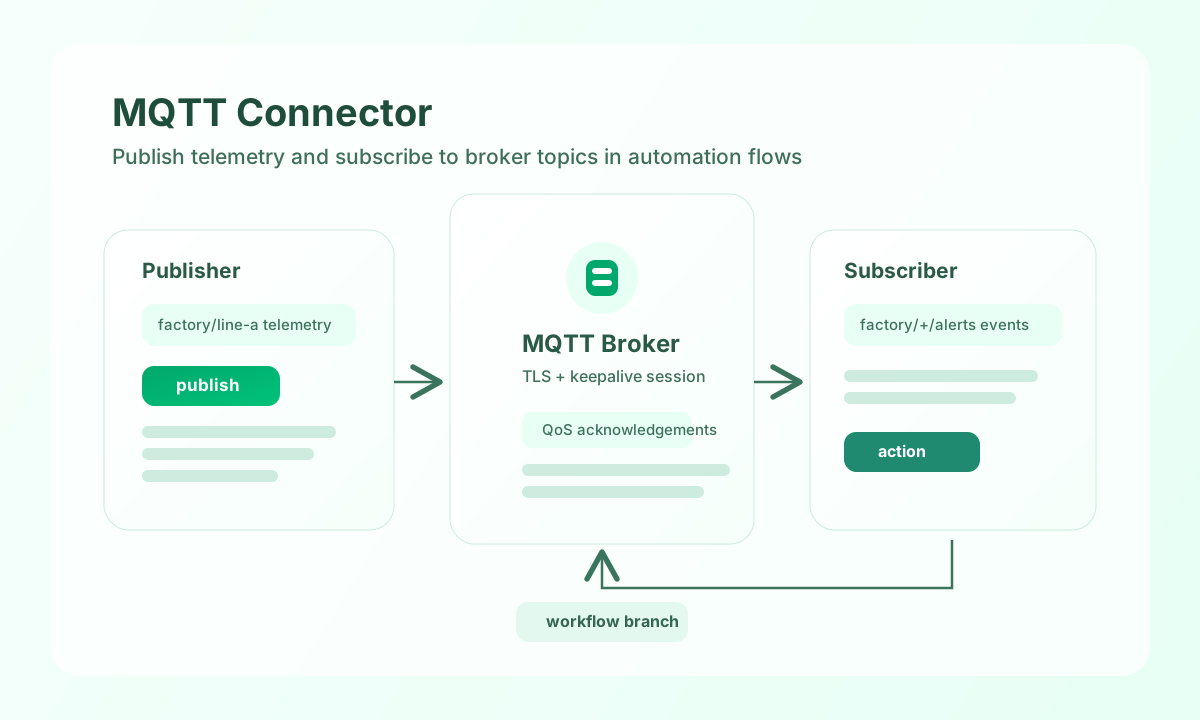
The MQTT connector lets Tealfabric workflows publish and consume lightweight broker messages for IoT and event-driven automation. It is a practical choice when systems need low-latency telemetry exchange without direct point-to-point API integrations.
Document information
| Field | Value |
|---|---|
| Canonical URL | /docs/04_connecting-systems/connectors/m/mqtt |
| Version (published date) | 2026-05-08 |
| Tags | connectors, reference, mqtt |
| Connector ID | mqtt-1.0.0 |
Configure broker connectivity
Set broker_host to your MQTT broker address and configure broker_port for your protocol and security mode. If your broker requires authentication, provide username and password, then enable use_tls for encrypted transport in production environments.
Set client_id to a unique value per integration instance to avoid session collisions, and tune keepalive and timeout_seconds to match broker expectations. Run test after setup to confirm connectivity and credentials before enabling scheduled or real-time flows.
Publish device events with publish
Use publish when your workflow needs to send telemetry or command data to an MQTT topic. Keep payloads compact and set QoS based on delivery guarantees your downstream consumers require.
const baseUrl = "https://api.example.com/api/v1";
const tenantId = "<TENANT_ID>";
const apiKey = "<API_KEY>";

async function publishSensorUpdate(integrationId: string) {
  const response = await fetch(`${baseUrl}/integrations/${encodeURIComponent(integrationId)}/execute`, {
    method: "POST",
    headers: {
      "X-API-Key": apiKey,
      "X-Tenant-ID": tenantId,
      "Content-Type": "application/json",
    },
    body: JSON.stringify({
      operation: "publish",
      topic: "factory/line-a/sensor-temperature",
      qos: 1,
      retain: false,
      payload: {
        device_id: "<ENTITY_ID>",
        temperature_c: 22.7,
        measured_at: "2026-05-08T19:55:00Z"
      }
    }),
  });
  if (!response.ok) throw new Error(`Request failed: ${response.status}`);
  return response.json();
}
curl -X POST "https://api.example.com/api/v1/integrations/<ENTITY_ID>/execute" \
-H "X-API-Key: <API_KEY>" \
-H "X-Tenant-ID: <TENANT_ID>" \
-H "Content-Type: application/json" \
-d '{
"operation": "publish",
"topic": "factory/line-a/sensor-temperature",
"qos": 1,
"retain": false,
"payload": {
"device_id": "<ENTITY_ID>",
"temperature_c": 22.7,
"measured_at": "2026-05-08T19:55:00Z"
}
}'
{
  "success": true,
  "data": {
    "topic": "factory/line-a/sensor-temperature",
    "qos": 1,
    "published": true
  }
}
Consume topic messages with subscribe
Use subscribe to listen for broker events and route them into downstream workflow branches. Topic filters and QoS should reflect expected message frequency and reliability needs.
const baseUrl = "https://api.example.com/api/v1";
const tenantId = "<TENANT_ID>";
const apiKey = "<API_KEY>";

async function subscribeToAlerts(integrationId: string) {
  const response = await fetch(`${baseUrl}/integrations/${encodeURIComponent(integrationId)}/execute`, {
    method: "POST",
    headers: {
      "X-API-Key": apiKey,
      "X-Tenant-ID": tenantId,
      "Content-Type": "application/json",
    },
    body: JSON.stringify({
      operation: "subscribe",
      topics: [
        { topic: "factory/+/alerts", qos: 1 }
      },
      max_messages: 25
    }),
  });
  if (!response.ok) throw new Error(`Request failed: ${response.status}`);
  return response.json();
}
curl -X POST "https://api.example.com/api/v1/integrations/<ENTITY_ID>/execute" \
-H "X-API-Key: <API_KEY>" \
-H "X-Tenant-ID: <TENANT_ID>" \
-H "Content-Type: application/json" \
-d '{
"operation": "subscribe",
"topics": [
{"topic": "factory/+/alerts", "qos": 1}
],
"max_messages": 25
}'
{
  "success": true,
  "data": {
    "subscription_count": 1,
    "messages": [
      {
        "topic": "factory/line-a/alerts",
        "payload": {
          "severity": "high",
          "device_id": "<ENTITY_ID>"
        }
      }
    ]
  }
}
Production guidance
MQTT reliability depends on stable sessions and predictable reconnect behavior. Use unique client IDs, tune keepalive conservatively, and apply QoS levels only where needed so broker load remains manageable.
Most production failures come from certificate mismatches, incorrect broker credentials, or excessive wildcard subscriptions. Validate TLS configuration early, keep topic filters specific, and monitor connection churn to catch issues before message loss occurs.
Related resources
For protocol behavior and quality-of-service semantics, review the MQTT specification.