Microsoft Dynamics 365 Connector Guide
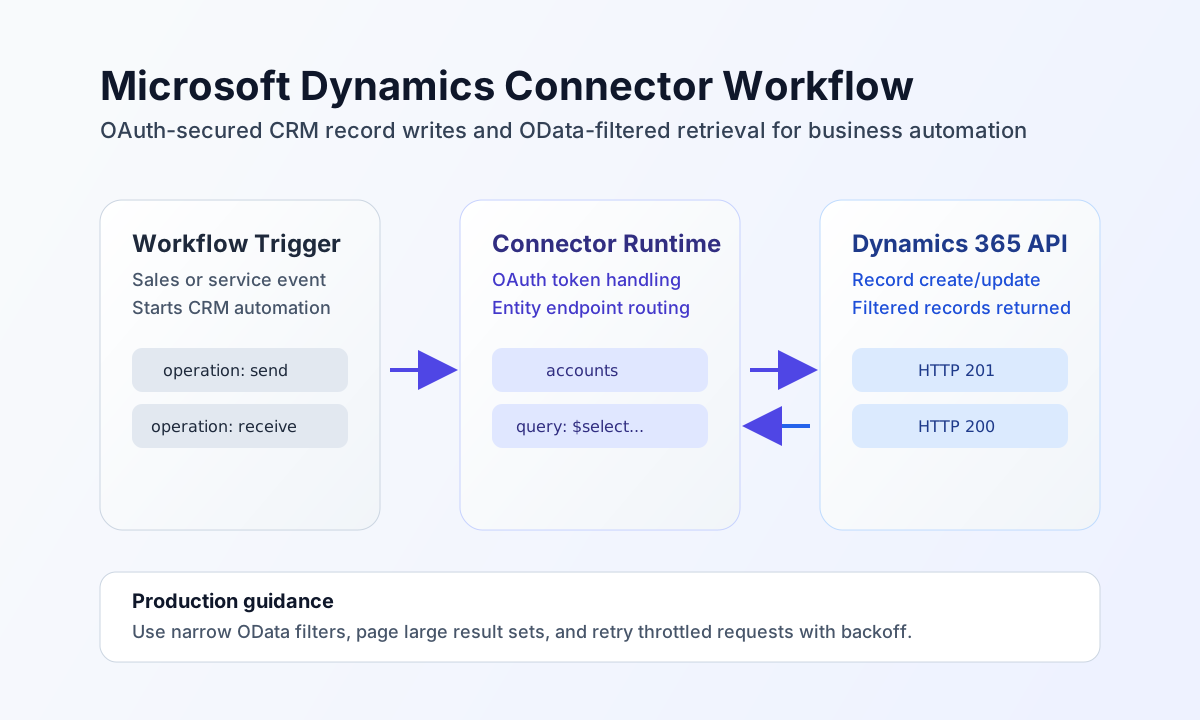
The Microsoft Dynamics 365 connector helps Tealfabric workflows create, update, and retrieve CRM records such as accounts, contacts, and leads. It is designed for teams that need secure, repeatable automation between Dynamics 365 and downstream operational systems.
Document information
| Field | Value |
|---|---|
| Canonical URL | /docs/04_connecting-systems/connectors/m/microsoft-dynamics |
| Version (published date) | 2026-05-08 |
| Tags | connectors, reference, microsoft-dynamics |
| Connector ID | microsoft-dynamics-1.0.0 |
Configure OAuth and environment access
Set client_id, client_secret, and redirect_uri from your Azure app registration, and set base_url to your Dynamics 365 environment URL such as https://yourorg.crm.dynamics.com. After authorization, store access_token and refresh_token so the connector can authenticate requests and refresh tokens automatically.
Set scope for your Dynamics environment and tune timeout_seconds to match expected query duration. Run test after setup to verify token validity and API reachability before enabling production schedules.
test validates the full OAuth app configuration (client_id, client_secret, redirect_uri) plus access_token and base_url. Runtime operations (send, receive, sync, batch) require access_token and base_url only; OAuth app credentials are used when a 401 triggers refresh-token exchange.
Create or update records with send
Use send when your workflow needs to create or patch CRM records such as accounts and contacts. Keep endpoint aligned to the Dynamics entity set name and use payload fields that match your environment schema.
const baseUrl = "https://api.example.com/api/v1";
const tenantId = "<TENANT_ID>";
const apiKey = "<API_KEY>";

async function createAccount(integrationId: string) {
  const response = await fetch(`${baseUrl}/integrations/${encodeURIComponent(integrationId)}/execute`, {
    method: "POST",
    headers: {
      "X-API-Key": apiKey,
      "X-Tenant-ID": tenantId,
      "Content-Type": "application/json",
    },
    body: JSON.stringify({
      operation: "send",
      endpoint: "accounts",
      method: "POST",
      data: {
        name: "Northwind Wholesale",
        telephone1: "+1-555-0100",
        address1_city: "Seattle",
        address1_stateorprovince: "WA"
      }
    }),
  });
  if (!response.ok) throw new Error(`Request failed: ${response.status}`);
  return response.json();
}
curl -X POST "https://api.example.com/api/v1/integrations/<ENTITY_ID>/execute" \
-H "X-API-Key: <API_KEY>" \
-H "X-Tenant-ID: <TENANT_ID>" \
-H "Content-Type: application/json" \
-d '{
"operation": "send",
"endpoint": "accounts",
"method": "POST",
"data": {
"name": "Northwind Wholesale",
"telephone1": "+1-555-0100",
"address1_city": "Seattle",
"address1_stateorprovince": "WA"
}
}'
{
  "success": true,
  "data": {
    "message_count": 1,
    "data": {
      "statusCode": 201,
      "data": {
        "accountid": "<ENTITY_ID>",
        "name": "Northwind Wholesale",
        "statecode": 0
      }
    },
    "response": {
      "statusCode": 201,
      "data": {
        "accountid": "<ENTITY_ID>",
        "name": "Northwind Wholesale",
        "statecode": 0
      }
    }
  }
}
Retrieve records with receive
Use receive for read operations such as pulling active accounts or syncing contacts into other systems. Use OData query options to keep payload size manageable and results focused on workflow needs.
const baseUrl = "https://api.example.com/api/v1";
const tenantId = "<TENANT_ID>";
const apiKey = "<API_KEY>";

async function listActiveAccounts(integrationId: string) {
  const response = await fetch(`${baseUrl}/integrations/${encodeURIComponent(integrationId)}/execute`, {
    method: "POST",
    headers: {
      "X-API-Key": apiKey,
      "X-Tenant-ID": tenantId,
      "Content-Type": "application/json",
    },
    body: JSON.stringify({
      operation: "receive",
      endpoint: "accounts",
      query: {
        select: "accountid,name,telephone1",
        filter: "statecode eq 0",
        top: 20,
        orderby: "createdon desc"
      }
    }),
  });
  if (!response.ok) throw new Error(`Request failed: ${response.status}`);
  return response.json();
}
curl -X POST "https://api.example.com/api/v1/integrations/<ENTITY_ID>/execute" \
-H "X-API-Key: <API_KEY>" \
-H "X-Tenant-ID: <TENANT_ID>" \
-H "Content-Type: application/json" \
-d '{
"operation": "receive",
"endpoint": "accounts",
"query": {
"select": "accountid,name,telephone1",
"filter": "statecode eq 0",
"top": 20,
"orderby": "createdon desc"
}
}'
{
  "success": true,
  "data": {
    "message_count": 1,
    "data": [
      {
        "accountid": "<ENTITY_ID>",
        "name": "Northwind Wholesale",
        "telephone1": "+1-555-0100"
      }
    ],
    "total_size": 1
  }
}
Operate reliably in production
Dynamics 365 can throttle high-volume request bursts, especially during broad queries and concurrent sync jobs. Use paging, narrow OData filters, and retry with backoff to keep integration runs predictable.
Authentication failures typically come from expired tokens, scope mismatches, or invalid app registration settings. Keep credentials and tokens in secure storage, avoid logging secret values, and re-run test after credential changes.
Related resources
For endpoint behavior and Web API capabilities, see the Dynamics 365 Web API documentation.