Mailchimp Connector Guide
The Mailchimp connector lets Tealfabric workflows manage audience members and campaign data through the Mailchimp Marketing API. It is commonly used for lead lifecycle automation, campaign synchronization, and engagement-driven workflow triggers.
Document information
| Field | Value |
|---|---|
| Canonical URL | /docs/04_connecting-systems/connectors/m/mailchimp |
| Version (published date) | 2026-05-08 |
| Tags | connectors, reference, mailchimp |
| Connector ID | mailchimp-1.0.0 |
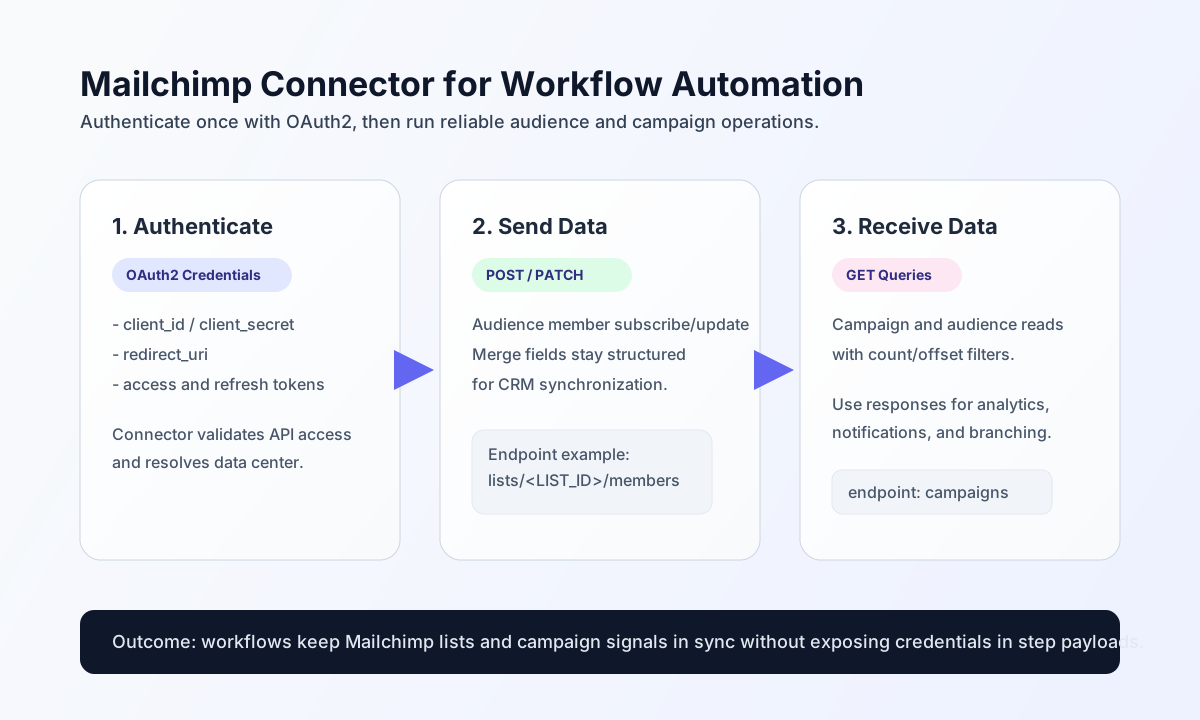
Configuration and OAuth setup
Configure the connector with your Mailchimp OAuth app credentials so workflows can authenticate securely and target the correct API data center. This keeps credential handling centralized and supports long-running automations.
Required values are client_id, client_secret, and redirect_uri. Optional values include access_token, refresh_token, data_center, and timeout_seconds. The test operation validates the full OAuth app configuration (client_id, client_secret, redirect_uri); other operations require only a valid access_token (and refresh_token for automatic token refresh on HTTP 401). After setup, run test to confirm token access and data-center resolution before production.
Add or update audience members with send
Use send to create or update contacts in a list. Keep list IDs and merge fields explicit so CRM-to-email synchronization remains auditable and reliable.
const baseUrl = "https://api.example.com/api/v1";
const tenantId = "<TENANT_ID>";
const apiKey = "<API_KEY>";

async function addListMember(integrationId: string) {
  const response = await fetch(`${baseUrl}/integrations/${encodeURIComponent(integrationId)}/execute`, {
    method: "POST",
    headers: {
      "X-API-Key": apiKey,
      "X-Tenant-ID": tenantId,
      "Content-Type": "application/json",
    },
    body: JSON.stringify({
      operation: "send",
      endpoint: "lists/<ENTITY_ID>/members",
      method: "POST",
      data: {
        email_address: "new.subscriber@example.com",
        status: "subscribed",
        merge_fields: {
          FNAME: "Avery",
          LNAME: "Miller"
        }
      }
    }),
  });
  if (!response.ok) throw new Error(`Request failed: ${response.status}`);
  return response.json();
}
curl -X POST "https://api.example.com/api/v1/integrations/<ENTITY_ID>/execute" \
-H "X-API-Key: <API_KEY>" \
-H "X-Tenant-ID: <TENANT_ID>" \
-H "Content-Type: application/json" \
-d '{
"operation": "send",
"endpoint": "lists/<ENTITY_ID>/members",
"method": "POST",
"data": {
"email_address": "new.subscriber@example.com",
"status": "subscribed",
"merge_fields": {
"FNAME": "Avery",
"LNAME": "Miller"
}
}
}'
{
  "success": true,
  "data": {
    "message_count": 1,
    "data": {
      "id": "3f6c9a7d8ab3c9f0b0d0d11122e33344",
      "email_address": "new.subscriber@example.com",
      "status": "subscribed"
    },
    "response": {
      "id": "3f6c9a7d8ab3c9f0b0d0d11122e33344",
      "email_address": "new.subscriber@example.com",
      "status": "subscribed"
    }
  }
}
Retrieve campaign or audience data with receive
Use receive to query contacts, campaigns, and related resources for reporting and trigger logic. Prefer scoped query parameters (count, offset, status filters) to avoid oversized payloads.
const baseUrl = "https://api.example.com/api/v1";
const tenantId = "<TENANT_ID>";
const apiKey = "<API_KEY>";

async function listSentCampaigns(integrationId: string) {
  const response = await fetch(`${baseUrl}/integrations/${encodeURIComponent(integrationId)}/execute`, {
    method: "POST",
    headers: {
      "X-API-Key": apiKey,
      "X-Tenant-ID": tenantId,
      "Content-Type": "application/json",
    },
    body: JSON.stringify({
      operation: "receive",
      endpoint: "campaigns",
      query: {
        status: "sent",
        count: 20,
        offset: 0
      }
    }),
  });
  if (!response.ok) throw new Error(`Request failed: ${response.status}`);
  return response.json();
}
curl -X POST "https://api.example.com/api/v1/integrations/<ENTITY_ID>/execute" \
-H "X-API-Key: <API_KEY>" \
-H "X-Tenant-ID: <TENANT_ID>" \
-H "Content-Type: application/json" \
-d '{
"operation": "receive",
"endpoint": "campaigns",
"query": {
"status": "sent",
"count": 20,
"offset": 0
}
}'
{
  "success": true,
  "data": {
    "message_count": 1,
    "data": [
      {
        "id": "a1b2c3d4e5",
        "status": "sent",
        "settings": {
          "subject_line": "May Product Update"
        }
      }
    ],
    "total_size": 1
  }
}
Reliability guidance
Most production failures come from expired tokens, insufficient app scopes, or list endpoint mismatches. Validate with test, verify app permissions for each endpoint, and keep list/campaign identifiers explicit in workflow payloads.
For stable operations, paginate large reads with count and offset, handle 429 responses with exponential backoff, and store subscriber hash values for deterministic member updates. These practices improve reliability and reduce duplicate audience actions.