Microsoft Active Directory Connector Guide
The Microsoft Active Directory connector lets Tealfabric workflows search directory objects and validate user credentials through LDAP. It is useful for identity-aware automation such as access checks, onboarding verification, and directory-based routing decisions.
Document information
| Field | Value |
|---|---|
| Canonical URL | /docs/04_connecting-systems/connectors/m/microsoft-active-directory |
| Version (published date) | 2026-05-08 |
| Tags | connectors, reference, microsoft-active-directory |
| Connector ID | microsoft-active-directory-1.0.0 |
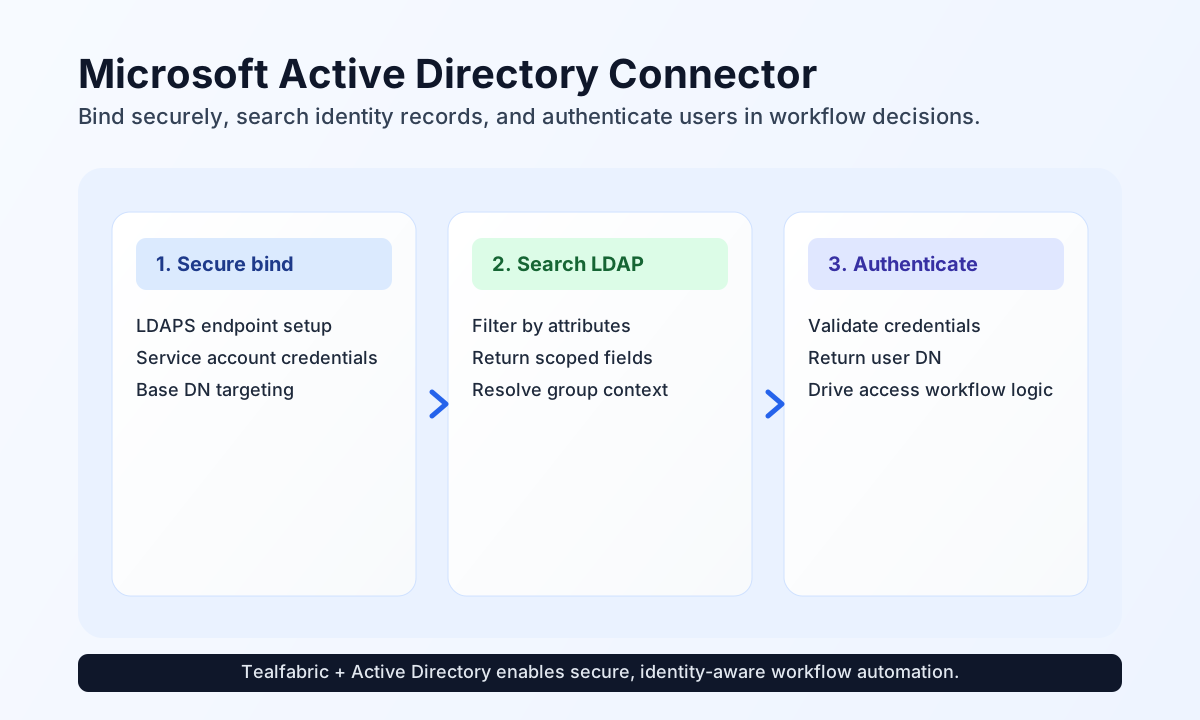
Configure secure directory access
Configure the connector with server_url, domain, base_dn, username, and password so workflows can bind to Active Directory before running operations. For production environments, use ldaps:// wherever possible to protect credentials and query data in transit.
Service account permissions should match the operations your workflows perform. Read-only search scenarios require less privilege than object modification flows, so scope access accordingly. Run test during setup to confirm service bind and base-DN reachability; only test performs full configuration validation (legacy validateConfiguration() semantics).
Search directory entries with search
Use search when workflows need user, group, or attribute data from Active Directory to decide next actions. LDAP filters let you target only the entries required for the process context. Defaults: filter (objectClass=*), base_dn from integration config, scope sub, attributes ["*"].
const baseUrl = "https://api.example.com/api/v1";
const tenantId = "<TENANT_ID>";
const apiKey = "<API_KEY>";

async function searchUsersByDepartment(integrationId: string) {
  const response = await fetch(`${baseUrl}/integrations/${encodeURIComponent(integrationId)}/execute`, {
    method: "POST",
    headers: {
      "X-API-Key": apiKey,
      "X-Tenant-ID": tenantId,
      "Content-Type": "application/json",
    },
    body: JSON.stringify({
      operation: "search",
      filter: "(&(objectClass=user)(department=Engineering))",
      attributes: ["cn", "mail", "sAMAccountName", "department"],
      scope: "sub"
    }),
  });
  if (!response.ok) throw new Error(`Request failed: ${response.status}`);
  return response.json();
}
curl -X POST "https://api.example.com/api/v1/integrations/<ENTITY_ID>/execute" \
-H "X-API-Key: <API_KEY>" \
-H "X-Tenant-ID: <TENANT_ID>" \
-H "Content-Type: application/json" \
-d '{
"operation": "search",
"filter": "(&(objectClass=user)(department=Engineering))",
"attributes": ["cn", "mail", "sAMAccountName", "department"],
"scope": "sub"
}'
{
  "success": true,
  "data": {
    "message": "Active Directory search completed successfully",
    "entry_count": 1,
    "entries": [
      {
        "dn": "CN=Avery Nguyen,OU=Users,DC=example,DC=com",
        "cn": "Avery Nguyen",
        "mail": "avery.nguyen@example.com",
        "department": "Engineering"
      }
    ]
  }
}
Validate credentials with authenticate
Use authenticate when a workflow must confirm a user can successfully bind to Active Directory before allowing a protected action. The connector binds as username@domain using the integration domain and callData username/password (not the service account password).
curl -X POST "https://api.example.com/api/v1/integrations/<ENTITY_ID>/execute" \
  -H "X-API-Key: <API_KEY>" \
  -H "X-Tenant-ID: <TENANT_ID>" \
  -H "Content-Type: application/json" \
  -d '{
    "operation": "authenticate",
    "username": "avery.nguyen",
    "password": "<USER_PASSWORD>"
  }'
{
  "success": true,
  "data": {
    "message": "Active Directory authentication successful",
    "user_dn": "avery.nguyen@example.com"
  }
}
Modify directory objects
Use add, modify, and delete when workflows must create, update, or remove LDAP entries under the service bind account. modify replaces attribute values (legacy ldap_modify semantics). All three operations require dn; add and modify also require an attributes map (string or string array per attribute).
curl -X POST "https://api.example.com/api/v1/integrations/<ENTITY_ID>/execute" \
  -H "X-API-Key: <API_KEY>" \
  -H "X-Tenant-ID: <TENANT_ID>" \
  -H "Content-Type: application/json" \
  -d '{
    "operation": "modify",
    "dn": "CN=Avery Nguyen,OU=Users,DC=example,DC=com",
    "attributes": {
      "department": "Platform Engineering"
    }
  }'
{
  "success": true,
  "data": {
    "message": "Active Directory object modified successfully",
    "dn": "CN=Avery Nguyen,OU=Users,DC=example,DC=com"
  }
}
Test connection with test
test validates required integration parameters, binds with the service account (username@domain), and runs a base-scope search on base_dn. Missing configuration returns Configuration validation failed (legacy testConnection() behavior).
{
  "success": true,
  "data": {
    "message": "Microsoft Active Directory connection test successful",
    "details": {
      "server_url": "ldaps://ad.example.com:636",
      "domain": "example.com",
      "base_dn": "DC=example,DC=com"
    }
  }
}
Reliability guidance
Most connector failures come from invalid bind credentials, unreachable domain controllers, or malformed LDAP filters. If operations fail, verify server connectivity and bind account access first, then validate DN and filter syntax.
For stable production behavior, use LDAPS endpoints, keep bind account permissions minimal, and restrict searches with focused filters and attribute lists. This improves both security posture and query performance.
Current limitations
- Native runtime uses
ldaptsinstead of PHPext-ldap; there is noextension_loaded('ldap')gate. - Per-operation LDAP error text may differ slightly from PHP
ldap_error()strings while preserving the same failure categories.