Markdown File Connector Guide
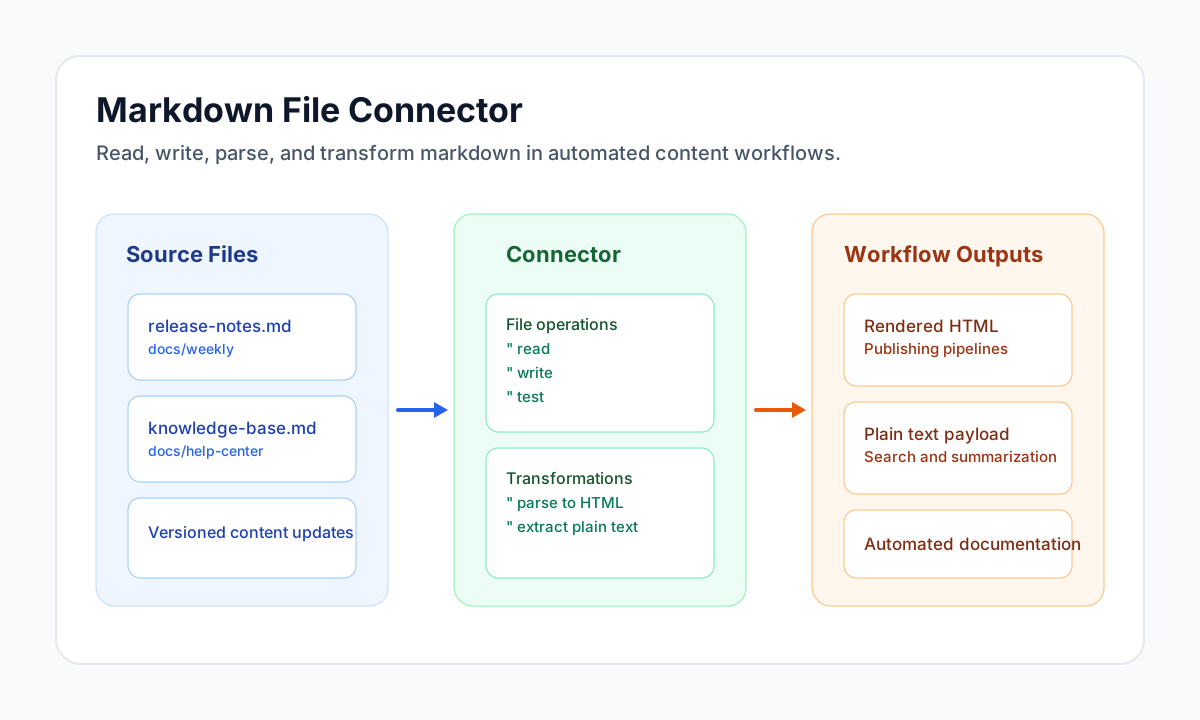
The Markdown File connector lets Tealfabric workflows read, write, parse, and transform Markdown content stored in tenant file storage. It is useful for documentation pipelines, knowledge-base sync jobs, and content-preparation workflows for search or AI processing.
Document information
| Field | Value |
|---|---|
| Canonical URL | /docs/04_connecting-systems/connectors/m/markdown-file |
| Version (published date) | 2026-05-08 |
| Tags | connectors, reference, markdown-file |
| Connector ID | markdown-file-1.0.0 |
Configure file location
Set filename to the target Markdown file and use path when the file is stored in a subdirectory. These values resolve under tenant storage (storage/tenantdata/{tenant_id}/[path/]{filename}).
filename(required): Markdown file name, for examplerelease-notes.md.path(optional): relative folder under tenant storage, for exampledocs/weekly.
Run test before production jobs to validate storage access and avoid runtime failures caused by missing files or path mismatches.
Read and update Markdown content
Use read to retrieve existing document content, then use write to publish generated or transformed Markdown. This pattern works well for automated release notes, knowledge updates, and editorial review pipelines.
const baseUrl = "https://api.example.com/api/v1";
const tenantId = "<TENANT_ID>";
const apiKey = "<API_KEY>";

async function readMarkdownFile(integrationId: string) {
  const response = await fetch(`${baseUrl}/integrations/${encodeURIComponent(integrationId)}/execute`, {
    method: "POST",
    headers: {
      "X-API-Key": apiKey,
      "X-Tenant-ID": tenantId,
      "Content-Type": "application/json",
    },
    body: JSON.stringify({
      operation: "read",
      filename: "release-notes.md",
      path: "docs/weekly"
    }),
  });
  if (!response.ok) throw new Error(`Request failed: ${response.status}`);
  return response.json();
}

async function writeMarkdownFile(integrationId: string) {
  const response = await fetch(`${baseUrl}/integrations/${encodeURIComponent(integrationId)}/execute`, {
    method: "POST",
    headers: {
      "X-API-Key": apiKey,
      "X-Tenant-ID": tenantId,
      "Content-Type": "application/json",
    },
    body: JSON.stringify({
      operation: "write",
      filename: "release-notes.md",
      path: "docs/weekly",
      content: "# Weekly Release Notes\n\n- Added new workflow templates.\n- Improved connector diagnostics."
    }),
  });
  if (!response.ok) throw new Error(`Request failed: ${response.status}`);
  return response.json();
}
curl -X POST "https://api.example.com/api/v1/integrations/<ENTITY_ID>/execute" \
-H "X-API-Key: <API_KEY>" \
-H "X-Tenant-ID: <TENANT_ID>" \
-H "Content-Type: application/json" \
-d '{
"operation": "write",
"filename": "release-notes.md",
"path": "docs/weekly",
"content": "# Weekly Release Notes\n\n- Added new workflow templates.\n- Improved connector diagnostics."
}'
{
  "success": true,
  "data": {
    "message": "Markdown file written successfully",
    "file_path": "/path/to/storage/tenantdata/<TENANT_ID>/docs/weekly/release-notes.md",
    "file_size": 96
  }
}
{
  "success": true,
  "data": {
    "message": "Markdown file read successfully",
    "content": "# Weekly Release Notes\n\n- Added new workflow templates.\n- Improved connector diagnostics.",
    "character_count": 96,
    "line_count": 4
  }
}
Parse markdown and extract plain text
Use parse when you need HTML output for rendering or publishing pipelines, and use extract_text when you want plain text for indexing, classification, or summarization tasks. Running these transformations in workflow steps keeps content-processing logic reusable and consistent.
const baseUrl = "https://api.example.com/api/v1";
const tenantId = "<TENANT_ID>";
const apiKey = "<API_KEY>";

async function parseMarkdown(integrationId: string) {
  const response = await fetch(`${baseUrl}/integrations/${encodeURIComponent(integrationId)}/execute`, {
    method: "POST",
    headers: {
      "X-API-Key": apiKey,
      "X-Tenant-ID": tenantId,
      "Content-Type": "application/json",
    },
    body: JSON.stringify({
      operation: "parse",
      filename: "release-notes.md",
      path: "docs/weekly"
    }),
  });
  if (!response.ok) throw new Error(`Request failed: ${response.status}`);
  return response.json();
}

async function extractMarkdownText(integrationId: string) {
  const response = await fetch(`${baseUrl}/integrations/${encodeURIComponent(integrationId)}/execute`, {
    method: "POST",
    headers: {
      "X-API-Key": apiKey,
      "X-Tenant-ID": tenantId,
      "Content-Type": "application/json",
    },
    body: JSON.stringify({
      operation: "extract_text",
      filename: "release-notes.md",
      path: "docs/weekly"
    }),
  });
  if (!response.ok) throw new Error(`Request failed: ${response.status}`);
  return response.json();
}
curl -X POST "https://api.example.com/api/v1/integrations/<ENTITY_ID>/execute" \
-H "X-API-Key: <API_KEY>" \
-H "X-Tenant-ID: <TENANT_ID>" \
-H "Content-Type: application/json" \
-d '{
"operation": "extract_text",
"filename": "release-notes.md",
"path": "docs/weekly"
}'
{
  "success": true,
  "data": {
    "message": "Text extracted successfully",
    "text": "Weekly Release Notes\n\nAdded new workflow templates. Improved connector diagnostics.",
    "word_count": 8,
    "character_count": 82
  }
}
{
  "success": true,
  "data": {
    "message": "Markdown parsed successfully",
    "html": "<p><h1>Weekly Release Notes</h1></p><p><br>- Added new workflow templates.<br>- Improved connector diagnostics.</p>",
    "markdown": "# Weekly Release Notes\n\n- Added new workflow templates.\n- Improved connector diagnostics."
  }
}
Pass inline Markdown to parse with markdown or content when you do not want to read from the configured file first.
Test storage access
Use test to confirm the configured file is readable or that the parent directory is writable when the file does not yet exist:
{
  "success": true,
  "data": {
    "message": "Markdown file connector test successful",
    "details": {
      "file_path": "/path/to/storage/tenantdata/<TENANT_ID>/docs/weekly/release-notes.md",
      "file_exists": false
    }
  }
}
Operational guidance
Validate file existence before read or parse operations and treat missing-file errors as expected control flow in dynamic workflows. For write operations, use deterministic filenames and commit metadata so content updates remain auditable.
When markdown feeds downstream AI processing, normalize content through extract_text first to reduce formatting noise. This improves consistency for search indexing and summarization quality.