Magento Connector Guide
The Magento connector enables Tealfabric workflows to integrate directly with Adobe Commerce and Magento REST APIs for catalog and order automation. It is designed for operational use cases where product data, order state, and customer records need to stay synchronized across systems.
Document information
| Field | Value |
|---|---|
| Canonical URL | /docs/04_connecting-systems/connectors/m/magento |
| Version (published date) | 2026-05-08 |
| Tags | connectors, reference, magento |
| Connector ID | magento-1.0.0 |
When to use this connector
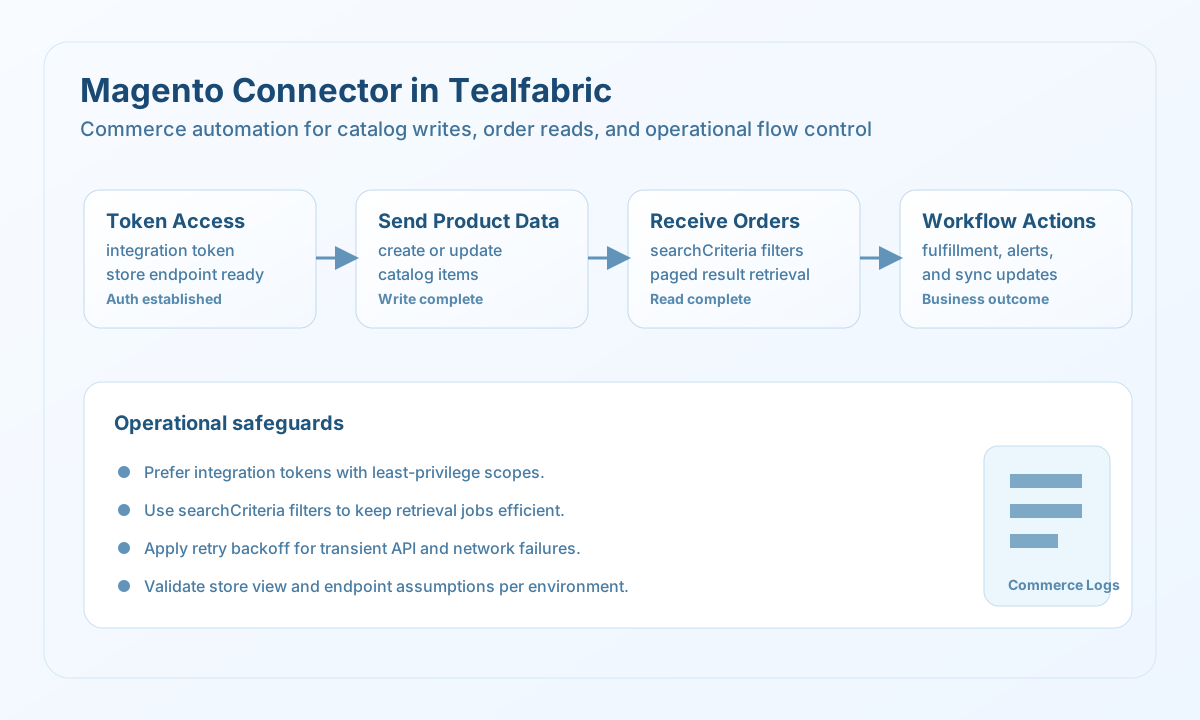
Use this connector when workflows need to create or update products, query orders, or synchronize customer-related records from Magento. It is especially useful for commerce operations where inventory and fulfillment steps depend on up-to-date store data. The connector performs best when endpoint usage is standardized by environment and store view.
Prerequisites
Before configuring the integration, create a Magento integration token with the minimum permissions required for your workflow. Confirm the base_url points to the right Magento instance and ensure your target store view is available for the endpoints you call. Establish deployment rules for token rotation and audit logging before production rollout.
Configuration
Store these settings in the integration profile:
token(required): Magento bearer token (integration token recommended).base_url(required): Magento API host URL, including protocol.timeout_seconds(optional): Request timeout in seconds, default30.
Create products with send
Use send for write operations such as creating and updating product records. Keep product payloads schema-aligned to prevent catalog validation errors and reduce reconciliation work later.
const baseUrl = "https://api.example.com/api/v1";
const tenantId = "<TENANT_ID>";
const apiKey = "<API_KEY>";

type MagentoProductResult = {
  id?: number;
  sku?: string;
  name?: string;
  price?: number;
};

async function createProduct(integrationId: string): Promise<MagentoProductResult> {
  const response = await fetch(
    `${baseUrl}/integrations/${encodeURIComponent(integrationId)}/execute`,
    {
      method: "POST",
      headers: {
        "X-API-Key": apiKey,
        "X-Tenant-ID": tenantId,
        "Content-Type": "application/json",
      },
      body: JSON.stringify({
        operation: "send",
        endpoint: "rest/default/V1/products",
        method: "POST",
        data: {
          product: {
            sku: "sku-20260508-001",
            name: "Tealfabric Hoodie",
            type_id: "simple",
            price: 69.0,
            attribute_set_id: 4,
            status: 1,
            visibility: 4,
            weight: 0.8,
          },
        },
      }),
    }
  );
  if (!response.ok) throw new Error(`Request failed: ${response.status}`);
  const payload = (await response.json()) as { data?: MagentoProductResult };
  if (!payload.data) throw new Error("Missing Magento product payload");
  return payload.data;
}
curl -X POST "https://api.example.com/api/v1/integrations/<ENTITY_ID>/execute" \
-H "X-API-Key: <API_KEY>" \
-H "X-Tenant-ID: <TENANT_ID>" \
-H "Content-Type: application/json" \
-d '{
"operation": "send",
"endpoint": "rest/default/V1/products",
"method": "POST",
"data": {
"product": {
"sku": "sku-20260508-001",
"name": "Tealfabric Hoodie",
"type_id": "simple",
"price": 69.0,
"attribute_set_id": 4,
"status": 1,
"visibility": 4
}
}
}'
{
  "success": true,
  "data": {
    "id": 4021,
    "sku": "sku-20260508-001",
    "name": "Tealfabric Hoodie",
    "price": 69
  }
}
Retrieve orders with receive
Use receive for order and fulfillment visibility, especially when downstream systems need processing-state updates. Apply searchCriteria filters to keep responses focused and cost-effective.
const baseUrl = "https://api.example.com/api/v1";
const tenantId = "<TENANT_ID>";
const apiKey = "<API_KEY>";

type MagentoOrder = {
  entity_id?: number;
  increment_id?: string;
  status?: string;
  grand_total?: number;
};

async function listProcessingOrders(integrationId: string): Promise<MagentoOrder[]> {
  const response = await fetch(
    `${baseUrl}/integrations/${encodeURIComponent(integrationId)}/execute`,
    {
      method: "POST",
      headers: {
        "X-API-Key": apiKey,
        "X-Tenant-ID": tenantId,
        "Content-Type": "application/json",
      },
      body: JSON.stringify({
        operation: "receive",
        endpoint: "rest/default/V1/orders",
        query: {
          "searchCriteria[filterGroups][0][filters][0][field]": "status",
          "searchCriteria[filterGroups][0][filters][0][value]": "processing",
          "searchCriteria[pageSize]": 20,
          "searchCriteria[currentPage]": 1,
        },
      }),
    }
  );
  if (!response.ok) throw new Error(`Request failed: ${response.status}`);
  const payload = (await response.json()) as { data?: MagentoOrder[] };
  if (!payload.data) throw new Error("Missing Magento order payload");
  return payload.data;
}
curl -X POST "https://api.example.com/api/v1/integrations/<ENTITY_ID>/execute" \
-H "X-API-Key: <API_KEY>" \
-H "X-Tenant-ID: <TENANT_ID>" \
-H "Content-Type: application/json" \
-d '{
"operation": "receive",
"endpoint": "rest/default/V1/orders",
"query": {
"searchCriteria[filterGroups][0][filters][0][field]": "status",
"searchCriteria[filterGroups][0][filters][0][value]": "processing",
"searchCriteria[pageSize]": 20,
"searchCriteria[currentPage]": 1
}
}'
{
  "success": true,
  "data": [
    {
      "entity_id": 9012,
      "increment_id": "000000912",
      "status": "processing",
      "grand_total": 138
    }
  ],
  "total_size": 1
}
Reliability guidance
Prefer integration tokens over temporary admin tokens for stable automation and clearer permission boundaries. Use pagination and search filters for large catalogs and order sets to avoid oversized responses. For high-volume workflows, combine idempotent updates with retry backoff to handle transient API or network failures safely.