Microsoft Dynamics 365 Finance & Operations Connector Guide
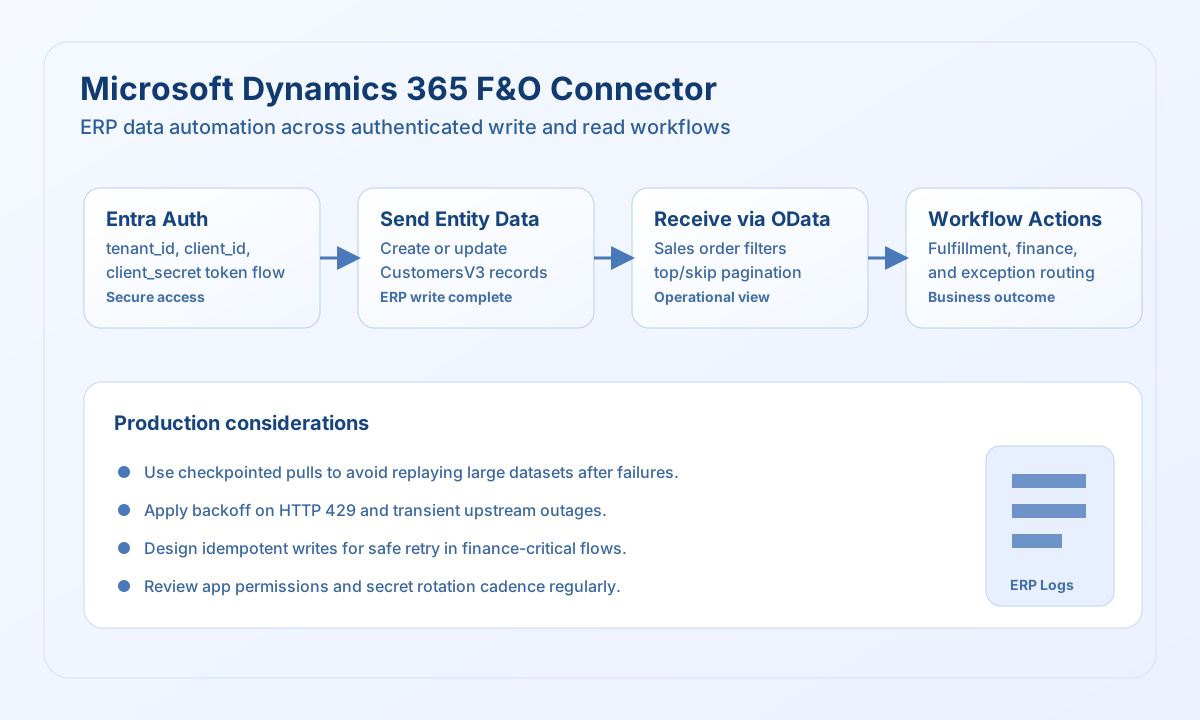
The Microsoft Dynamics 365 Finance & Operations connector allows Tealfabric workflows to exchange ERP data through Dynamics data entities and OData endpoints. It is designed for reliable operational automations such as customer synchronization, order orchestration, and finance process handoffs.
Document information
| Field | Value |
|---|---|
| Canonical URL | /docs/04_connecting-systems/connectors/m/microsoft-dynamics-fo |
| Version (published date) | 2026-05-08 |
| Tags | connectors, reference, microsoft-dynamics-fo |
| Connector ID | microsoft-dynamics-fo-1.0.0 |
When to use this connector
Use this connector when workflows must write business records to Dynamics F&O or read entity data to drive downstream actions. Typical use cases include syncing customers, checking open transactions, and moving approved data into accounting or supply-chain processes. The connector is most effective when integrations clearly separate read and write responsibilities and include retry-safe execution logic.
Prerequisites
Before creating workflows, register an Azure AD application with permissions to your Dynamics F&O environment and confirm that required data entities are available. Collect connection settings and validate API access in a non-production environment before promotion. Define operational ownership for credentials and access reviews to reduce integration risk.
Configuration
Set these values in the integration profile:
base_url(required): Dynamics F&O environment URL.tenant_id(required): Microsoft Entra tenant identifier.client_id(required): Application client ID.client_secret(required): Application client secret.timeout_seconds(optional): Request timeout in seconds.
Write customer data with send
Use send for create or update flows that push business data into Dynamics F&O entities. Keep payload fields aligned with the target entity definition and validate required attributes before runtime.
const baseUrl = "https://api.example.com/api/v1";
const tenantId = "<TENANT_ID>";
const apiKey = "<API_KEY>";

type DynamicsWriteResult = {
  entity_key?: string;
  status?: string;
};

async function createCustomer(integrationId: string): Promise<DynamicsWriteResult> {
  const response = await fetch(
    `${baseUrl}/integrations/${encodeURIComponent(integrationId)}/execute`,
    {
      method: "POST",
      headers: {
        "X-API-Key": apiKey,
        "X-Tenant-ID": tenantId,
        "Content-Type": "application/json",
      },
      body: JSON.stringify({
        operation: "send",
        endpoint: "data/CustomersV3",
        method: "POST",
        data: {
          dataAreaId: "USMF",
          CustomerAccount: "CUST-10508",
          OrganizationName: "Acme Components",
          CurrencyCode: "USD",
          CustomerGroupId: "10",
        },
      }),
    }
  );

  if (!response.ok) throw new Error(`Request failed: ${response.status}`);
  const payload = (await response.json()) as { result?: DynamicsWriteResult };
  if (!payload.result) throw new Error("Missing Dynamics write payload");
  return payload.result;
}
curl -X POST "https://api.example.com/api/v1/integrations/<ENTITY_ID>/execute" \
-H "X-API-Key: <API_KEY>" \
-H "X-Tenant-ID: <TENANT_ID>" \
-H "Content-Type: application/json" \
-d '{
"operation": "send",
"endpoint": "data/CustomersV3",
"method": "POST",
"data": {
"dataAreaId": "USMF",
"CustomerAccount": "CUST-10508",
"OrganizationName": "Acme Components",
"CurrencyCode": "USD",
"CustomerGroupId": "10"
}
}'
{
  "success": true,
  "result": {
    "entity_key": "CUST-10508",
    "status": "created"
  }
}
Read open sales orders with receive
Use receive to query Dynamics F&O entities through OData-style filters and pagination values. This pattern is useful for scheduled jobs that gather operational records for fulfillment, reconciliation, or reporting.
const baseUrl = "https://api.example.com/api/v1";
const tenantId = "<TENANT_ID>";
const apiKey = "<API_KEY>";

type SalesOrder = {
  SalesOrderNumber?: string;
  CustomerAccount?: string;
  OrderStatus?: string;
};

async function listOpenSalesOrders(integrationId: string): Promise<SalesOrder[]> {
  const response = await fetch(
    `${baseUrl}/integrations/${encodeURIComponent(integrationId)}/execute`,
    {
      method: "POST",
      headers: {
        "X-API-Key": apiKey,
        "X-Tenant-ID": tenantId,
        "Content-Type": "application/json",
      },
      body: JSON.stringify({
        operation: "receive",
        endpoint: "data/SalesOrderHeadersV2",
        query: {
          "filter": "OrderStatus eq Microsoft.Dynamics.DataEntities.SalesStatus"Backorder"",
          "top": 20,
          "skip": 0,
        },
      }),
    }
  );

  if (!response.ok) throw new Error(`Request failed: ${response.status}`);
  const payload = (await response.json()) as { data?: SalesOrder[] };
  if (!payload.data) throw new Error("Missing Dynamics receive payload");
  return payload.data;
}
curl -X POST "https://api.example.com/api/v1/integrations/<ENTITY_ID>/execute" \
  -H "X-API-Key: <API_KEY>" \
  -H "X-Tenant-ID: <TENANT_ID>" \
  -H "Content-Type: application/json" \
  -d '{
    "operation": "receive",
    "endpoint": "data/SalesOrderHeadersV2",
    "query": {
      "$filter": "OrderStatus eq Microsoft.Dynamics.DataEntities.SalesStatus'\''Backorder'\''",
      "$top": 20,
      "$skip": 0
    }
  }'
{
  "success": true,
  "data": [
    {
      "SalesOrderNumber": "SO-001245",
      "CustomerAccount": "CUST-10508",
      "OrderStatus": "Backorder"
    }
  ],
  "record_count": 1
}
Reliability guidance
Use a lower top value and incremental checkpoints for high-volume entity pulls so retries remain bounded and observable. Handle 429 and transient network failures with backoff and idempotent workflow logic to avoid duplicate posting. Keep credentials in secure storage, rotate secrets on a schedule, and review app permissions regularly as business processes evolve.