Postmark Connector Guide
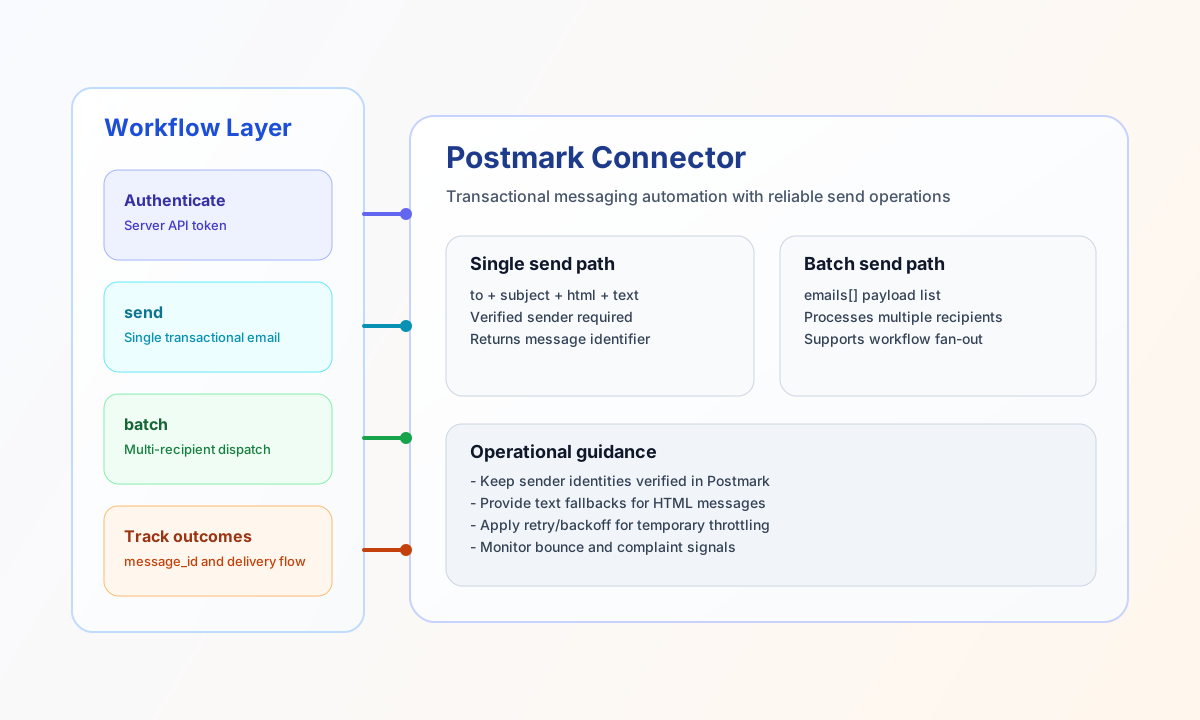
The Postmark connector lets Tealfabric workflows send transactional email through Postmark with reliable delivery and response tracking. It is well suited for notifications, onboarding messages, and operational alerting where message status matters.
Document information
| Field | Value |
|---|---|
| Canonical URL | /docs/04_connecting-systems/connectors/p/postmark |
| Version (published date) | 2026-05-08 |
| Tags | connectors, reference, postmark |
| Connector ID | postmark-1.0.0 |
Configure credentials
Set api_key to a Postmark Server API Token and configure a verified from_email address. Add from_name if you want a default display name and keep base_url at its default unless your environment requires custom routing.
Use timeout_seconds based on expected traffic and workflow latency tolerance. Before production rollout, verify sender domains and identities in Postmark to avoid rejected sends.
Send transactional email with send
Use send to deliver transactional messages directly from workflows, including HTML and text content. Keep payloads explicit and include both content formats when possible to improve compatibility across recipient clients.
const baseUrl = "https://api.example.com/api/v1";
const tenantId = "<TENANT_ID>";
const apiKey = "<API_KEY>";

async function sendStatusEmail(integrationId: string) {
  const response = await fetch(`${baseUrl}/integrations/${encodeURIComponent(integrationId)}/execute`, {
    method: "POST",
    headers: {
      "X-API-Key": apiKey,
      "X-Tenant-ID": tenantId,
      "Content-Type": "application/json",
    },
    body: JSON.stringify({
      operation: "send",
      to: "ops-team@example.com",
      subject: "Deployment completed successfully",
      html: "<h2>Deployment Success</h2><p>Release 2026.05.08 was deployed without incidents.</p>",
      text: "Deployment Success\n\nRelease 2026.05.08 was deployed without incidents."
    }),
  });
  if (!response.ok) throw new Error(`Request failed: ${response.status}`);
  return response.json();
}
curl -X POST "https://api.example.com/api/v1/integrations/<ENTITY_ID>/execute" \
-H "X-API-Key: <API_KEY>" \
-H "X-Tenant-ID: <TENANT_ID>" \
-H "Content-Type: application/json" \
-d '{
"operation": "send",
"to": "ops-team@example.com",
"subject": "Deployment completed successfully",
"html": "<h2>Deployment Success</h2><p>Release 2026.05.08 was deployed without incidents.</p>",
"text": "Deployment Success\n\nRelease 2026.05.08 was deployed without incidents."
}'
{
  "success": true,
  "data": {
    "message_count": 1,
    "message_id": "f16e0f4a-0e56-4a5a-85d8-57fc4f6b6f0d",
    "submitted_at": "2026-05-08T16:54:00Z",
    "data": {
      "ErrorCode": 0,
      "Message": "OK",
      "MessageID": "f16e0f4a-0e56-4a5a-85d8-57fc4f6b6f0d",
      "SubmittedAt": "2026-05-08T16:54:00Z",
      "To": "ops-team@example.com"
    }
  }
}
Retrieve outbound messages with receive
Use receive to list or inspect Postmark resources. The default endpoint is messages/outbound; pass endpoint (or alias resource) and optional query for pagination.
const baseUrl = "https://api.example.com/api/v1";
const tenantId = "<TENANT_ID>";
const apiKey = "<API_KEY>";

async function listOutbound(integrationId: string) {
  const response = await fetch(`${baseUrl}/integrations/${encodeURIComponent(integrationId)}/execute`, {
    method: "POST",
    headers: {
      "X-API-Key": apiKey,
      "X-Tenant-ID": tenantId,
      "Content-Type": "application/json",
    },
    body: JSON.stringify({
      operation: "receive",
      endpoint: "messages/outbound",
      query: { count: 10, offset: 0 }
    }),
  });
  if (!response.ok) throw new Error(`Request failed: ${response.status}`);
  return response.json();
}
curl -X POST "https://api.example.com/api/v1/integrations/<ENTITY_ID>/execute" \
-H "X-API-Key: <API_KEY>" \
-H "X-Tenant-ID: <TENANT_ID>" \
-H "Content-Type: application/json" \
-d '{
"operation": "receive",
"endpoint": "messages/outbound",
"query": { "count": 10, "offset": 0 }
}'
{
  "success": true,
  "data": {
    "message_count": 2,
    "total_size": 2,
    "data": [
      { "MessageID": "07e7d74f-b13a-4c6d-bd8c-f4fd34c9b9fd", "To": "owner-a@example.com" },
      { "MessageID": "ea4ab6a2-a6e8-42f8-9234-1130e98a4c5b", "To": "owner-b@example.com" }
    ]
  }
}
Validate credentials with test
Use test to confirm the server token and from_email configuration. Unlike send/receive/sync/batch, test validates required configuration fields before calling GET /server.
{
  "operation": "test"
}
{
  "success": true,
  "data": {
    "message": "Postmark connection test successful",
    "details": {
      "api_base_url": "https://api.postmarkapp.com",
      "server_id": 123456,
      "name": "Production Server"
    }
  }
}
Send multiple messages with batch
Use batch when a workflow needs to deliver multiple messages in one step, such as campaign-like operational notifications or multi-recipient alerting. Keep each message payload simple and apply controlled pacing if your environment has strict throughput limits.
const baseUrl = "https://api.example.com/api/v1";
const tenantId = "<TENANT_ID>";
const apiKey = "<API_KEY>";

async function sendBatch(integrationId: string) {
  const response = await fetch(`${baseUrl}/integrations/${encodeURIComponent(integrationId)}/execute`, {
    method: "POST",
    headers: {
      "X-API-Key": apiKey,
      "X-Tenant-ID": tenantId,
      "Content-Type": "application/json",
    },
    body: JSON.stringify({
      operation: "batch",
      emails: [
        {
          to: "owner-a@example.com",
          subject: "Action required: ticket #510",
          text: "Please review ticket #510."
        },
        {
          to: "owner-b@example.com",
          subject: "Action required: ticket #511",
          text: "Please review ticket #511."
        }
      }
    }),
  });
  if (!response.ok) throw new Error(`Request failed: ${response.status}`);
  return response.json();
}
curl -X POST "https://api.example.com/api/v1/integrations/<ENTITY_ID>/execute" \
-H "X-API-Key: <API_KEY>" \
-H "X-Tenant-ID: <TENANT_ID>" \
-H "Content-Type: application/json" \
-d '{
"operation": "batch",
"emails": [
{
"to": "owner-a@example.com",
"subject": "Action required: ticket #510",
"text": "Please review ticket #510."
},
{
"to": "owner-b@example.com",
"subject": "Action required: ticket #511",
"text": "Please review ticket #511."
}
]
}'
{
  "success": true,
  "data": {
    "message_count": 2,
    "total_emails": 2,
    "successful_emails": 2,
    "results": [
      {
        "index": 0,
        "success": true,
        "result": {
          "message_count": 1,
          "message_id": "07e7d74f-b13a-4c6d-bd8c-f4fd34c9b9fd",
          "submitted_at": "2026-05-08T16:54:00Z",
          "data": {}
        }
      },
      {
        "index": 1,
        "success": true,
        "result": {
          "message_count": 1,
          "message_id": "ea4ab6a2-a6e8-42f8-9234-1130e98a4c5b",
          "submitted_at": "2026-05-08T16:54:01Z",
          "data": {}
        }
      }
    ]
  }
}
Reliability guidance
Most failures come from invalid server tokens, unverified sender identities, or malformed email payloads. If sends fail, validate credentials and sender setup first, then confirm required message fields are present.
For stable production behavior, include plain-text fallbacks, monitor bounce patterns, and apply retry/backoff when rate limits are returned. This keeps transactional messaging flows dependable under load.