Pipedrive API Connector Guide
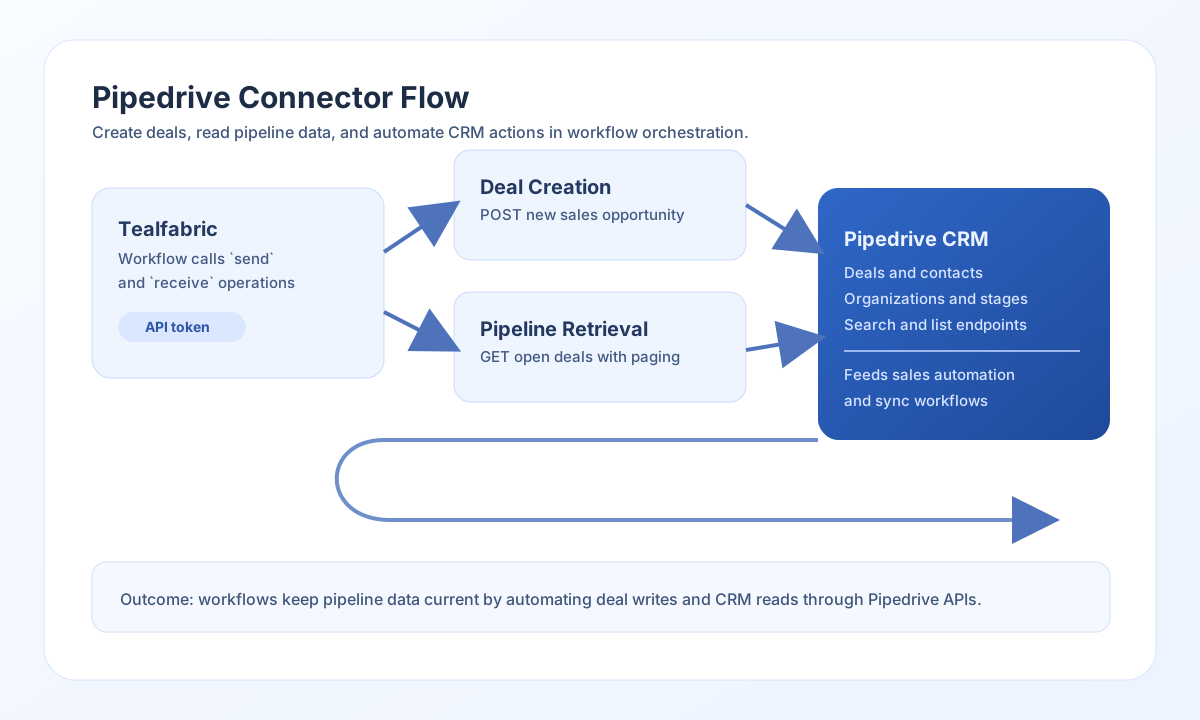
The Pipedrive API connector lets Tealfabric workflows create, update, and retrieve CRM records such as deals, persons, and organizations. It is useful for pipeline automation, sales reporting, and cross-system synchronization where CRM data needs to move reliably between tools.
Document information
| Field | Value |
|---|---|
| Canonical URL | /docs/04_connecting-systems/connectors/p/pipedrive-api |
| Version (published date) | 2026-05-08 |
| Tags | connectors, reference, pipedrive-api |
| Connector ID | pipedrive-api-1.0.0 |
Configure authentication
Set api_key to a valid Pipedrive personal API token from your account settings. You can keep the default base_url in most environments, and adjust timeout_seconds only if your workflows handle larger payloads or slower network conditions.
Before production use, confirm that the token has access to the target data and required endpoints. This prevents permission-related failures during automated deal or contact operations.
Create and update deals with send
Use send when your workflow needs to create or update CRM records. A common pattern is creating deals from inbound leads and attaching person or organization relationships.
const baseUrl = "https://api.example.com/api/v1";
const tenantId = "<TENANT_ID>";
const apiKey = "<API_KEY>";

async function createDeal(integrationId: string) {
  const response = await fetch(`${baseUrl}/integrations/${encodeURIComponent(integrationId)}/execute`, {
    method: "POST",
    headers: {
      "X-API-Key": apiKey,
      "X-Tenant-ID": tenantId,
      "Content-Type": "application/json",
    },
    body: JSON.stringify({
      operation: "send",
      endpoint: "deals",
      method: "POST",
      data: {
        title: "Enterprise Renewal - Northwind",
        value: 82000,
        currency: "USD",
        person_id: 1532,
        org_id: 774,
        stage_id: 3
      }
    }),
  });
  if (!response.ok) throw new Error(`Request failed: ${response.status}`);
  return response.json();
}
curl -X POST "https://api.example.com/api/v1/integrations/<ENTITY_ID>/execute" \
-H "X-API-Key: <API_KEY>" \
-H "X-Tenant-ID: <TENANT_ID>" \
-H "Content-Type: application/json" \
-d '{
"operation": "send",
"endpoint": "deals",
"method": "POST",
"data": {
"title": "Enterprise Renewal - Northwind",
"value": 82000,
"currency": "USD",
"person_id": 1532,
"org_id": 774,
"stage_id": 3
}
}'
{
  "success": true,
  "data": {
    "id": 48192,
    "title": "Enterprise Renewal - Northwind",
    "status": "open"
  }
}
Retrieve pipeline data with receive
Use receive to list or fetch CRM records for dashboards, enrichment, and sync jobs. Query options such as limit, start, and filters help keep workflows efficient and predictable.
const baseUrl = "https://api.example.com/api/v1";
const tenantId = "<TENANT_ID>";
const apiKey = "<API_KEY>";

async function listOpenDeals(integrationId: string) {
  const response = await fetch(`${baseUrl}/integrations/${encodeURIComponent(integrationId)}/execute`, {
    method: "POST",
    headers: {
      "X-API-Key": apiKey,
      "X-Tenant-ID": tenantId,
      "Content-Type": "application/json",
    },
    body: JSON.stringify({
      operation: "receive",
      endpoint: "deals",
      query: {
        status: "open",
        limit: 20,
        start: 0
      }
    }),
  });
  if (!response.ok) throw new Error(`Request failed: ${response.status}`);
  return response.json();
}
curl -X POST "https://api.example.com/api/v1/integrations/<ENTITY_ID>/execute" \
-H "X-API-Key: <API_KEY>" \
-H "X-Tenant-ID: <TENANT_ID>" \
-H "Content-Type: application/json" \
-d '{
"operation": "receive",
"endpoint": "deals",
"query": {
"status": "open",
"limit": 20,
"start": 0
}
}'
{
  "success": true,
  "record_count": 2,
  "data": [
    { "id": 48192, "title": "Enterprise Renewal - Northwind", "value": 82000 },
    { "id": 48193, "title": "Upsell - Contoso", "value": 23000 }
  ]
}
Reliability guidance
Most failures come from invalid API tokens, exceeded rate limits, or malformed endpoint payloads. Validate credentials first, then verify endpoint paths and required request fields.
For production-grade reliability, paginate list operations, add retry with backoff for throttling responses, and always check success before downstream processing. This keeps CRM automations stable as data volume grows.