Perplexity AI Connector Guide
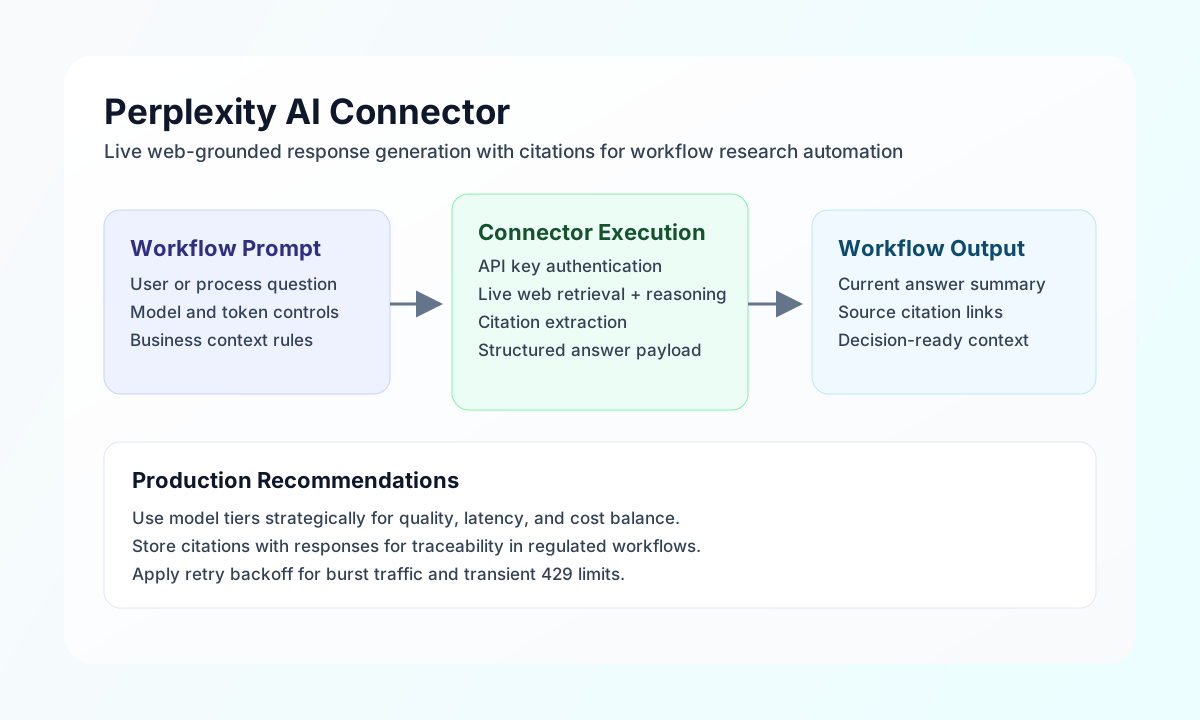
The Perplexity AI connector lets Tealfabric workflows run real-time, citation-aware AI responses backed by live web retrieval. It is useful for research automation, policy summarization, incident context gathering, and other workflows that need current information with source traceability.
Document information
| Field | Value |
|---|---|
| Canonical URL | /docs/04_connecting-systems/connectors/p/perplexity-ai |
| Version (published date) | 2026-05-08 |
| Tags | connectors, reference, perplexity-ai |
| Connector ID | perplexity-ai-1.0.0 |
Configuration and authentication
Configure the connector with a Perplexity API key so workflow requests can authenticate and access supported online models. This key is required for all operations and should remain in secure integration settings rather than process payloads.
The required value is api_key, and timeout_seconds is optional for slower or citation-heavy prompts. After setup, run test to confirm key validity before enabling production workflows.
Generate grounded responses with send
Use send to request chat-style completions that can include up-to-date web context and citations. Keep model choice and system instructions explicit so response quality and latency are predictable.
const baseUrl = "https://api.example.com/api/v1";
const tenantId = "<TENANT_ID>";
const apiKey = "<API_KEY>";

async function summarizeRegulatoryUpdate(integrationId: string) {
  const response = await fetch(`${baseUrl}/integrations/${encodeURIComponent(integrationId)}/execute`, {
    method: "POST",
    headers: {
      "X-API-Key": apiKey,
      "X-Tenant-ID": tenantId,
      "Content-Type": "application/json",
    },
    body: JSON.stringify({
      operation: "send",
      endpoint: "chat/completions",
      data: {
        model: "llama-3.1-sonar-large-128k-online",
        messages: [
          {
            role: "system",
            content: "Return concise enterprise-ready summaries and include citations."
          },
          {
            role: "user",
            content: "Summarize this week's major AI governance policy updates in three bullet points."
          }
        },
        temperature: 0.2,
        max_tokens: 500
      }
    }),
  });
  if (!response.ok) throw new Error(`Request failed: ${response.status}`);
  return response.json();
}
curl -X POST "https://api.example.com/api/v1/integrations/<ENTITY_ID>/execute" \
-H "X-API-Key: <API_KEY>" \
-H "X-Tenant-ID: <TENANT_ID>" \
-H "Content-Type: application/json" \
-d '{
"operation": "send",
"endpoint": "chat/completions",
"data": {
"model": "llama-3.1-sonar-large-128k-online",
"messages": [
{
"role": "system",
"content": "Return concise enterprise-ready summaries and include citations."
},
{
"role": "user",
"content": "Summarize this week's major AI governance policy updates in three bullet points."
}
],
"temperature": 0.2,
"max_tokens": 500
}
}'
{
  "success": true,
  "result": {
    "id": "pplx-123456",
    "model": "llama-3.1-sonar-large-128k-online",
    "choices": [
      {
        "message": {
          "role": "assistant",
          "content": "- Policy update one...\n- Policy update two...\n- Policy update three...",
          "citations": [
            {
              "url": "https://example.com/policy-update"
            }
          ]
        }
      }
    ]
  }
}
Run custom calls with execute
Use execute when you need explicit method and endpoint control for advanced Perplexity request patterns. This operation is useful for teams standardizing request wrappers while still exposing model and payload flexibility.
const baseUrl = "https://api.example.com/api/v1";
const tenantId = "<TENANT_ID>";
const apiKey = "<API_KEY>";

async function runCustomPerplexityCall(integrationId: string) {
  const response = await fetch(`${baseUrl}/integrations/${encodeURIComponent(integrationId)}/execute`, {
    method: "POST",
    headers: {
      "X-API-Key": apiKey,
      "X-Tenant-ID": tenantId,
      "Content-Type": "application/json",
    },
    body: JSON.stringify({
      operation: "execute",
      endpoint: "chat/completions",
      method: "POST",
      body: {
        model: "llama-3.1-sonar-small-128k-online",
        messages: [
          { role: "user", content: "List the top three cloud cost optimization trends this month." }
        }
      }
    }),
  });
  if (!response.ok) throw new Error(`Request failed: ${response.status}`);
  return response.json();
}
curl -X POST "https://api.example.com/api/v1/integrations/<ENTITY_ID>/execute" \
-H "X-API-Key: <API_KEY>" \
-H "X-Tenant-ID: <TENANT_ID>" \
-H "Content-Type: application/json" \
-d '{
"operation": "execute",
"endpoint": "chat/completions",
"method": "POST",
"body": {
"model": "llama-3.1-sonar-small-128k-online",
"messages": [
{
"role": "user",
"content": "List the top three cloud cost optimization trends this month."
}
]
}
}'
{
  "success": true,
  "message": "Perplexity AI method executed successfully",
  "result": {
    "choices": [
      {
        "message": {
          "content": "1) Rightsizing automation ... 2) Storage lifecycle optimization ... 3) AI-driven anomaly detection ...",
          "citations": [
            { "url": "https://example.com/cloud-report" }
          ]
        }
      }
    ]
  }
}
Reliability guidance
Most production failures are caused by invalid API keys, model mismatches, or rate-limit bursts. Validate credentials with test, select models intentionally for latency and quality, and apply exponential backoff for 429 and transient timeout conditions.
For stable operations, keep prompts focused, set appropriate token limits, and store citation URLs with outputs for downstream auditability. These practices improve trust and consistency in web-grounded AI workflows.