Plaid Connector Guide
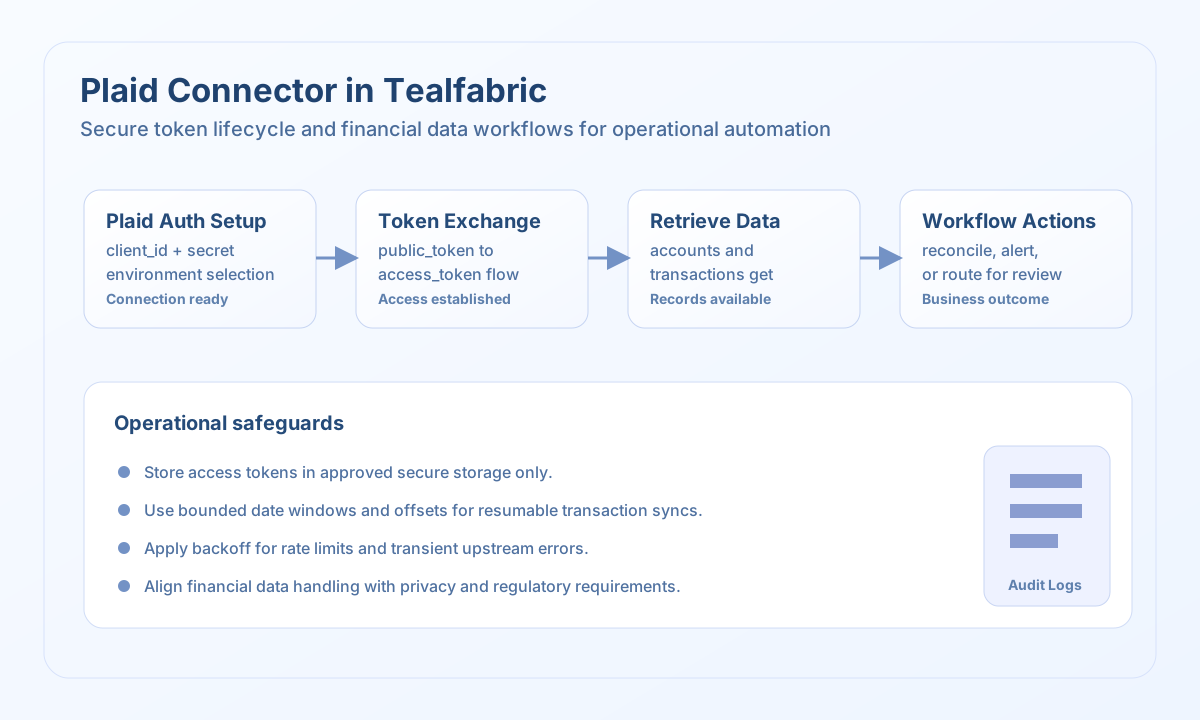
The Plaid connector allows Tealfabric workflows to securely connect financial account data for use cases such as account verification, transaction ingestion, and cash-flow monitoring. It is designed for operational integrations that require clear token handling and consistent data retrieval patterns.
Document information
| Field | Value |
|---|---|
| Canonical URL | /docs/04_connecting-systems/connectors/p/plaid |
| Version (published date) | 2026-05-08 |
| Tags | connectors, reference, plaid |
| Connector ID | plaid-1.0.0 |
When to use this connector
Use this connector when workflows need to move verified bank account data into downstream business processes. Typical scenarios include onboarding checks, reconciliations, and transaction-driven alerts. The connector is most effective when token lifecycle handling and data retention rules are defined before production rollout.
Prerequisites
Before configuring the integration, create Plaid API credentials and select the correct environment (sandbox, development, or production). Ensure your workflow has a clear process for creating and exchanging tokens, and confirm which Plaid products are enabled for your use case. Review compliance requirements for financial data storage and access in your organization.
Configuration
Store these settings in the integration profile:
client_id(required): Plaid client identifier.secret(required): Plaid API secret.environment(optional):sandbox,development, orproduction.timeout_seconds(optional): Request timeout in seconds.
Create and exchange tokens with send
Use send for token lifecycle actions, including Link token creation and public token exchange. Keep requests tightly scoped so each workflow step handles one token action clearly.
const baseUrl = "https://api.example.com/api/v1";
const tenantId = "<TENANT_ID>";
const apiKey = "<API_KEY>";

type PlaidTokenResult = {
  access_token?: string;
  item_id?: string;
};

async function exchangePublicToken(
  integrationId: string,
  publicToken: string
): Promise<PlaidTokenResult> {
  const response = await fetch(
    `${baseUrl}/integrations/${encodeURIComponent(integrationId)}/execute`,
    {
      method: "POST",
      headers: {
        "X-API-Key": apiKey,
        "X-Tenant-ID": tenantId,
        "Content-Type": "application/json",
      },
      body: JSON.stringify({
        operation: "send",
        endpoint: "item/public_token/exchange",
        data: {
          public_token: publicToken,
        },
      }),
    }
  );
  if (!response.ok) throw new Error(`Request failed: ${response.status}`);
  const payload = (await response.json()) as {
    data?: {
      success?: boolean;
      message?: string;
      result?: PlaidTokenResult;
    };
  };
  if (!payload.data?.result) throw new Error("Missing Plaid token exchange payload");
  return payload.data.result;
}
curl -X POST "https://api.example.com/api/v1/integrations/<ENTITY_ID>/execute" \
-H "X-API-Key: <API_KEY>" \
-H "X-Tenant-ID: <TENANT_ID>" \
-H "Content-Type: application/json" \
-d '{
"operation": "send",
"endpoint": "item/public_token/exchange",
"data": {
"public_token": "<ENTITY_ID>"
}
}'
{
  "success": true,
  "data": {
    "success": true,
    "message": "Plaid operation completed successfully",
    "result": {
      "access_token": "<ENTITY_ID>",
      "item_id": "<ENTITY_ID>"
    }
  }
}
Retrieve account and transaction data with receive
Use receive to fetch accounts or transactions after a valid access token is available. Keep date ranges and limits controlled to reduce processing load and simplify incremental sync logic.
const baseUrl = "https://api.example.com/api/v1";
const tenantId = "<TENANT_ID>";
const apiKey = "<API_KEY>";

type PlaidTransaction = {
  transaction_id?: string;
  amount?: number;
  date?: string;
  name?: string;
};

async function getTransactions(
  integrationId: string,
  accessToken: string
): Promise<PlaidTransaction[]> {
  const response = await fetch(
    `${baseUrl}/integrations/${encodeURIComponent(integrationId)}/execute`,
    {
      method: "POST",
      headers: {
        "X-API-Key": apiKey,
        "X-Tenant-ID": tenantId,
        "Content-Type": "application/json",
      },
      body: JSON.stringify({
        operation: "receive",
        endpoint: "transactions/get",
        data: {
          access_token: accessToken,
          start_date: "2026-05-01",
          end_date: "2026-05-08",
          options: {
            count: 25,
            offset: 0,
          },
        },
      }),
    }
  );
  if (!response.ok) throw new Error(`Request failed: ${response.status}`);
  const payload = (await response.json()) as {
    data?: {
      success?: boolean;
      message?: string;
      result?: { transactions?: PlaidTransaction[] };
    };
  };
  if (!payload.data?.result?.transactions) throw new Error("Missing Plaid transactions payload");
  return payload.data.result.transactions;
}
curl -X POST "https://api.example.com/api/v1/integrations/<ENTITY_ID>/execute" \
-H "X-API-Key: <API_KEY>" \
-H "X-Tenant-ID: <TENANT_ID>" \
-H "Content-Type: application/json" \
-d '{
"operation": "receive",
"endpoint": "transactions/get",
"data": {
"access_token": "<ENTITY_ID>",
"start_date": "2026-05-01",
"end_date": "2026-05-08",
"options": {
"count": 25,
"offset": 0
}
}
}'
{
  "success": true,
  "data": {
    "success": true,
    "message": "Plaid data retrieved successfully",
    "result": {
      "transactions": [
        {
          "transaction_id": "<ENTITY_ID>",
          "amount": 48.25,
          "date": "2026-05-07",
          "name": "Coffee Shop"
        }
      ]
    }
  }
}
Reliability and security guidance
Treat Plaid access tokens as highly sensitive and store them only in approved secure systems. Use narrow date ranges and checkpointed offsets for repeatable transaction syncs, especially in high-volume accounts. Implement backoff for rate limits and network failures, and ensure financial-data processing aligns with your regulatory and privacy requirements.