Pinecone Connector Guide
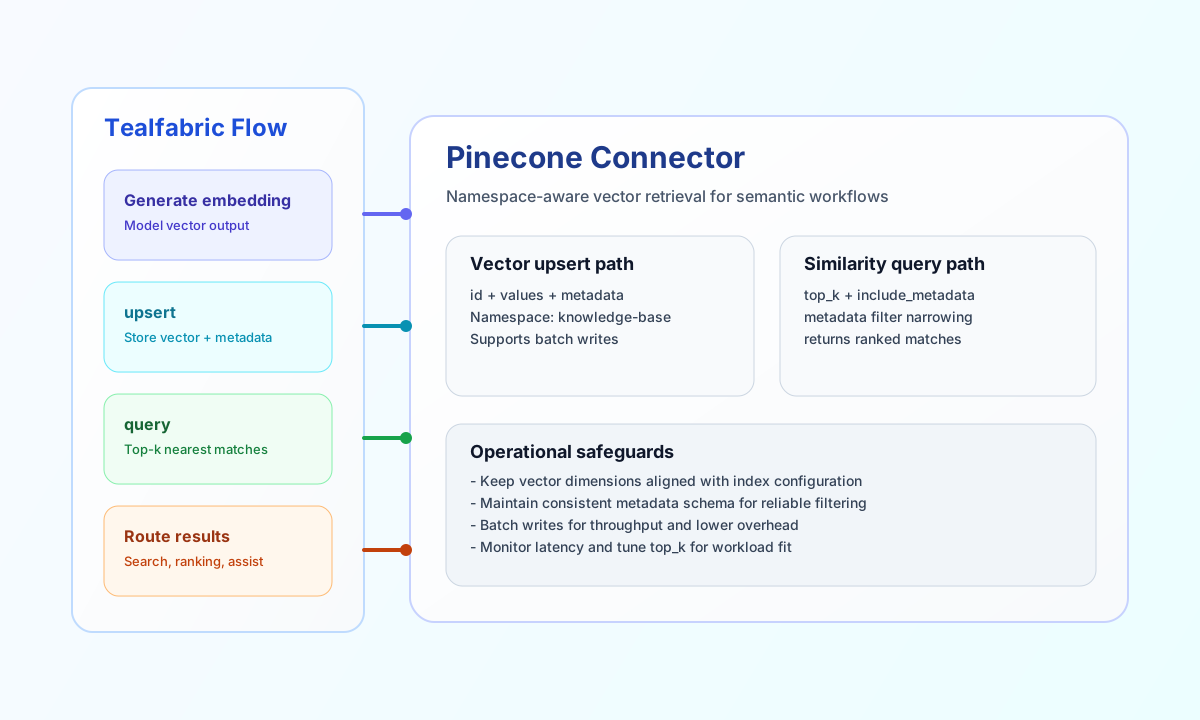
The Pinecone connector lets Tealfabric workflows store and retrieve vector embeddings for semantic search use cases. It is well suited for recommendation workflows, document retrieval, and AI-assisted ranking pipelines.
Document information
| Field | Value |
|---|---|
| Canonical URL | /docs/04_connecting-systems/connectors/p/pinecone |
| Version (published date) | 2026-06-17 |
| Tags | connectors, reference, pinecone |
| Connector ID | pinecone-1.0.0 |
Configuration and prerequisites
api_key(required): Pinecone API key sent as theApi-Keyheader.environment(required): Pinecone environment/region host segment (for exampleus-east-1-aws).index_name(required): Target index name. The index must already exist and its dimension must match workflow embeddings.timeout_seconds(optional): HTTP timeout in seconds (default30).
The connector targets https://{index_name}-{environment}.svc.pinecone.io. Use test to validate credentials and index reachability via GET /describe_index_stats. Only test performs full configuration validation; other operations load config and rely on Pinecone API responses when credentials are incomplete.
Operation reference
upsert: insert or overwrite vectors (vectors, optionalnamespace).query: similarity search (vectororquery_vector, optionaltop_k,filter/metadata_filter,namespace).fetch: fetch vectors by ID (idsorvector_ids, optionalnamespace).delete: delete by IDs, metadata filter, ordelete_all(optionalnamespace).update: patch metadata for one vector (idorvector_id,metadata, optionalnamespace).test: validate configuration and calldescribe_index_stats.
Upsert vectors with upsert
curl -X POST "https://api.example.com/api/v1/integrations/<INTEGRATION_ID>/execute" \
  -H "X-API-Key: <API_KEY>" \
  -H "X-Tenant-ID: <TENANT_ID>" \
  -H "Content-Type: application/json" \
  -d '{
    "operation": "upsert",
    "vectors": [
      {
        "id": "doc-1001",
        "values": [0.091, -0.214, 0.333, 0.172],
        "metadata": {
          "title": "Industrial Safety Checklist",
          "category": "operations"
        }
      }
    ],
    "namespace": "knowledge-base"
  }'
{
  "success": true,
  "data": {
    "vector_count": 1,
    "upserted_count": 1,
    "data": {
      "upsertedCount": 1
    }
  }
}
Query similar vectors with query
curl -X POST "https://api.example.com/api/v1/integrations/<INTEGRATION_ID>/execute" \
  -H "X-API-Key: <API_KEY>" \
  -H "X-Tenant-ID: <TENANT_ID>" \
  -H "Content-Type: application/json" \
  -d '{
    "operation": "query",
    "vector": [0.087, -0.220, 0.318, 0.181],
    "top_k": 5,
    "include_metadata": true,
    "filter": {
      "category": { "eq": "operations" }
    },
    "namespace": "knowledge-base"
  }'
{
  "success": true,
  "data": {
    "vector_count": 1,
    "matches": [
      {
        "id": "doc-1001",
        "score": 0.94,
        "metadata": {
          "title": "Industrial Safety Checklist",
          "category": "operations"
        }
      }
    ],
    "data": {
      "matches": []
    }
  }
}
Fetch vectors with fetch
curl -X POST "https://api.example.com/api/v1/integrations/<INTEGRATION_ID>/execute" \
  -H "X-API-Key: <API_KEY>" \
  -H "X-Tenant-ID: <TENANT_ID>" \
  -H "Content-Type: application/json" \
  -d '{
    "operation": "fetch",
    "ids": ["doc-1001"],
    "namespace": "knowledge-base"
  }'
Delete vectors with delete
Provide at least one of ids/vector_ids, filter/metadata_filter, or delete_all: true.
curl -X POST "https://api.example.com/api/v1/integrations/<INTEGRATION_ID>/execute" \
  -H "X-API-Key: <API_KEY>" \
  -H "X-Tenant-ID: <TENANT_ID>" \
  -H "Content-Type: application/json" \
  -d '{
    "operation": "delete",
    "ids": ["doc-1001"],
    "namespace": "knowledge-base"
  }'
Update vector metadata with update
curl -X POST "https://api.example.com/api/v1/integrations/<INTEGRATION_ID>/execute" \
  -H "X-API-Key: <API_KEY>" \
  -H "X-Tenant-ID: <TENANT_ID>" \
  -H "Content-Type: application/json" \
  -d '{
    "operation": "update",
    "id": "doc-1001",
    "metadata": { "category": "safety" },
    "namespace": "knowledge-base"
  }'
Test connection with test
curl -X POST "https://api.example.com/api/v1/integrations/<INTEGRATION_ID>/execute" \
  -H "X-API-Key: <API_KEY>" \
  -H "X-Tenant-ID: <TENANT_ID>" \
  -H "Content-Type: application/json" \
  -d '{ "operation": "test" }'
{
  "success": true,
  "data": {
    "message": "Pinecone connection test successful",
    "details": {
      "environment": "us-east-1-aws",
      "index_name": "my-index",
      "total_vector_count": 42
    }
  }
}
Reliability guidance
Most failures come from invalid API credentials, non-existent indexes, or vector dimensions that do not match the target index configuration. If a request fails, verify index settings first and then confirm payload fields and namespace usage.
For stable production performance, batch upserts where possible, keep metadata schemas consistent, and monitor query latency as collection size grows. Pinecone may return HTTP 429 under rate limits; the connector surfaces those as retriable errors.