Pinterest API Connector Guide
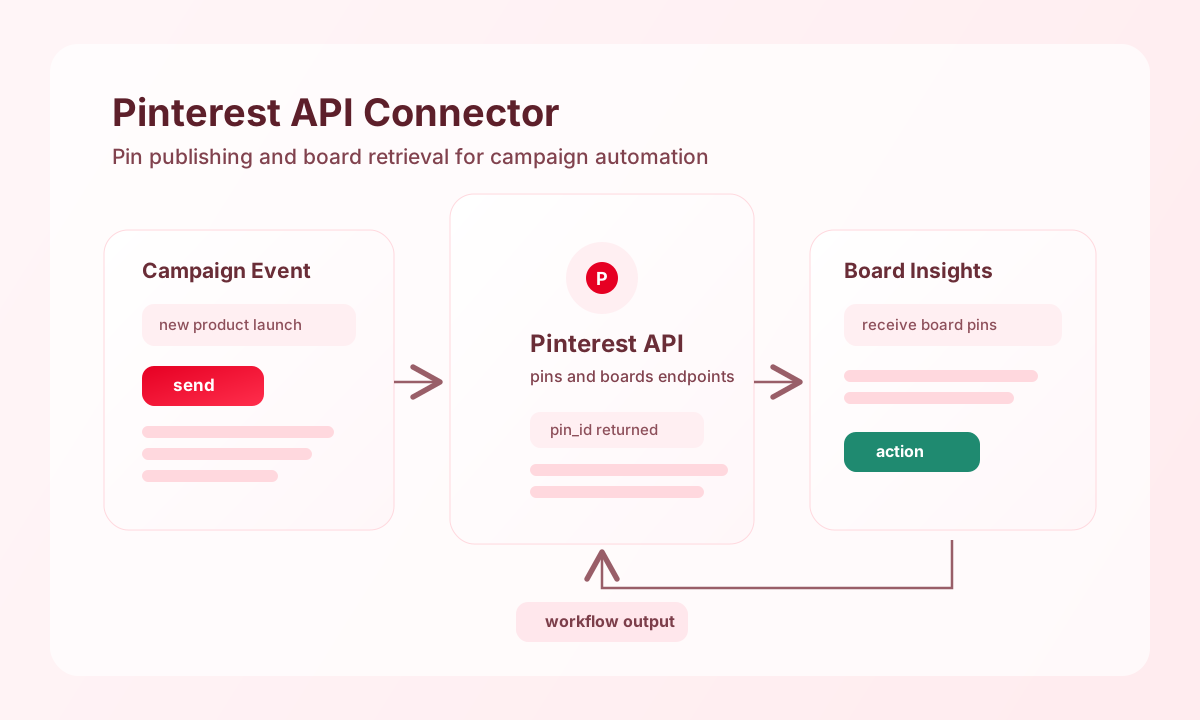
The Pinterest API connector lets Tealfabric workflows publish pins and retrieve board content through Pinterest API v5. It is useful for campaign automation, catalog distribution, and engagement reporting across Pinterest business workflows.
Document information
| Field | Value |
|---|---|
| Canonical URL | /docs/04_connecting-systems/connectors/p/pinterest |
| Version (published date) | 2026-05-08 |
| Tags | connectors, reference, pinterest |
| Connector ID | pinterest-1.0.0 |
Configure Pinterest OAuth
Set client_id, client_secret, and redirect_uri from your Pinterest developer app settings, and ensure the redirect URI exactly matches your app configuration. This is required for reliable authorization code exchange and token refresh behavior.
Store access_token and refresh_token in integration settings after authorization, and set scope for the minimum permissions your workflow needs, such as pins:write and boards:read. Run test after setup to confirm account access before automating publishing.
Create pins with send
Use send to publish pins from workflow events such as product launches, seasonal campaigns, or new content drops. Keep payloads explicit so board targeting and media source behavior are easy to validate.
const baseUrl = "https://api.example.com/api/v1";
const tenantId = "<TENANT_ID>";
const apiKey = "<API_KEY>";

async function createCampaignPin(integrationId: string) {
  const response = await fetch(`${baseUrl}/integrations/${encodeURIComponent(integrationId)}/execute`, {
    method: "POST",
    headers: {
      "X-API-Key": apiKey,
      "X-Tenant-ID": tenantId,
      "Content-Type": "application/json",
    },
    body: JSON.stringify({
      operation: "send",
      endpoint: "pins",
      method: "POST",
      data: {
        board_id: "<ENTITY_ID>",
        media_source: {
          source_type: "image_url",
          url: "https://cdn.example.com/assets/summer-launch.jpg"
        },
        title: "Summer Launch Collection",
        description: "Discover the latest launch items.",
        link: "https://example.com/summer-launch"
      }
    }),
  });
  if (!response.ok) throw new Error(`Request failed: ${response.status}`);
  return response.json();
}
curl -X POST "https://api.example.com/api/v1/integrations/<ENTITY_ID>/execute" \
-H "X-API-Key: <API_KEY>" \
-H "X-Tenant-ID: <TENANT_ID>" \
-H "Content-Type: application/json" \
-d '{
"operation": "send",
"endpoint": "pins",
"method": "POST",
"data": {
"board_id": "<ENTITY_ID>",
"media_source": {
"source_type": "image_url",
"url": "https://cdn.example.com/assets/summer-launch.jpg"
},
"title": "Summer Launch Collection",
"description": "Discover the latest launch items.",
"link": "https://example.com/summer-launch"
}
}'
{
  "success": true,
  "data": {
    "id": "<ENTITY_ID>",
    "board_id": "<ENTITY_ID>",
    "title": "Summer Launch Collection"
  }
}
Retrieve board content with receive
Use receive to list pins or board metadata for analytics, moderation, or synchronization workflows. Pagination fields such as bookmark and page_size help you process large catalogs safely.
const baseUrl = "https://api.example.com/api/v1";
const tenantId = "<TENANT_ID>";
const apiKey = "<API_KEY>";

async function listBoardPins(integrationId: string) {
  const response = await fetch(`${baseUrl}/integrations/${encodeURIComponent(integrationId)}/execute`, {
    method: "POST",
    headers: {
      "X-API-Key": apiKey,
      "X-Tenant-ID": tenantId,
      "Content-Type": "application/json",
    },
    body: JSON.stringify({
      operation: "receive",
      endpoint: "pins",
      query: {
        board_id: "<ENTITY_ID>",
        page_size: 25
      }
    }),
  });
  if (!response.ok) throw new Error(`Request failed: ${response.status}`);
  return response.json();
}
curl -X POST "https://api.example.com/api/v1/integrations/<ENTITY_ID>/execute" \
-H "X-API-Key: <API_KEY>" \
-H "X-Tenant-ID: <TENANT_ID>" \
-H "Content-Type: application/json" \
-d '{
"operation": "receive",
"endpoint": "pins",
"query": {
"board_id": "<ENTITY_ID>",
"page_size": 25
}
}'
{
  "success": true,
  "data": {
    "items": [
      {
        "id": "<ENTITY_ID>",
        "board_id": "<ENTITY_ID>",
        "title": "Summer Launch Collection"
      }
    ],
    "bookmark": "<ENTITY_ID>"
  }
}
Production guidance
Pinterest API limits and scope rules vary by endpoint, so keep request pacing predictable and request only permissions your workflow actually uses. This improves reliability and reduces avoidable permission failures.
Most production issues come from expired tokens, board access mismatches, or insufficient publishing scopes. Re-test integrations after credential rotations and monitor endpoint-level errors to catch scope or account restrictions early.
Related resources
Use the Pinterest API documentation and Pinterest authentication guide for endpoint-specific requirements.