PayPal Connector Guide
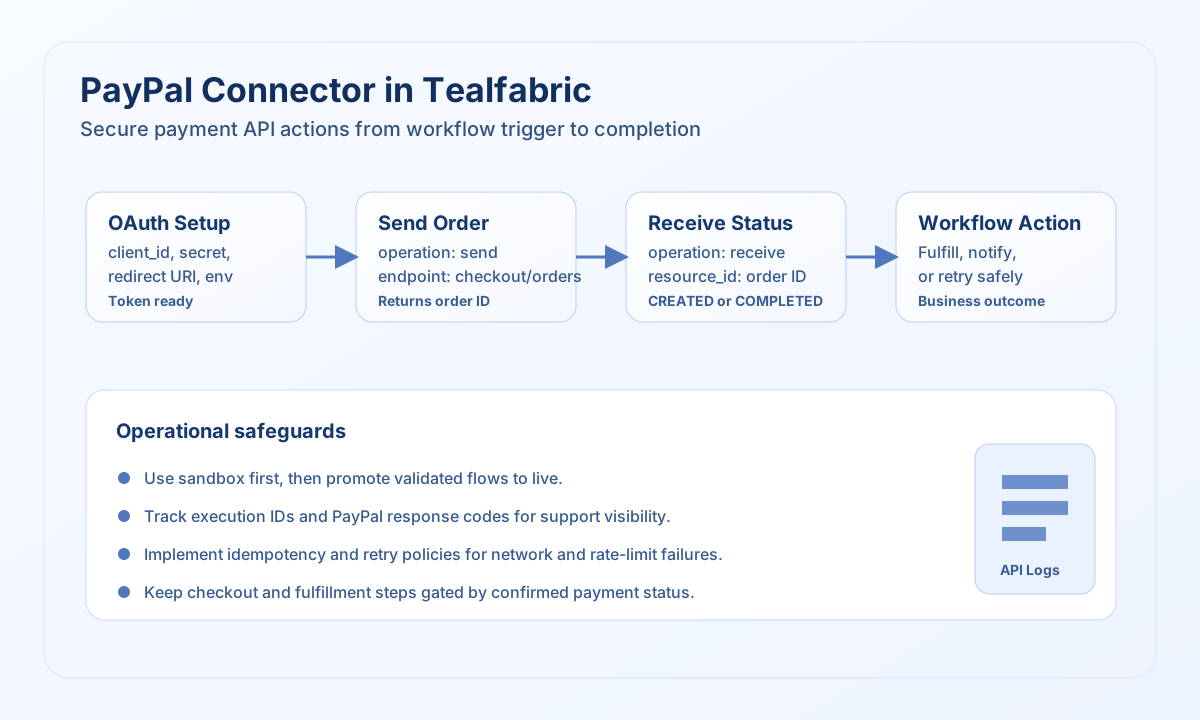
The PayPal connector lets you run checkout and billing automations from Tealfabric by calling PayPal REST APIs with a managed integration profile. You can create orders, read payment state, and coordinate subscription workflows while keeping authentication and connector execution in one place.
Document information
| Field | Value |
|---|---|
| Canonical URL | /docs/04_connecting-systems/connectors/p/paypal |
| Version (published date) | 2026-05-08 |
| Tags | connectors, reference, paypal |
| Connector ID | paypal-1.0.0 |
When to use this connector
Use this connector when your workflow needs to trigger PayPal actions directly, such as creating checkout orders or checking final payment status before fulfillment. It fits best in operational flows where payment state drives the next business step, including fulfillment, notifications, or subscription provisioning. A clear sandbox-to-live promotion path helps you validate behavior safely before production.
Prerequisites
Before building workflow steps, create a PayPal app and collect your OAuth credentials from the PayPal developer portal. Confirm that your redirect URI and granted scopes match the resources you plan to call, and decide whether each integration runs in sandbox or live. You should also define idempotency and retry expectations so downstream systems stay consistent when network errors occur.
Configuration
These values are configured on the integration and reused by operations at runtime.
client_id(required): PayPal app client ID.client_secret(required): PayPal app client secret.redirect_uri(required): OAuth callback URL registered in PayPal.access_token(optional): Current OAuth access token.refresh_token(optional): Token used to refresh access.environment(optional):sandboxorlive; default issandbox.timeout_seconds(optional): Request timeout; default is30.
Create an order with send
The most common write pattern is send with endpoint: "checkout/orders" and method: "POST". Keep your payload minimal and explicit so order intent and currency are unambiguous in logs and audits.
const baseUrl = "https://api.example.com/api/v1";
const tenantId = "<TENANT_ID>";
const apiKey = "<API_KEY>";

type PayPalOrder = {
  id?: string;
  status?: string;
};

async function createPayPalOrder(integrationId: string): Promise<PayPalOrder> {
  const response = await fetch(
    `${baseUrl}/integrations/${encodeURIComponent(integrationId)}/execute`,
    {
      method: "POST",
      headers: {
        "X-API-Key": apiKey,
        "X-Tenant-ID": tenantId,
        "Content-Type": "application/json",
      },
      body: JSON.stringify({
        operation: "send",
        endpoint: "checkout/orders",
        method: "POST",
        data: {
          intent: "CAPTURE",
          purchase_units: [
            {
              amount: {
                currency_code: "USD",
                value: "10.00",
              },
              description: "Order A-100",
            },
          },
        },
      }),
    }
  );
  if (!response.ok) throw new Error(`Request failed: ${response.status}`);
  const payload = (await response.json()) as { data?: PayPalOrder };
  if (!payload.data) throw new Error("Missing PayPal order payload");
  return payload.data;
}
curl -X POST "https://api.example.com/api/v1/integrations/<ENTITY_ID>/execute" \
-H "X-API-Key: <API_KEY>" \
-H "X-Tenant-ID: <TENANT_ID>" \
-H "Content-Type: application/json" \
-d '{
"operation": "send",
"endpoint": "checkout/orders",
"method": "POST",
"data": {
"intent": "CAPTURE",
"purchase_units": [
{
"amount": {
"currency_code": "USD",
"value": "10.00"
},
"description": "Order A-100"
}
]
}
}'
{
  "success": true,
  "data": {
    "id": "8RU61172JS455403V",
    "status": "CREATED"
  }
}
Retrieve an order with receive
Use receive to confirm status transitions after approval or capture. Reading order state in a follow-up step keeps fulfillment and customer messaging aligned with real payment outcomes.
const baseUrl = "https://api.example.com/api/v1";
const tenantId = "<TENANT_ID>";
const apiKey = "<API_KEY>";

type PayPalOrderStatus = {
  id?: string;
  status?: string;
  intent?: string;
};

async function getPayPalOrder(
  integrationId: string,
  orderId: string
): Promise<PayPalOrderStatus> {
  const response = await fetch(
    `${baseUrl}/integrations/${encodeURIComponent(integrationId)}/execute`,
    {
      method: "POST",
      headers: {
        "X-API-Key": apiKey,
        "X-Tenant-ID": tenantId,
        "Content-Type": "application/json",
      },
      body: JSON.stringify({
        operation: "receive",
        endpoint: "checkout/orders",
        resource_id: orderId,
      }),
    }
  );
  if (!response.ok) throw new Error(`Request failed: ${response.status}`);
  const payload = (await response.json()) as { data?: PayPalOrderStatus[] };
  if (!payload.data?.length) throw new Error("Missing PayPal order response");
  return payload.data[0];
}
curl -X POST "https://api.example.com/api/v1/integrations/<ENTITY_ID>/execute" \
-H "X-API-Key: <API_KEY>" \
-H "X-Tenant-ID: <TENANT_ID>" \
-H "Content-Type: application/json" \
-d '{
"operation": "receive",
"endpoint": "checkout/orders",
"resource_id": "<ENTITY_ID>"
}'
{
  "success": true,
  "data": [
    {
      "id": "8RU61172JS455403V",
      "status": "COMPLETED",
      "intent": "CAPTURE"
    }
  ]
}
Reliability and troubleshooting
Start in sandbox and promote to live only after validating full workflow behavior, including retries and idempotent order handling. If authentication fails, revalidate OAuth credentials and token freshness in the integration settings. For intermittent API errors, log PayPal response codes and execution IDs so support teams can correlate connector runs with upstream API events.