Personio Connector Guide
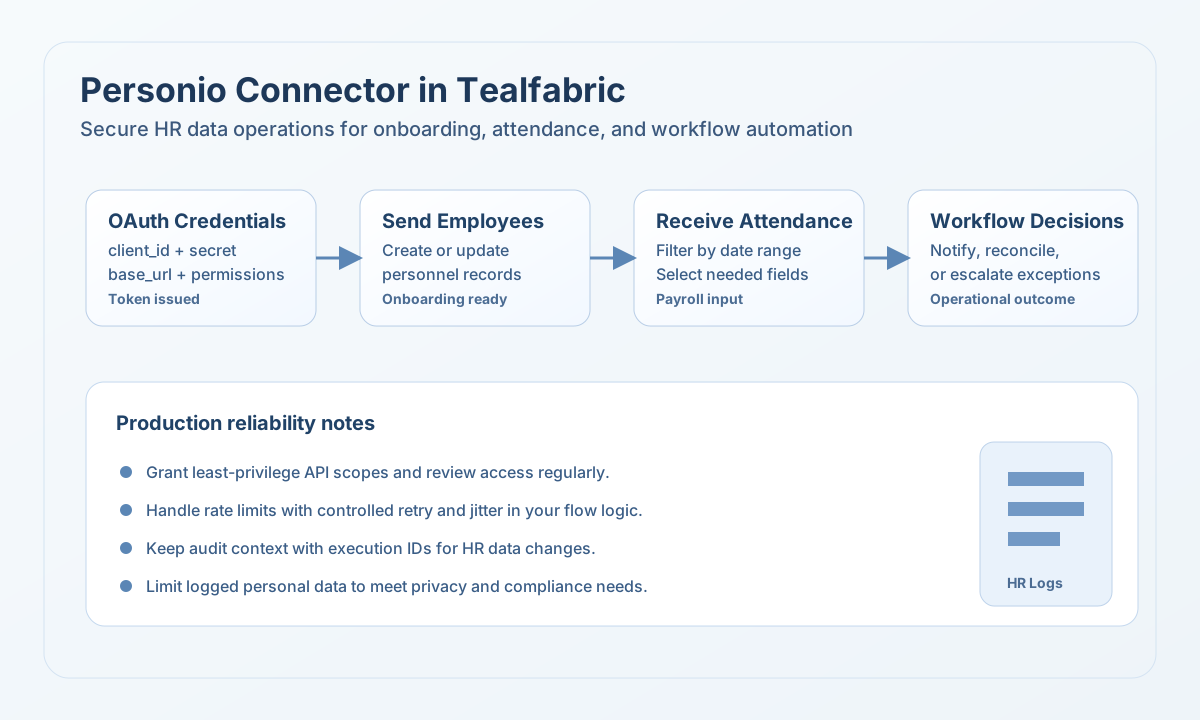
The Personio connector helps you automate HR workflows in Tealfabric by creating and retrieving records through Personio APIs. It is designed for operational use cases such as employee onboarding, leave tracking, and attendance synchronization where data accuracy and permission scope both matter.
Document information
| Field | Value |
|---|---|
| Canonical URL | /docs/04_connecting-systems/connectors/p/personio |
| Version (published date) | 2026-05-08 |
| Tags | connectors, reference, personio |
| Connector ID | personio-1.0.0 |
When to use this connector
Use this connector when your automation needs to send workforce updates to Personio or read HR records to drive downstream actions. Common scenarios include creating employee records after onboarding approvals, collecting absences for payroll preparation, and pulling attendance data into operational reporting. This connector is most effective when each workflow step has clear ownership for permissions and data governance.
Prerequisites
Before building workflows, create an OAuth application in Personio and confirm API permissions for the entities you intend to access. You should collect base_url, client_id, and client_secret, then verify which fields are allowed in your Personio tenant. Plan for GDPR-safe handling of employee data in logs and data exports before moving to production.
Configuration
These settings are stored in the integration profile and reused during execution.
base_url(required): Personio API base URL (for examplehttps://api.personio.de).client_id(required): OAuth client identifier.client_secret(required): OAuth client secret.timeout_seconds(optional): Request timeout in seconds; default is30.
The test operation validates that base_url, client_id, and client_secret are present. Other operations rely on runtime OAuth and API behavior without repeating that configuration check.
Create or update records with send
The send operation issues an HTTP request to {base_url}/api/{endpoint} (default method POST). Provide the Personio API path in endpoint and the JSON body in data.
const baseUrl = "https://api.example.com/api/v1";
const tenantId = "<TENANT_ID>";
const apiKey = "<API_KEY>";

async function createEmployee(integrationId: string) {
  const response = await fetch(
    `${baseUrl}/integrations/${encodeURIComponent(integrationId)}/execute`,
    {
      method: "POST",
      headers: {
        "X-API-Key": apiKey,
        "X-Tenant-ID": tenantId,
        "Content-Type": "application/json",
      },
      body: JSON.stringify({
        operation: "send",
        endpoint: "company/employees",
        method: "POST",
        data: {
          employee: {
            email: "jane.doe@example.com",
            first_name: "Jane",
            last_name: "Doe",
          },
        },
      }),
    }
  );

  if (!response.ok) throw new Error(`Request failed: ${response.status}`);
  return response.json();
}
curl -X POST "https://api.example.com/api/v1/integrations/<ENTITY_ID>/execute" \
-H "X-API-Key: <API_KEY>" \
-H "X-Tenant-ID: <TENANT_ID>" \
-H "Content-Type: application/json" \
-d '{
"operation": "send",
"endpoint": "company/employees",
"method": "POST",
"data": {
"employee": {
"email": "jane.doe@example.com",
"first_name": "Jane",
"last_name": "Doe"
}
}
}'
{
  "success": true,
  "data": {
    "message": "Personio operation completed successfully",
    "result": {
      "success": true,
      "data": {
        "id": 8472
      }
    }
  }
}
Retrieve records with receive
The receive operation performs GET {base_url}/api/{endpoint} with optional query parameters. When Personio returns a top-level data field, that value is returned as items; otherwise the full API payload is wrapped in a single-element array.
const baseUrl = "https://api.example.com/api/v1";
const tenantId = "<TENANT_ID>";
const apiKey = "<API_KEY>";

async function listAttendances(integrationId: string) {
  const response = await fetch(
    `${baseUrl}/integrations/${encodeURIComponent(integrationId)}/execute`,
    {
      method: "POST",
      headers: {
        "X-API-Key": apiKey,
        "X-Tenant-ID": tenantId,
        "Content-Type": "application/json",
      },
      body: JSON.stringify({
        operation: "receive",
        endpoint: "company/attendances",
        query: {
          start_date: "2026-05-01",
          end_date: "2026-05-31",
          limit: 50,
          offset: 0,
        },
      }),
    }
  );

  if (!response.ok) throw new Error(`Request failed: ${response.status}`);
  const payload = await response.json();
  return payload.data?.items ?? [];
}
curl -X POST "https://api.example.com/api/v1/integrations/<ENTITY_ID>/execute" \
-H "X-API-Key: <API_KEY>" \
-H "X-Tenant-ID: <TENANT_ID>" \
-H "Content-Type: application/json" \
-d '{
"operation": "receive",
"endpoint": "company/attendances",
"query": {
"start_date": "2026-05-01",
"end_date": "2026-05-31",
"limit": 50,
"offset": 0
}
}'
{
  "success": true,
  "data": {
    "message": "Personio data retrieved successfully",
    "employee_count": 2,
    "items": [
      {
        "id": 9821,
        "employee": { "id": 8472 },
        "date": "2026-05-07"
      }
    ]
  }
}
Call arbitrary API paths with execute
Use execute when you need an explicit HTTP method (default GET) and a JSON body from body or data.
{
  "operation": "execute",
  "endpoint": "company/time-offs",
  "method": "GET"
}
Validate connectivity with test
The test operation acquires an OAuth token and calls GET company/employees. It returns employees_found in data.details.
{
  "success": true,
  "data": {
    "message": "Personio connection test successful",
    "details": {
      "base_url": "https://api.personio.de",
      "employees_found": 42
    }
  }
}
Reliability guidance
Personio permissions control what each integration can read or modify, so review scopes before troubleshooting payload-level errors. Handle 429 and temporary network failures with controlled retries in your workflow logic to avoid dropped updates. For production operations, keep audit trails with execution IDs and minimize personally identifiable data in logs.