Plivo Connector Guide
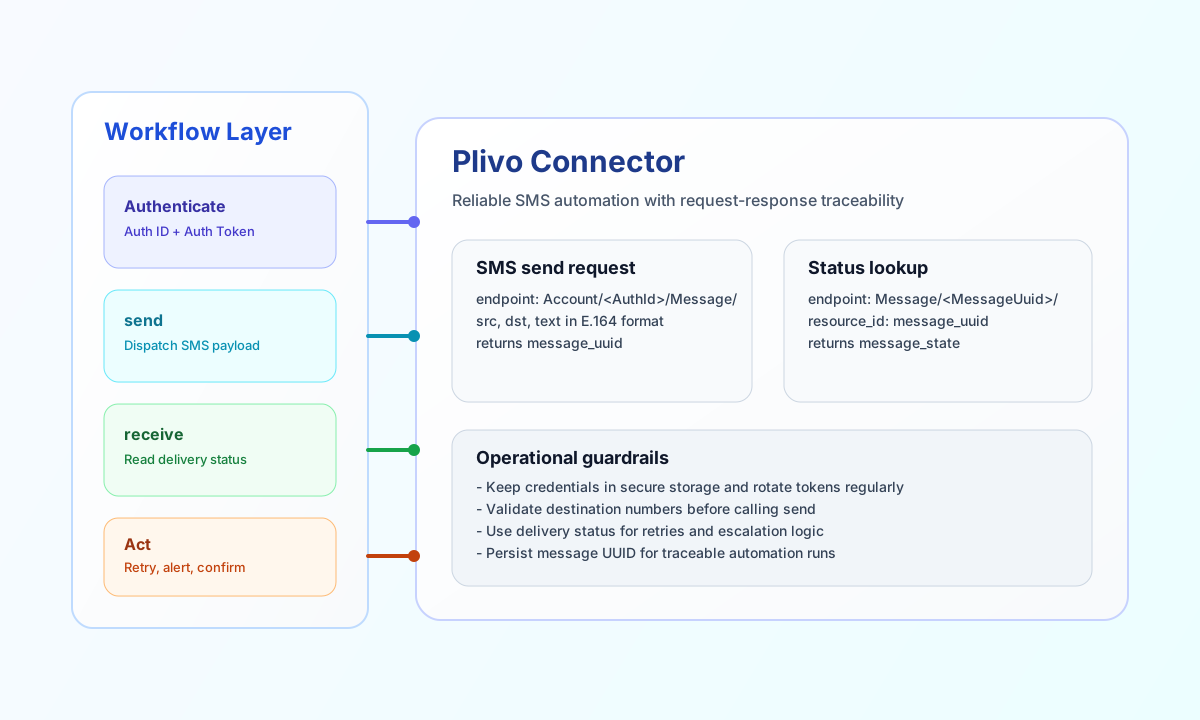
The Plivo connector lets Tealfabric workflows send outbound messages and retrieve delivery details from Plivo. It is designed for notification, verification, and operations workflows that need reliable SMS delivery signals.
Document information
| Field | Value |
|---|---|
| Canonical URL | /docs/04_connecting-systems/connectors/p/plivo |
| Version (published date) | 2026-05-08 |
| Tags | connectors, reference, plivo |
| Connector ID | plivo-1.0.0 |
Configure credentials
Set username to your Plivo Auth ID and password to your Auth Token from the Plivo dashboard. Add from_number in E.164 format, such as +14155550123, so workflows can send messages without redefining sender values each run.
Use optional host, port, and timeout_seconds only when your environment requires overrides from defaults. In most cases, secure credential storage and correct phone formatting are the main setup requirements.
Send SMS with send
Use the send operation to dispatch SMS messages. Provide connector callData fields (to, message, optional from, url, method) directly in the execute payload.
const baseUrl = "https://api.example.com/api/v1";
const tenantId = "<TENANT_ID>";
const apiKey = "<API_KEY>";

async function sendSms(integrationId: string) {
  const response = await fetch(`${baseUrl}/integrations/${encodeURIComponent(integrationId)}/execute`, {
    method: "POST",
    headers: {
      "X-API-Key": apiKey,
      "X-Tenant-ID": tenantId,
      "Content-Type": "application/json",
    },
    body: JSON.stringify({
      operation: "send",
      to: "+14155550199",
      message: "Your verification code is 128944.",
      from: "+14155550123"
    }),
  });
  if (!response.ok) throw new Error(`Request failed: ${response.status}`);
  return response.json();
}
curl -X POST "https://api.example.com/api/v1/integrations/<ENTITY_ID>/execute" \
-H "X-API-Key: <API_KEY>" \
-H "X-Tenant-ID: <TENANT_ID>" \
-H "Content-Type: application/json" \
-d '{
"operation": "send",
"to": "+14155550199",
"message": "Your verification code is 128944.",
"from": "+14155550123"
}'
{
  "success": true,
  "data": {
    "message_uuid": [
      "7f9f98a5-3dc1-42d7-8f0b-90d04d9093aa"
    ],
    "api_id": "ec28fb95-ff14-4f50-b65a-6c36c568f946"
  }
}
Retrieve message status with receive
Use receive to look up a single message by message_uuid (or id) or list messages with optional query. Omit both to use the connector default query limit=50.
const baseUrl = "https://api.example.com/api/v1";
const tenantId = "<TENANT_ID>";
const apiKey = "<API_KEY>";

async function getMessageStatus(integrationId: string, messageUuid: string) {
  const response = await fetch(`${baseUrl}/integrations/${encodeURIComponent(integrationId)}/execute`, {
    method: "POST",
    headers: {
      "X-API-Key": apiKey,
      "X-Tenant-ID": tenantId,
      "Content-Type": "application/json",
    },
    body: JSON.stringify({
      operation: "receive",
      message_uuid: messageUuid
    }),
  });
  if (!response.ok) throw new Error(`Request failed: ${response.status}`);
  return response.json();
}
curl -X POST "https://api.example.com/api/v1/integrations/<ENTITY_ID>/execute" \
-H "X-API-Key: <API_KEY>" \
-H "X-Tenant-ID: <TENANT_ID>" \
-H "Content-Type: application/json" \
-d '{
"operation": "receive",
"message_uuid": "<MESSAGE_UUID>"
}'
{
  "success": true,
  "data": {
    "message_uuid": "7f9f98a5-3dc1-42d7-8f0b-90d04d9093aa",
    "message_state": "delivered",
    "from_number": "+14155550123",
    "to_number": "+14155550199"
  }
}
Run sync, batch, and test
syncaccepts optionaloutbound(sendcallData) andinbound(receivecallData) and returns both legs plus aggregatemessage_count.batchacceptsmessages(or aliasitems) and executes sequential sends; response includes per-item success/error results.testverifies Basic auth and account access usingGET Account/{auth_id}/.
curl -X POST "https://api.example.com/api/v1/integrations/<ENTITY_ID>/execute" \
  -H "X-API-Key: <API_KEY>" \
  -H "X-Tenant-ID: <TENANT_ID>" \
  -H "Content-Type: application/json" \
  -d '{
    "operation": "batch",
    "messages": [
      { "to": "+14155550199", "message": "First message" },
      { "to": "+14155550200", "message": "Second message" }
    ]
  }'
Reliability and error handling
Authentication failures usually indicate incorrect Auth ID or Auth Token values, while delivery failures often come from invalid destination formatting. Keep all numbers in E.164 format and verify sender IDs match your Plivo account configuration.
In production flows, store returned message_uuid values and use them for follow-up status checks. This gives your workflow deterministic control over retry behavior and customer communication outcomes.