Salesforce Pardot Connector Guide
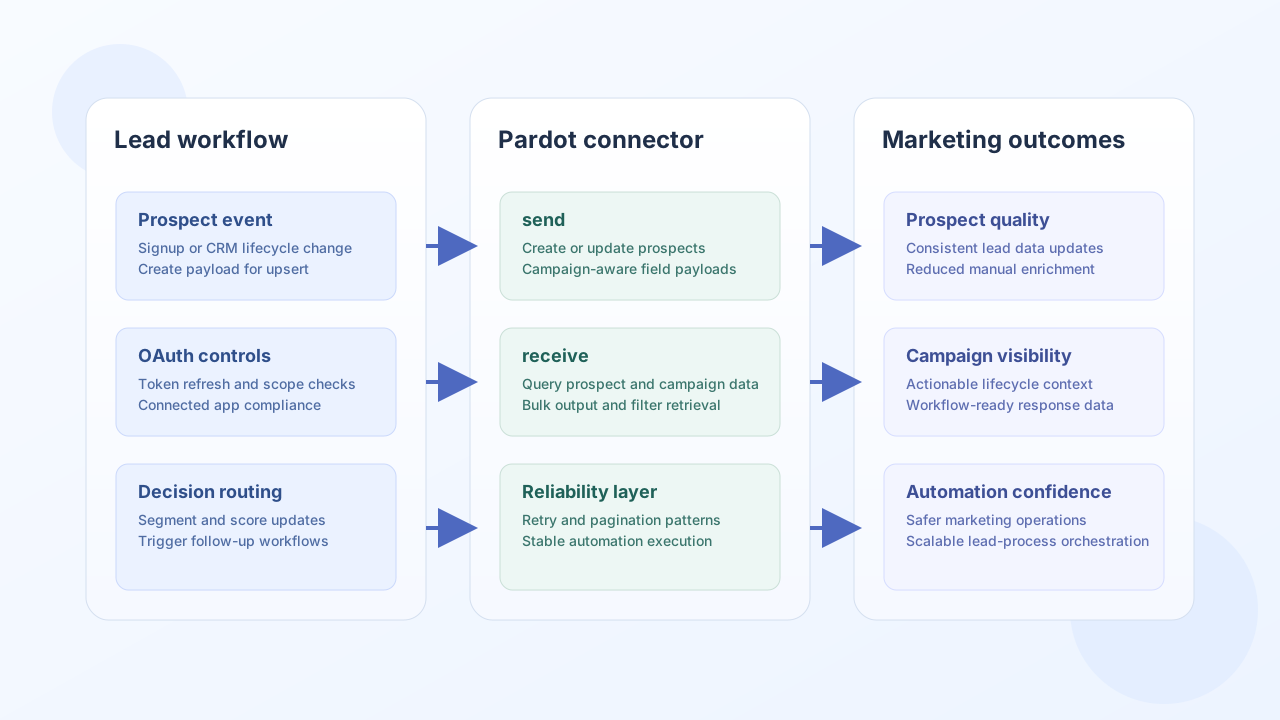
The Salesforce Pardot connector lets Tealfabric workflows create and enrich marketing prospects, assign list membership, and retrieve campaign-side records for segmentation and follow-up automation. It is designed for teams that need dependable movement between business workflows and Pardot lifecycle data.
Document information
| Field | Value |
|---|---|
| Canonical URL | /docs/04_connecting-systems/connectors/p/pardot |
| Version (published date) | 2026-05-08 |
| Tags | connectors, reference, pardot |
| Connector ID | pardot-1.0.0 |
Configuration and OAuth setup
Configure Salesforce connected-app credentials and Pardot API URL so workflow calls can authenticate and refresh tokens reliably. Keep scopes minimal and aligned to the operations your workflow actually performs.
client_id(required): Salesforce connected app client ID.client_secret(required): Salesforce connected app client secret.redirect_uri(required): OAuth callback URI configured in Salesforce.base_url(required): Pardot API base URL.access_tokenandrefresh_token(optional): persisted OAuth tokens.scope(optional): requested scopes such asapi pardot_api.timeout_seconds(optional): request timeout threshold.
The test operation validates client_id, client_secret, and redirect_uri. send, receive, sync, and batch require a valid access_token at runtime (matching legacy execution flow).
Authorization starts at:
https://login.salesforce.com/services/oauth2/authorize?client_id=<API_KEY>&redirect_uri=<REDIRECT_URI>&response_type=code&scope=<SCOPES>
After token exchange, run test to verify the connector is ready for production traffic.
Create or update prospects with send
Use send to create and update prospect records as contacts move through your pipeline. Include campaign and identity fields consistently so later segmentation, scoring, and routing logic can operate without manual cleanup.
const baseUrl = "https://api.example.com/api/v1";
const tenantId = "<TENANT_ID>";
const apiKey = "<API_KEY>";

async function upsertProspect(integrationId: string) {
  const response = await fetch(`${baseUrl}/integrations/${encodeURIComponent(integrationId)}/execute`, {
    method: "POST",
    headers: {
      "X-API-Key": apiKey,
      "X-Tenant-ID": tenantId,
      "Content-Type": "application/json",
    },
    body: JSON.stringify({
      operation: "send",
      endpoint: "prospect/version/4/do/create",
      method: "POST",
      data: {
        email: "prospect@example.com",
        first_name: "Jordan",
        last_name: "Miles",
        company: "Example Corp",
        campaign_id: "<ENTITY_ID>",
      },
    }),
  });
  if (!response.ok) throw new Error(`Request failed: ${response.status}`);
  const payload = await response.json();
  return payload.data;
}
curl -X POST "https://api.example.com/api/v1/integrations/<ENTITY_ID>/execute" \
-H "X-API-Key: <API_KEY>" \
-H "X-Tenant-ID: <TENANT_ID>" \
-H "Content-Type: application/json" \
-d '{
"operation": "send",
"endpoint": "prospect/version/4/do/create",
"method": "POST",
"data": {
"email": "prospect@example.com",
"first_name": "Jordan",
"last_name": "Miles",
"company": "Example Corp",
"campaign_id": "<ENTITY_ID>"
}
}'
{
  "success": true,
  "data": {
    "message_count": 1,
    "data": {
      "id": "<ENTITY_ID>",
      "email": "prospect@example.com",
      "first_name": "Jordan",
      "last_name": "Miles"
    },
    "response": {
      "id": "<ENTITY_ID>",
      "email": "prospect@example.com",
      "first_name": "Jordan",
      "last_name": "Miles"
    }
  }
}
Retrieve prospect and campaign data with receive
Use receive when workflow decisions depend on current prospect state or campaign context. Request compact responses with only required fields to reduce API pressure and improve run latency.
const baseUrl = "https://api.example.com/api/v1";
const tenantId = "<TENANT_ID>";
const apiKey = "<API_KEY>";

async function queryProspects(integrationId: string) {
  const response = await fetch(`${baseUrl}/integrations/${encodeURIComponent(integrationId)}/execute`, {
    method: "POST",
    headers: {
      "X-API-Key": apiKey,
      "X-Tenant-ID": tenantId,
      "Content-Type": "application/json",
    },
    body: JSON.stringify({
      operation: "receive",
      endpoint: "prospect/version/4/do/query",
      query: {
        email: "prospect@example.com",
        output: "bulk",
        format: "json",
      },
    }),
  });
  if (!response.ok) throw new Error(`Request failed: ${response.status}`);
  const payload = await response.json();
  return payload.data ?? [];
}
curl -X POST "https://api.example.com/api/v1/integrations/<ENTITY_ID>/execute" \
-H "X-API-Key: <API_KEY>" \
-H "X-Tenant-ID: <TENANT_ID>" \
-H "Content-Type: application/json" \
-d '{
"operation": "receive",
"endpoint": "prospect/version/4/do/query",
"query": {
"email": "prospect@example.com",
"output": "bulk",
"format": "json"
}
}'
{
  "success": true,
  "data": {
    "message_count": 1,
    "data": [
      {
        "id": "<ENTITY_ID>",
        "email": "prospect@example.com",
        "first_name": "Jordan",
        "last_name": "Miles"
      }
    ],
    "total_size": 1
  }
}
Reliability guidance
Most Pardot integration failures come from token expiration, missing scope grants, and high-frequency polling without pagination controls. Validate refresh-token behavior, use field- and filter-based queries where possible, and add retry with backoff for transient API failures.
These controls make marketing automation runs more stable and easier to monitor at scale.