PostgreSQL Database Connector Guide
The PostgreSQL connector lets Tealfabric workflows write and read operational data in PostgreSQL databases using parameterized SQL. It is commonly used for workflow state persistence, transactional updates, and analytics-oriented data retrieval.
Document information
| Field | Value |
|---|---|
| Canonical URL | /docs/04_connecting-systems/connectors/p/postgresql |
| Version (published date) | 2026-05-08 |
| Tags | connectors, reference, postgresql |
| Connector ID | postgresql-1.0.0 |
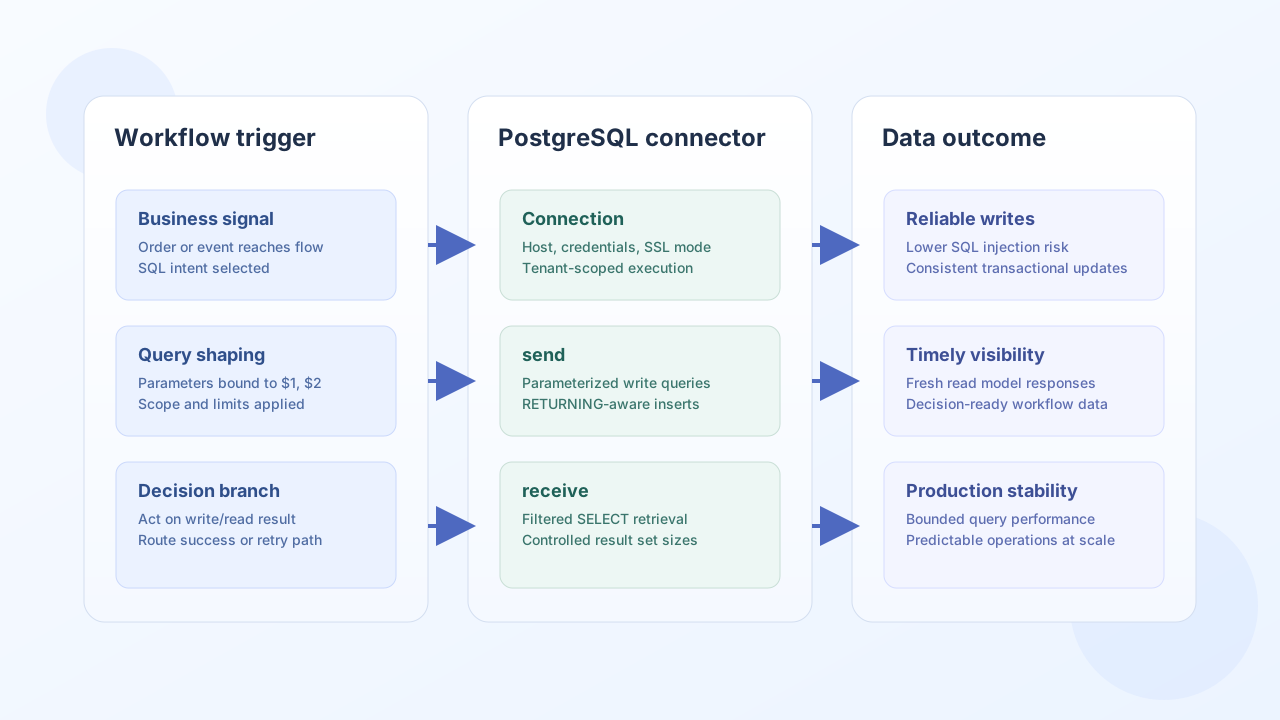
Configuration and connection setup
Configure host, credentials, and database name so each workflow run can open a stable PostgreSQL session. Use least-privilege credentials and secure transport settings in production environments.
host(required): PostgreSQL hostname or IP address.username(required): database user for connector access.password(required): password for the database user.database_name(required): target PostgreSQL database.port(optional): defaults to5432.ssl_mode(optional): transport security mode (disable,require,verify-ca,verify-full).ssl_ca_pem(optional): CA certificate in PEM format.timeout_seconds(optional): connection timeout.
Use ssl_mode: disable only when non-encrypted transport is explicitly acceptable for that tenant environment.
Use ssl_mode: require for encrypted transport without certificate verification.
Use ssl_mode: verify-ca or ssl_mode: verify-full with ssl_ca_pem to enforce certificate trust validation.
PostgreSQL query parameters use numbered placeholders ($1, $2, $3) rather than positional ? placeholders.
Write records with send
Use send for arbitrary SQL write or DDL operations that should run as part of workflow business logic. Parameterized SQL reduces injection risk and keeps statements consistent across environments.
const baseUrl = "https://api.example.com/api/v1";
const tenantId = "<TENANT_ID>";
const apiKey = "<API_KEY>";

async function insertOrder(integrationId: string) {
  const response = await fetch(`${baseUrl}/integrations/${encodeURIComponent(integrationId)}/execute`, {
    method: "POST",
    headers: {
      "X-API-Key": apiKey,
      "X-Tenant-ID": tenantId,
      "Content-Type": "application/json",
    },
    body: JSON.stringify({
      operation: "send",
      query: "INSERT INTO orders (customer_id, total_amount, created_at) VALUES ($1, $2, NOW()) RETURNING id",
      params: ["CUST-2048", 320.55]
    }),
  });
  if (!response.ok) throw new Error(`Request failed: ${response.status}`);
  return response.json();
}
curl -X POST "https://api.example.com/api/v1/integrations/<ENTITY_ID>/execute" \
-H "X-API-Key: <API_KEY>" \
-H "X-Tenant-ID: <TENANT_ID>" \
-H "Content-Type: application/json" \
-d '{
"operation": "send",
"query": "INSERT INTO orders (customer_id, total_amount, created_at) VALUES ($1, $2, NOW()) RETURNING id",
"params": ["CUST-2048", 320.55]
}'
{
  "success": true,
  "affected_rows": 1,
  "last_insert_id": 9021
}
Retrieve data with receive
Use receive for arbitrary SQL reads and metadata queries that drive downstream decisions and reporting. Keep filters explicit and cap result size to protect workflow latency.
const baseUrl = "https://api.example.com/api/v1";
const tenantId = "<TENANT_ID>";
const apiKey = "<API_KEY>";

async function listPaidOrders(integrationId: string) {
  const response = await fetch(`${baseUrl}/integrations/${encodeURIComponent(integrationId)}/execute`, {
    method: "POST",
    headers: {
      "X-API-Key": apiKey,
      "X-Tenant-ID": tenantId,
      "Content-Type": "application/json",
    },
    body: JSON.stringify({
      operation: "receive",
      query: "SELECT id, customer_id, total_amount FROM orders WHERE status = $1 ORDER BY created_at DESC LIMIT 20",
      params: ["paid"]
    }),
  });
  if (!response.ok) throw new Error(`Request failed: ${response.status}`);
  const payload = await response.json();
  return payload.data ?? [];
}
curl -X POST "https://api.example.com/api/v1/integrations/<ENTITY_ID>/execute" \
-H "X-API-Key: <API_KEY>" \
-H "X-Tenant-ID: <TENANT_ID>" \
-H "Content-Type: application/json" \
-d '{
"operation": "receive",
"query": "SELECT id, customer_id, total_amount FROM orders WHERE status = $1 ORDER BY created_at DESC LIMIT 20",
"params": ["paid"]
}'
{
  "success": true,
  "total_size": 2,
  "data": [
    {"id": 9021, "customer_id": "CUST-2048", "total_amount": 320.55},
    {"id": 9018, "customer_id": "CUST-1982", "total_amount": 119.0}
  ]
}
Reliability guidance
Most production failures are caused by connectivity issues, permission mismatches, or unbounded queries. Validate the connection with test, enforce parameterized SQL for every operation, and keep result sets constrained with filters and limits.
These practices keep PostgreSQL workflow automation safe, predictable, and easier to operate at scale.