Typesense Connector Guide
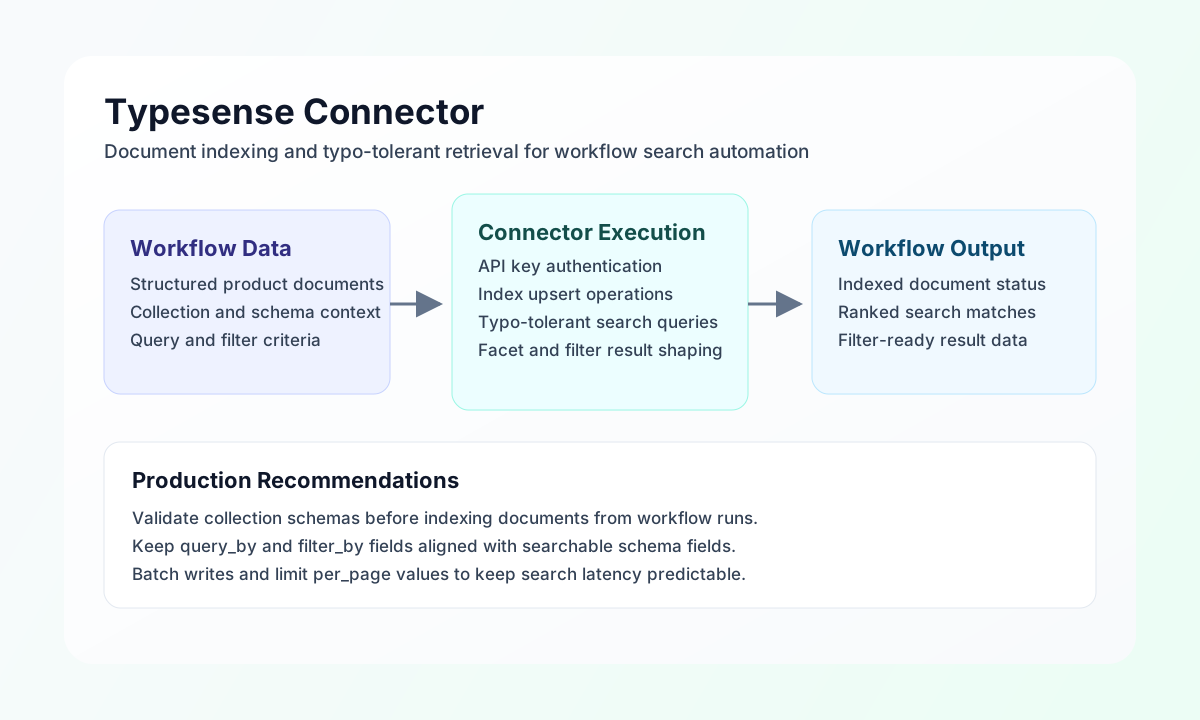
The Typesense connector lets Tealfabric workflows index and query search documents with low-latency, typo-tolerant matching. It is useful for building product lookup, support knowledge retrieval, and catalog enrichment automations that need fast and structured search behavior.
Document information
| Field | Value |
|---|---|
| Canonical URL | /docs/04_connecting-systems/connectors/t/typesense |
| Version (published date) | 2026-05-08 |
| Tags | connectors, reference, typesense |
| Connector ID | typesense-1.0.0 |
Configuration and authentication
Configure the connector with your Typesense endpoint and API key so workflows can securely index and search documents. This setup is required for all operations because Typesense uses API key authentication instead of OAuth.
Required values are endpoint_url and api_key, and you can optionally set timeout_seconds for larger batches or constrained networks. Before production use, run test to confirm endpoint connectivity and credential validity.
Index documents with index
Use index to import documents into an existing Typesense collection via POST /collections/{collection}/documents. Pass a documents array for batches, or a single document object when indexing one record. The index field is an alias for collection.
const baseUrl = "https://api.example.com/api/v1";
const tenantId = "<TENANT_ID>";
const apiKey = "<API_KEY>";

async function indexProducts(integrationId: string) {
  const response = await fetch(`${baseUrl}/integrations/${encodeURIComponent(integrationId)}/execute`, {
    method: "POST",
    headers: {
      "X-API-Key": apiKey,
      "X-Tenant-ID": tenantId,
      "Content-Type": "application/json",
    },
    body: JSON.stringify({
      operation: "index",
      collection: "products",
      documents: [
        {
          id: "sku-10001",
          name: "Noise Cancelling Headphones",
          category: "audio",
          price: 249.99,
          in_stock: true
        }
      ]
    }),
  });
  if (!response.ok) throw new Error(`Request failed: ${response.status}`);
  return response.json();
}
curl -X POST "https://api.example.com/api/v1/integrations/<ENTITY_ID>/execute" \
-H "X-API-Key: <API_KEY>" \
-H "X-Tenant-ID: <TENANT_ID>" \
-H "Content-Type: application/json" \
-d '{
"operation": "index",
"collection": "products",
"documents": [
{
"id": "sku-10001",
"name": "Noise Cancelling Headphones",
"category": "audio",
"price": 249.99,
"in_stock": true
}
]
}'
{
  "success": true,
  "data": {
    "document_count": 1,
    "data": [
      {
        "success": true,
        "id": "sku-10001"
      }
    ]
  }
}
Search documents with search
Use search to retrieve ranked matches with filtering and sorting. Specify query_by against fields defined in your collection schema. Supported optional parameters are query_by, filter_by, sort_by, per_page, and page. Use q as an alias for query.
const baseUrl = "https://api.example.com/api/v1";
const tenantId = "<TENANT_ID>";
const apiKey = "<API_KEY>";

async function searchProducts(integrationId: string) {
  const response = await fetch(`${baseUrl}/integrations/${encodeURIComponent(integrationId)}/execute`, {
    method: "POST",
    headers: {
      "X-API-Key": apiKey,
      "X-Tenant-ID": tenantId,
      "Content-Type": "application/json",
    },
    body: JSON.stringify({
      operation: "search",
      collection: "products",
      q: "wireless headphones",
      query_by: "name,category,description",
      filter_by: "in_stock:=true && price:<300",
      per_page: 10,
      page: 1
    }),
  });
  if (!response.ok) throw new Error(`Request failed: ${response.status}`);
  return response.json();
}
curl -X POST "https://api.example.com/api/v1/integrations/<ENTITY_ID>/execute" \
-H "X-API-Key: <API_KEY>" \
-H "X-Tenant-ID: <TENANT_ID>" \
-H "Content-Type: application/json" \
-d '{
"operation": "search",
"collection": "products",
"q": "wireless headphones",
"query_by": "name,category,description",
"filter_by": "in_stock:=true && price:<300",
"per_page": 10,
"page": 1
}'
{
  "success": true,
  "data": {
    "document_count": 1,
    "total": 24,
    "hits": [
      {
        "document": {
          "id": "sku-10001",
          "name": "Noise Cancelling Headphones",
          "category": "audio",
          "price": 249.99
        }
      }
    ],
    "data": {
      "found": 24,
      "page": 1,
      "search_time_ms": 7,
      "hits": [
        {
          "document": {
            "id": "sku-10001",
            "name": "Noise Cancelling Headphones",
            "category": "audio",
            "price": 249.99
          }
        }
      ]
    }
  }
}
Retrieve, update, and delete documents
Use get to fetch one document by id, update to patch fields on an existing document, and delete to remove a document. For update, provide document with the fields to change; the connector resolves the document id from document.id or the top-level id field.
curl -X POST "https://api.example.com/api/v1/integrations/<ENTITY_ID>/execute" \
  -H "X-API-Key: <API_KEY>" \
  -H "X-Tenant-ID: <TENANT_ID>" \
  -H "Content-Type: application/json" \
  -d '{
    "operation": "get",
    "collection": "products",
    "id": "sku-10001"
  }'
{
  "success": true,
  "data": {
    "document_count": 1,
    "document": {
      "id": "sku-10001",
      "name": "Noise Cancelling Headphones",
      "category": "audio",
      "price": 249.99,
      "in_stock": true
    },
    "data": {
      "id": "sku-10001",
      "name": "Noise Cancelling Headphones",
      "category": "audio",
      "price": 249.99,
      "in_stock": true
    }
  }
}
Test connectivity with test
Run test to verify endpoint_url and api_key by calling Typesense GET /health. The connector validates required configuration before issuing the health probe.
curl -X POST "https://api.example.com/api/v1/integrations/<ENTITY_ID>/execute" \
  -H "X-API-Key: <API_KEY>" \
  -H "X-Tenant-ID: <TENANT_ID>" \
  -H "Content-Type: application/json" \
  -d '{"operation": "test"}'
{
  "success": true,
  "data": {
    "message": "Typesense connection test successful",
    "details": {
      "endpoint": "https://typesense.example.com",
      "ok": true
    }
  }
}
Reliability guidance
Most failures in production come from invalid API keys, missing collections, or schema-field mismatches in query_by and filters. Run test and validate collection schemas before activating automation flows.
For stable search behavior, use bounded per_page values, keep filters simple, and batch document writes during indexing windows. These practices maintain fast response times and predictable result quality.