Twilio Voice Connector Guide
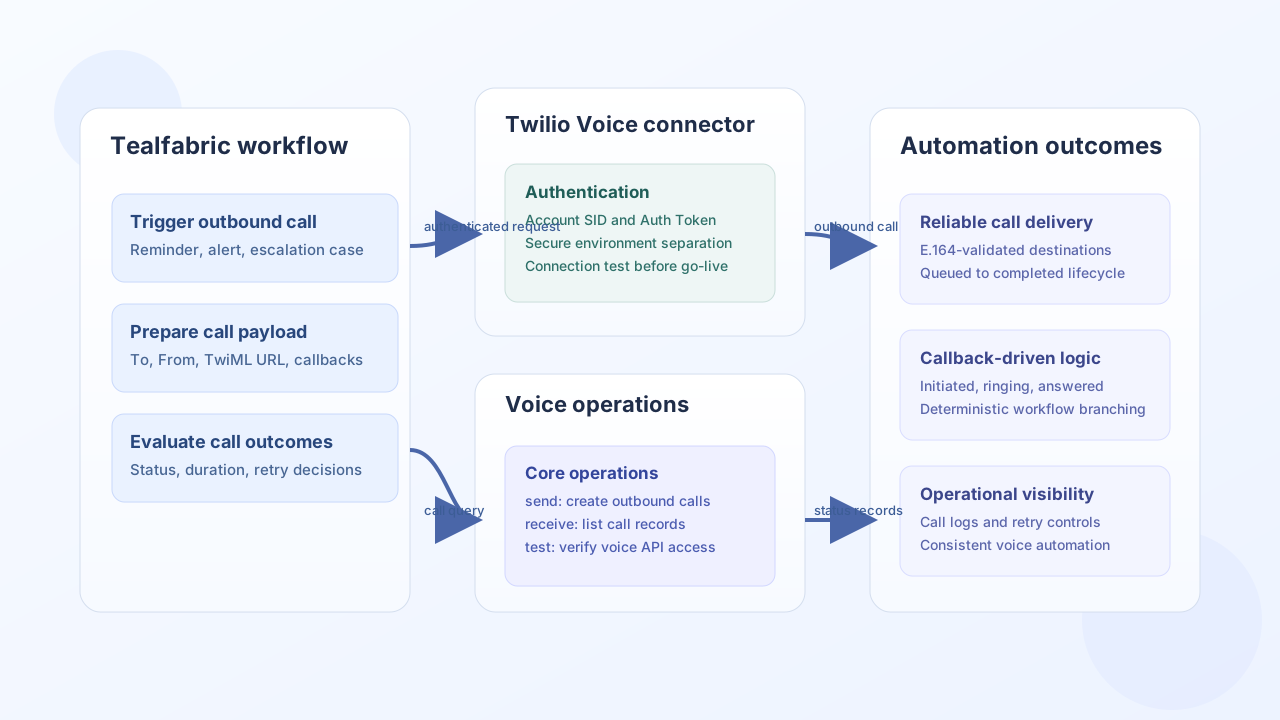
The Twilio Voice connector lets Tealfabric workflows initiate outbound calls and track call outcomes in real time. It is useful for automated reminders, escalation calls, and operational notifications where call status should drive next workflow steps.
Document information
| Field | Value |
|---|---|
| Canonical URL | /docs/04_connecting-systems/connectors/t/twilio-voice |
| Version (published date) | 2026-05-08 |
| Tags | connectors, reference, twilio-voice |
| Connector ID | twilio-voice-1.0.0 |
Configuration and authentication
Configure this connector with a Twilio Account SID and Auth Token from a service-owned Twilio project. Keep credentials scoped per environment so production and test traffic stay separate. Before enabling any calling workflow, run test to verify authentication and outbound API connectivity.
username(required): Twilio Account SID.password(required): Twilio Auth Token.host(optional): Defaults toapi.twilio.com.port(optional): Defaults to443.timeout_seconds(optional): Request timeout for connector calls.
Place outbound calls with send
Use send to create calls from a Twilio number to a destination in E.164 format. Add status callback settings when your workflow needs to branch on ringing, answered, or completed outcomes.
const baseUrl = "https://api.example.com/api/v1";
const tenantId = "<TENANT_ID>";
const apiKey = "<API_KEY>";

async function placeReminderCall(integrationId: string) {
  const response = await fetch(`${baseUrl}/integrations/${encodeURIComponent(integrationId)}/execute`, {
    method: "POST",
    headers: {
      "X-API-Key": apiKey,
      "X-Tenant-ID": tenantId,
      "Content-Type": "application/json",
    },
    body: JSON.stringify({
      operation: "send",
      endpoint: "Accounts/<ENTITY_ID>/Calls",
      method: "POST",
      data: {
        To: "+15551234567",
        From: "+15557654321",
        Url: "https://example.com/twiml/reminder",
        StatusCallback: "https://example.com/webhooks/call-status",
        StatusCallbackEvent: ["initiated", "ringing", "answered", "completed"],
      },
    }),
  });
  if (!response.ok) throw new Error(`Request failed: ${response.status}`);
  const payload = await response.json();
  return payload.data;
}
curl -X POST "https://api.example.com/api/v1/integrations/<ENTITY_ID>/execute" \
-H "X-API-Key: <API_KEY>" \
-H "X-Tenant-ID: <TENANT_ID>" \
-H "Content-Type: application/json" \
-d '{
"operation": "send",
"endpoint": "Accounts/<ENTITY_ID>/Calls",
"method": "POST",
"data": {
"To": "+15551234567",
"From": "+15557654321",
"Url": "https://example.com/twiml/reminder",
"StatusCallback": "https://example.com/webhooks/call-status",
"StatusCallbackEvent": ["initiated", "ringing", "answered", "completed"]
}
}'
{
  "success": true,
  "data": {
    "sid": "<ENTITY_ID>",
    "status": "queued",
    "to": "+15551234567",
    "from": "+15557654321"
  }
}
Retrieve call records with receive
Use receive to fetch call history for reporting, retry decisions, and compliance logging. Keep queries bounded by status and time windows so recurring jobs remain fast and predictable.
const baseUrl = "https://api.example.com/api/v1";
const tenantId = "<TENANT_ID>";
const apiKey = "<API_KEY>";

async function listCompletedCalls(integrationId: string) {
  const response = await fetch(`${baseUrl}/integrations/${encodeURIComponent(integrationId)}/execute`, {
    method: "POST",
    headers: {
      "X-API-Key": apiKey,
      "X-Tenant-ID": tenantId,
      "Content-Type": "application/json",
    },
    body: JSON.stringify({
      operation: "receive",
      endpoint: "Accounts/<ENTITY_ID>/Calls",
      query: {
        PageSize: 25,
        Status: "completed",
        StartTimeAfter: "2026-05-01",
        StartTimeBefore: "2026-05-08",
      },
    }),
  });
  if (!response.ok) throw new Error(`Request failed: ${response.status}`);
  const payload = await response.json();
  return payload.data ?? [];
}
curl -X POST "https://api.example.com/api/v1/integrations/<ENTITY_ID>/execute" \
-H "X-API-Key: <API_KEY>" \
-H "X-Tenant-ID: <TENANT_ID>" \
-H "Content-Type: application/json" \
-d '{
"operation": "receive",
"endpoint": "Accounts/<ENTITY_ID>/Calls",
"query": {
"PageSize": 25,
"Status": "completed",
"StartTimeAfter": "2026-05-01",
"StartTimeBefore": "2026-05-08"
}
}'
{
  "success": true,
  "record_count": 1,
  "data": [
    {
      "sid": "<ENTITY_ID>",
      "status": "completed",
      "to": "+15551234567",
      "from": "+15557654321",
      "duration": "89"
    }
  ]
}
Reliability guidance
Production issues usually come from invalid credentials, non-E.164 numbers, or unbounded polling. Validate phone formatting before call creation, use status callbacks instead of tight polling loops, and apply retry backoff when Twilio returns transient limits. These controls keep voice workflows dependable at scale.