Text File Connector Guide
The Text File connector allows Tealfabric workflows to read, write, and append plain text files in tenant storage. It is useful for lightweight logs, export artifacts, and intermediary data exchange where a simple file format is sufficient.
Document information
| Field | Value |
|---|---|
| Canonical URL | /docs/04_connecting-systems/connectors/t/txt-file |
| Version (published date) | 2026-05-08 |
| Tags | connectors, reference, txt-file |
| Connector ID | txt-file-1.0.0 |
When to use this connector
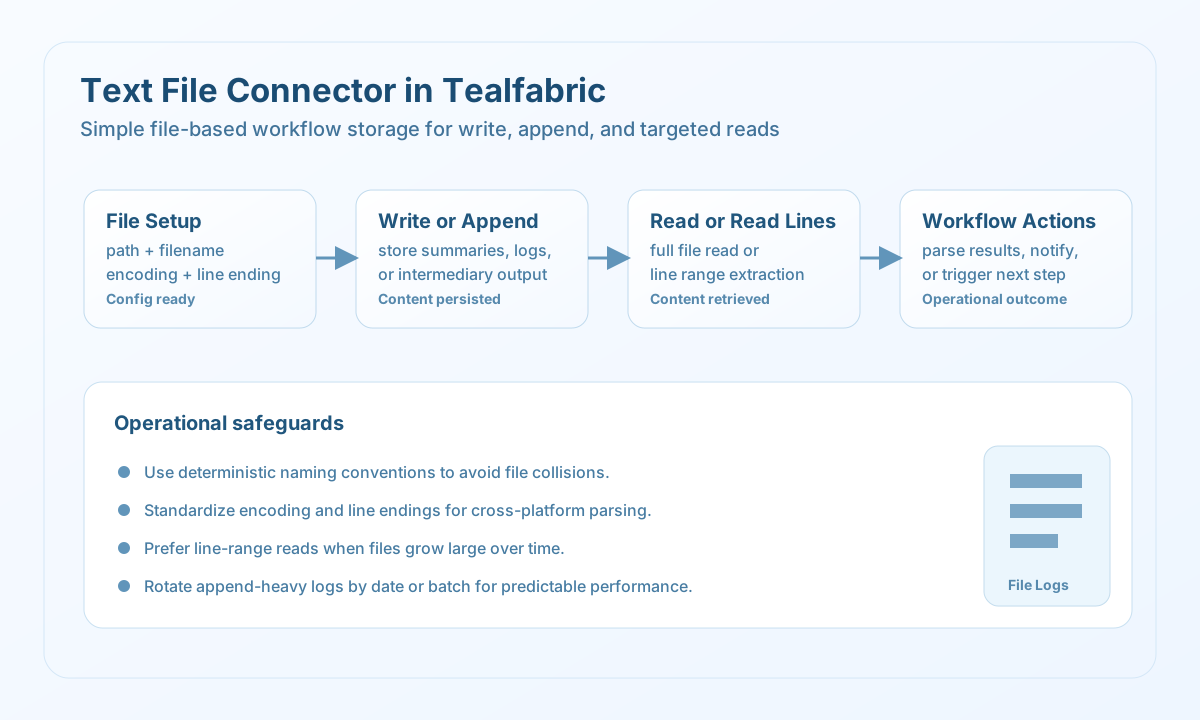
Use this connector when your workflow needs simple text persistence without an external database or API. Common use cases include writing process summaries, appending event logs, and reading generated text outputs for subsequent steps. It works best when file naming and directory conventions are consistent across automation runs.
Prerequisites
Before building workflows, confirm that the configured tenant storage path is available and writable. Decide the expected encoding and line ending format so text files stay interoperable across systems. For multi-step jobs, define rules for file overwrite versus append behavior.
Configuration
Store these values in the integration profile (or pass path/filename on each execute call):
filename(required): Target text file name.path(optional): Relative folder under tenant storage (storage/tenantdata/{tenant_id}/[path/]{filename}).encoding(optional): File encoding label, defaultUTF-8(stored for compatibility; runtime I/O uses UTF-8 bytes).line_ending(optional):unix,windows, ormac— applied onwrite/append.
For write and append, supply body text via content, text, or data (numeric 0 is valid). Run test before production jobs to confirm the target file is readable or its parent directory is writable.
Write and append text content
Use write when each run should replace file content, and append when each run should preserve prior lines and add new entries. Keep content structured with consistent delimiters when downstream parsing is required.
const baseUrl = "https://api.example.com/api/v1";
const tenantId = "<TENANT_ID>";
const apiKey = "<API_KEY>";

type FileWriteResult = {
  message?: string;
  file_path?: string;
  file_size?: number;
  line_count?: number;
};

async function writeSummaryFile(integrationId: string): Promise<FileWriteResult> {
  const response = await fetch(
    `${baseUrl}/integrations/${encodeURIComponent(integrationId)}/execute`,
    {
      method: "POST",
      headers: {
        "X-API-Key": apiKey,
        "X-Tenant-ID": tenantId,
        "Content-Type": "application/json",
      },
      body: JSON.stringify({
        operation: "write",
        path: "exports/daily",
        filename: "summary.txt",
        encoding: "UTF-8",
        line_ending: "unix",
        content: "Batch ID: b_20260508\nStatus: completed\nRecords: 124",
      }),
    }
  );
  if (!response.ok) throw new Error(`Request failed: ${response.status}`);
  const payload = (await response.json()) as { data?: FileWriteResult };
  if (!payload.data) throw new Error("Missing text write payload");
  return payload.data;
}
curl -X POST "https://api.example.com/api/v1/integrations/<ENTITY_ID>/execute" \
-H "X-API-Key: <API_KEY>" \
-H "X-Tenant-ID: <TENANT_ID>" \
-H "Content-Type: application/json" \
-d '{
"operation": "write",
"path": "exports/daily",
"filename": "summary.txt",
"encoding": "UTF-8",
"line_ending": "unix",
"content": "Batch ID: b_20260508\nStatus: completed\nRecords: 124"
}'
{
  "success": true,
  "data": {
    "message": "Text file written successfully",
    "file_path": "/path/to/storage/tenantdata/<TENANT_ID>/exports/daily/summary.txt",
    "file_size": 56,
    "line_count": 3
  }
}
Read file content and line ranges
Use read to retrieve full file content and read_lines when workflows only need a specific segment such as the latest status lines. Line-based reads reduce processing overhead for large text outputs.
const baseUrl = "https://api.example.com/api/v1";
const tenantId = "<TENANT_ID>";
const apiKey = "<API_KEY>";

type ReadLinesResult = {
  message?: string;
  lines?: Array<{ line_number: number; content: string }>;
  line_count?: number;
  start_line?: number;
  end_line?: number;
};

async function readLastLines(integrationId: string): Promise<ReadLinesResult> {
  const response = await fetch(
    `${baseUrl}/integrations/${encodeURIComponent(integrationId)}/execute`,
    {
      method: "POST",
      headers: {
        "X-API-Key": apiKey,
        "X-Tenant-ID": tenantId,
        "Content-Type": "application/json",
      },
      body: JSON.stringify({
        operation: "read_lines",
        path: "exports/daily",
        filename: "summary.txt",
        start_line: 1,
        end_line: 3,
      }),
    }
  );
  if (!response.ok) throw new Error(`Request failed: ${response.status}`);
  const payload = (await response.json()) as { data?: ReadLinesResult };
  if (!payload.data) throw new Error("Missing text read payload");
  return payload.data;
}
curl -X POST "https://api.example.com/api/v1/integrations/<ENTITY_ID>/execute" \
-H "X-API-Key: <API_KEY>" \
-H "X-Tenant-ID: <TENANT_ID>" \
-H "Content-Type: application/json" \
-d '{
"operation": "read_lines",
"path": "exports/daily",
"filename": "summary.txt",
"start_line": 1,
"end_line": 3
}'
{
  "success": true,
  "data": {
    "message": "Lines read successfully",
    "lines": [
      { "line_number": 1, "content": "Batch ID: b_20260508" },
      { "line_number": 2, "content": "Status: completed" },
      { "line_number": 3, "content": "Records: 124" }
    ],
    "line_count": 3,
    "start_line": 1,
    "end_line": 3
  }
}
Test file access
Use test to verify the configured path resolves under tenant storage and the file is readable (if it exists) or the parent directory is writable (if it does not).
curl -X POST "https://api.example.com/api/v1/integrations/<ENTITY_ID>/execute" \
  -H "X-API-Key: <API_KEY>" \
  -H "X-Tenant-ID: <TENANT_ID>" \
  -H "Content-Type: application/json" \
  -d '{
    "operation": "test",
    "path": "exports/daily",
    "filename": "summary.txt"
  }'
{
  "success": true,
  "data": {
    "message": "Text file connector test successful",
    "details": {
      "file_path": "/path/to/storage/tenantdata/<TENANT_ID>/exports/daily/summary.txt",
      "file_exists": true,
      "encoding": "UTF-8"
    }
  }
}
Reliability guidance
Use deterministic filenames and directory patterns so each run can find the right file without ambiguity. Choose a single encoding and line-ending strategy per integration to prevent cross-platform parsing issues. For high-volume append flows, rotate files by date or batch ID to keep read operations fast and predictable.