Tray.io Connector Guide
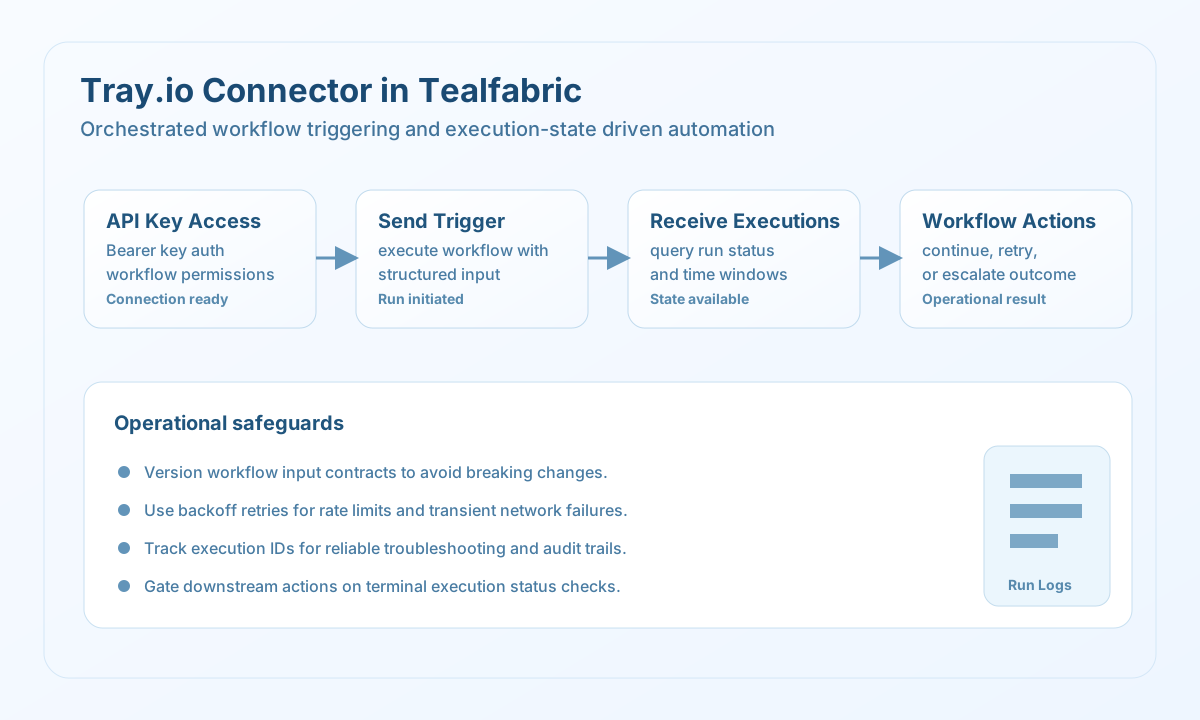
The Tray.io connector allows Tealfabric workflows to interact with Tray.io APIs for workflow execution and operational monitoring. It is useful when your team needs to trigger existing Tray automations and collect execution outcomes inside broader process orchestration.
Document information
| Field | Value |
|---|---|
| Canonical URL | /docs/04_connecting-systems/connectors/t/tray-io |
| Version (published date) | 2026-05-08 |
| Tags | connectors, reference, tray-io |
| Connector ID | tray-io-1.0.0 |
When to use this connector
Use this connector when a Tealfabric process needs to trigger a Tray workflow and react to its execution state. Typical use cases include cross-platform automations, delegated integration logic, and centralized run-status reporting. The connector is most effective when Tray workflow input schemas and execution expectations are documented clearly.
Prerequisites
Before configuring the integration, create a Tray.io API key with permissions to the workflows your process will call. Confirm the target workflows are published and can accept the input payload you plan to send. Define how your process should handle asynchronous execution results, including retries and timeout behavior.
Configuration
Store these values in the integration profile:
api_key(required): Tray.io API key.timeout_seconds(optional): Request timeout in seconds, default30.
Trigger workflows with send
Use send for write-style operations such as triggering a workflow with structured input data. Keep input contracts versioned so changes to Tray workflows do not break production automations.
const baseUrl = "https://api.example.com/api/v1";
const tenantId = "<TENANT_ID>";
const apiKey = "<API_KEY>";

type TriggerResult = {
  id?: string;
  status?: string;
};

async function triggerWorkflow(integrationId: string, workflowId: string): Promise<TriggerResult> {
  const response = await fetch(
    `${baseUrl}/integrations/${encodeURIComponent(integrationId)}/execute`,
    {
      method: "POST",
      headers: {
        "X-API-Key": apiKey,
        "X-Tenant-ID": tenantId,
        "Content-Type": "application/json",
      },
      body: JSON.stringify({
        operation: "send",
        endpoint: `workflows/${encodeURIComponent(workflowId)}/execute`,
        method: "POST",
        data: {
          input: {
            batch_id: "b_20260508",
            priority: "high",
            source: "tealfabric",
          },
        },
      }),
    }
  );
  if (!response.ok) throw new Error(`Request failed: ${response.status}`);
  const payload = (await response.json()) as { data?: TriggerResult };
  if (!payload.data) throw new Error("Missing Tray trigger payload");
  return payload.data;
}
curl -X POST "https://api.example.com/api/v1/integrations/<ENTITY_ID>/execute" \
-H "X-API-Key: <API_KEY>" \
-H "X-Tenant-ID: <TENANT_ID>" \
-H "Content-Type: application/json" \
-d '{
"operation": "send",
"endpoint": "workflows/<ENTITY_ID>/execute",
"method": "POST",
"data": {
"input": {
"batch_id": "b_20260508",
"priority": "high",
"source": "tealfabric"
}
}
}'
{
  "success": true,
  "data": {
    "id": "<ENTITY_ID>",
    "status": "queued"
  }
}
Retrieve execution history with receive
Use receive to inspect workflow execution records and react to success or failure conditions in downstream steps. Time-bounded queries help keep monitoring jobs efficient and repeatable.
const baseUrl = "https://api.example.com/api/v1";
const tenantId = "<TENANT_ID>";
const apiKey = "<API_KEY>";

type ExecutionRecord = {
  id?: string;
  status?: string;
  started_at?: string;
  finished_at?: string;
};

async function listExecutions(integrationId: string, workflowId: string): Promise<ExecutionRecord[]> {
  const response = await fetch(
    `${baseUrl}/integrations/${encodeURIComponent(integrationId)}/execute`,
    {
      method: "POST",
      headers: {
        "X-API-Key": apiKey,
        "X-Tenant-ID": tenantId,
        "Content-Type": "application/json",
      },
      body: JSON.stringify({
        operation: "receive",
        endpoint: "executions",
        query: {
          filter: `workflow_id=${workflowId}`,
          limit: 25,
          start_date: "2026-05-08T00:00:00Z",
          end_date: "2026-05-08T23:59:59Z",
        },
      }),
    }
  );
  if (!response.ok) throw new Error(`Request failed: ${response.status}`);
  const payload = (await response.json()) as { data?: ExecutionRecord[] };
  if (!payload.data) throw new Error("Missing Tray executions payload");
  return payload.data;
}
curl -X POST "https://api.example.com/api/v1/integrations/<ENTITY_ID>/execute" \
-H "X-API-Key: <API_KEY>" \
-H "X-Tenant-ID: <TENANT_ID>" \
-H "Content-Type: application/json" \
-d '{
"operation": "receive",
"endpoint": "executions",
"query": {
"filter": "workflow_id=<ENTITY_ID>",
"limit": 25,
"start_date": "2026-05-08T00:00:00Z",
"end_date": "2026-05-08T23:59:59Z"
}
}'
{
  "success": true,
  "data": [
    {
      "id": "<ENTITY_ID>",
      "status": "success",
      "started_at": "2026-05-08T13:20:10Z",
      "finished_at": "2026-05-08T13:20:24Z"
    }
  ],
  "record_count": 1
}
Reliability guidance
Tray workflow execution is often asynchronous, so build follow-up checks that confirm terminal status before dependent actions run. Apply retries with backoff for rate-limited or transient failures, and keep execution IDs in logs for support and audit workflows. For evolving automations, version workflow inputs and update integration contracts deliberately.