Twilio SMS Connector Guide
The Twilio SMS connector lets Tealfabric workflows send and monitor SMS messages through Twilio Messaging APIs. It is commonly used for transactional notifications, one-time codes, and delivery-status-driven workflow branching.
Document information
| Field | Value |
|---|---|
| Canonical URL | /docs/04_connecting-systems/connectors/t/twilio-sms |
| Version (published date) | 2026-05-08 |
| Tags | connectors, reference, twilio-sms |
| Connector ID | twilio-sms-1.0.0 |
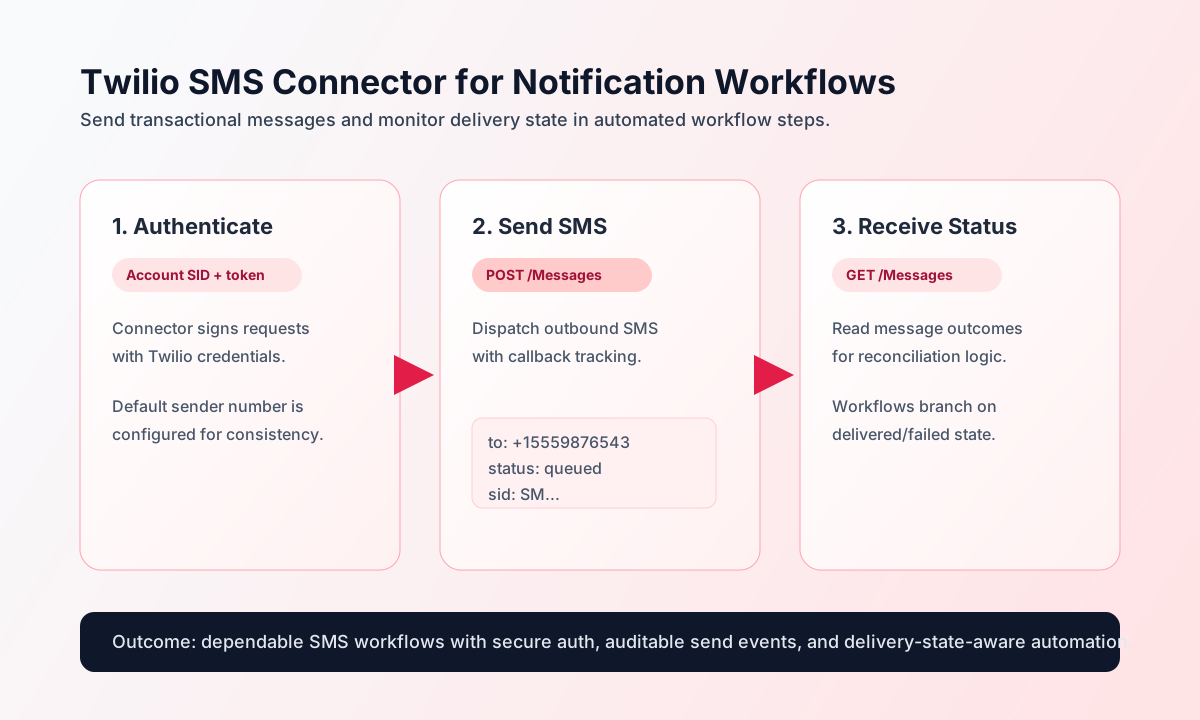
Configure Twilio authentication
Configure the connector with Twilio account credentials and a default sender number so workflows can send messages without exposing secrets in each step payload. This centralized setup improves operational safety and reuse across message flows.
Required settings are account_sid, auth_token, and from_number. Optional timeout_seconds can be tuned for network conditions. Use E.164 format for all phone numbers and run test before enabling production sends.
Send SMS with send
Use send to dispatch single SMS messages or callback-enabled notifications. Keep recipient formatting strict and include status callbacks for post-send tracking.
const baseUrl = "https://api.example.com/api/v1";
const tenantId = "<TENANT_ID>";
const apiKey = "<API_KEY>";

async function sendSms(integrationId: string) {
  const response = await fetch(`${baseUrl}/integrations/${encodeURIComponent(integrationId)}/execute`, {
    method: "POST",
    headers: {
      "X-API-Key": apiKey,
      "X-Tenant-ID": tenantId,
      "Content-Type": "application/json",
    },
    body: JSON.stringify({
      operation: "send",
      to: "+15559876543",
      message: "Your verification code is 482913",
      status_callback: "https://example.com/webhooks/twilio-status"
    }),
  });
  if (!response.ok) throw new Error(`Request failed: ${response.status}`);
  return response.json();
}
curl -X POST "https://api.example.com/api/v1/integrations/<ENTITY_ID>/execute" \
-H "X-API-Key: <API_KEY>" \
-H "X-Tenant-ID: <TENANT_ID>" \
-H "Content-Type: application/json" \
-d '{
"operation": "send",
"to": "+15559876543",
"message": "Your verification code is 482913",
"status_callback": "https://example.com/webhooks/twilio-status"
}'
{
  "success": true,
  "data": {
    "message_count": 1,
    "data": {
      "sid": "SMXXXXXXXXXXXXXXXXXXXXXXXXXXXXXXXX",
      "status": "queued",
      "to": "+15559876543"
    },
    "message_sid": "SMXXXXXXXXXXXXXXXXXXXXXXXXXXXXXXXX",
    "status": "queued"
  }
}
Retrieve message state with receive
Use receive to list recent messages or fetch a specific message SID for delivery-state checks. When listing, omit query to use the connector default PageSize=50, or pass Twilio list filters such as PageSize, To, and From (Twilio parameter names are case-sensitive).
const baseUrl = "https://api.example.com/api/v1";
const tenantId = "<TENANT_ID>";
const apiKey = "<API_KEY>";

async function listRecentMessages(integrationId: string) {
  const response = await fetch(`${baseUrl}/integrations/${encodeURIComponent(integrationId)}/execute`, {
    method: "POST",
    headers: {
      "X-API-Key": apiKey,
      "X-Tenant-ID": tenantId,
      "Content-Type": "application/json",
    },
    body: JSON.stringify({
      operation: "receive",
      query: {
        PageSize: 20,
        To: "+15559876543"
      }
    }),
  });
  if (!response.ok) throw new Error(`Request failed: ${response.status}`);
  return response.json();
}
curl -X POST "https://api.example.com/api/v1/integrations/<ENTITY_ID>/execute" \
-H "X-API-Key: <API_KEY>" \
-H "X-Tenant-ID: <TENANT_ID>" \
-H "Content-Type: application/json" \
-d '{
"operation": "receive",
"query": {
"PageSize": 20,
"To": "+15559876543"
}
}'
{
  "success": true,
  "data": {
    "message_count": 1,
    "data": [
      {
        "sid": "SMXXXXXXXXXXXXXXXXXXXXXXXXXXXXXXXX",
        "to": "+15559876543",
        "status": "delivered"
      }
    ],
    "total_size": 1
  }
}
Run sync, batch, and test
syncaccepts optionaloutbound(sendcallData) andinbound(receivecallData). Empty outbound/inbound payloads are skipped, matching legacy connector behavior.batchacceptsmessages(or aliasitems) and sends each message sequentially with local 100 req/min throttling.testvalidates credentials viaGET Accounts/{AccountSid}.jsonand returns account metadata indata.details.
curl -X POST "https://api.example.com/api/v1/integrations/<ENTITY_ID>/execute" \
  -H "X-API-Key: <API_KEY>" \
  -H "X-Tenant-ID: <TENANT_ID>" \
  -H "Content-Type: application/json" \
  -d '{
    "operation": "test"
  }'
{
  "success": true,
  "data": {
    "message": "Twilio SMS connection test successful",
    "details": {
      "api_base_url": "https://api.twilio.com/2010-04-01",
      "account_sid": "ACXXXXXXXXXXXXXXXXXXXXXXXXXXXXXXXX",
      "friendly_name": "My Twilio Account"
    }
  }
}
Reliability guidance
Most failures come from invalid credentials, non-E.164 phone formats, or unapproved sender numbers. If a call fails, validate account credentials first, then ensure sender/recipient formats are correct, and finally inspect Twilio error codes and throttling behavior.
For high-volume messaging workflows, include status callbacks, handle retries idempotently, and monitor delivery outcomes before triggering dependent business actions. This improves reliability and reduces duplicate notification side effects.