Twitter (X) Connector Guide
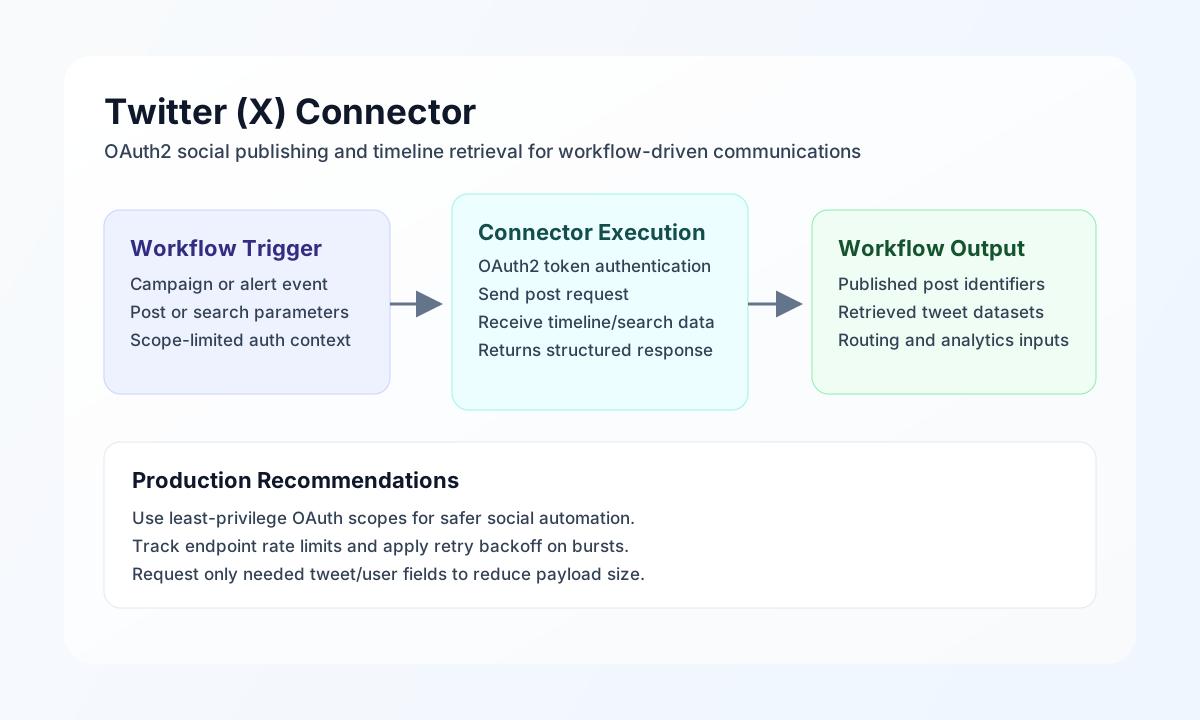
The Twitter (X) connector lets Tealfabric workflows publish posts and retrieve timeline/search data through the X API. It is useful for social publishing automation, campaign monitoring, and event-based response workflows.
Document information
| Field | Value |
|---|---|
| Canonical URL | /docs/04_connecting-systems/connectors/t/twitter |
| Version (published date) | 2026-05-08 |
| Tags | connectors, reference, twitter |
| Connector ID | twitter-1.0.0 |
Configuration and OAuth setup
Configure the connector with your OAuth client credentials so workflows can authenticate safely against X API endpoints. Use dedicated app credentials and least-privilege scopes based on the operations your automation actually performs.
Required values are client_id, client_secret, and redirect_uri. Optional values include access_token, refresh_token, scope, and timeout_seconds. After setup, run test to confirm token and account access before scheduling production jobs.
test is the only operation that validates OAuth app configuration (client_id, client_secret, redirect_uri). Other operations require a bearer access_token but do not re-validate app credentials on every call. On HTTP 401, the connector attempts a refresh-token exchange when refresh_token is configured.
Publish posts with send
Use send to create posts or perform other write actions on supported endpoints. Keep outbound content and endpoint choices explicit so audit and moderation workflows remain predictable.
const baseUrl = "https://api.example.com/api/v1";
const tenantId = "<TENANT_ID>";
const apiKey = "<API_KEY>";

async function publishStatusUpdate(integrationId: string) {
  const response = await fetch(`${baseUrl}/integrations/${encodeURIComponent(integrationId)}/execute`, {
    method: "POST",
    headers: {
      "X-API-Key": apiKey,
      "X-Tenant-ID": tenantId,
      "Content-Type": "application/json",
    },
    body: JSON.stringify({
      operation: "send",
      endpoint: "tweets",
      method: "POST",
      data: {
        text: "Warehouse sync completed successfully. Order queue is now current."
      }
    }),
  });
  if (!response.ok) throw new Error(`Request failed: ${response.status}`);
  return response.json();
}
curl -X POST "https://api.example.com/api/v1/integrations/<ENTITY_ID>/execute" \
-H "X-API-Key: <API_KEY>" \
-H "X-Tenant-ID: <TENANT_ID>" \
-H "Content-Type: application/json" \
-d '{
"operation": "send",
"endpoint": "tweets",
"method": "POST",
"data": {
"text": "Warehouse sync completed successfully. Order queue is now current."
}
}'
{
  "success": true,
  "data": {
    "message_count": 1,
    "data": {
      "data": {
        "id": "1898877665544332211",
        "text": "Warehouse sync completed successfully. Order queue is now current."
      }
    },
    "response": {
      "data": {
        "id": "1898877665544332211",
        "text": "Warehouse sync completed successfully. Order queue is now current."
      }
    }
  }
}
Retrieve post data with receive
Use receive to fetch posts, user timelines, or search results for analytics and trigger workflows. Prefer explicit query fields so responses stay lightweight and easier to process downstream.
const baseUrl = "https://api.example.com/api/v1";
const tenantId = "<TENANT_ID>";
const apiKey = "<API_KEY>";

async function fetchRecentMentions(integrationId: string) {
  const response = await fetch(`${baseUrl}/integrations/${encodeURIComponent(integrationId)}/execute`, {
    method: "POST",
    headers: {
      "X-API-Key": apiKey,
      "X-Tenant-ID": tenantId,
      "Content-Type": "application/json",
    },
    body: JSON.stringify({
      operation: "receive",
      endpoint: "tweets/search/recent",
      query: {
        query: "tealfabric -is:retweet",
        max_results: 10,
        "tweet.fields": "created_at,author_id,public_metrics"
      }
    }),
  });
  if (!response.ok) throw new Error(`Request failed: ${response.status}`);
  return response.json();
}
curl -X POST "https://api.example.com/api/v1/integrations/<ENTITY_ID>/execute" \
-H "X-API-Key: <API_KEY>" \
-H "X-Tenant-ID: <TENANT_ID>" \
-H "Content-Type: application/json" \
-d '{
"operation": "receive",
"endpoint": "tweets/search/recent",
"query": {
"query": "tealfabric -is:retweet",
"max_results": 10,
"tweet.fields": "created_at,author_id,public_metrics"
}
}'
{
  "success": true,
  "data": {
    "message_count": 1,
    "data": [
      {
        "id": "1898877665544332211",
        "text": "Testing Tealfabric social alerts.",
        "created_at": "2026-05-08T15:38:30.000Z"
      }
    ],
    "total_size": 1
  }
}
Test connection with test
Use test after OAuth setup to confirm the bearer token and account identity via GET users/me.
{
  "success": true,
  "data": {
    "message": "Twitter connection test successful",
    "details": {
      "api_base_url": "https://api.twitter.com/2",
      "user_id": "1234567890",
      "username": "example_user"
    }
  }
}
Reliability guidance
Most failures come from expired tokens, missing scopes, or endpoint-specific rate limits. Validate OAuth setup with test, keep scopes minimal but sufficient, and apply exponential backoff for transient 429 responses.
For stable automation, request only required fields, track endpoint usage limits, and include clear operational logging for moderation and compliance review. These controls improve reliability and governance.