ThingWorx Connector Guide
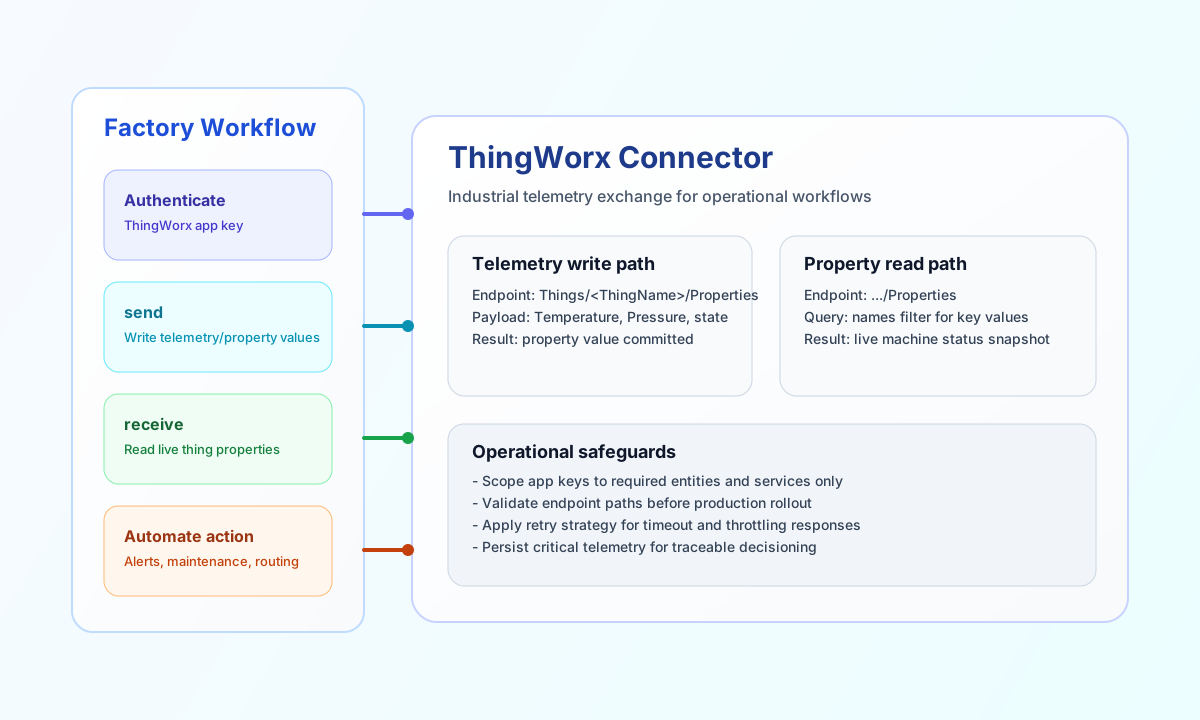
The ThingWorx connector lets Tealfabric workflows exchange industrial telemetry and asset state with PTC ThingWorx. It is designed for use cases such as device-status updates, remote monitoring dashboards, and rules-driven operational alerts.
Document information
| Field | Value |
|---|---|
| Canonical URL | /docs/04_connecting-systems/connectors/t/thingworx |
| Version (published date) | 2026-05-08 |
| Tags | connectors, reference, thingworx |
| Connector ID | thingworx-1.0.0 |
Configure access
Set base_url to your ThingWorx platform URL and app_key to a key with permission to read and write the target entities. Add timeout_seconds if your environment includes higher-latency networks or long-running Thing service calls.
App keys should be scoped to only the resources your workflow needs and rotated as part of your security policy. This keeps industrial integrations reliable while minimizing access risk.
Provide endpoint as the path segment under ThingWorx /Thingworx/ (for example, Things/BoilerLine01/Properties/Temperature). Do not include the /Thingworx/ prefix because the connector always sends requests to {base_url}/Thingworx/{endpoint} with the appKey header.
Write telemetry with send
Use send to write new values to Thing properties or to invoke write-oriented resources in ThingWorx. This is typically the first step when sensor events or machine states must be pushed into a digital operations workflow.
method defaults to POST when omitted. Provide the JSON body in data; when data is omitted, non-routing top-level fields are sent as the request body (legacy parity). Empty bodies are omitted for POST/PUT/PATCH, matching legacy PHP !empty($body) behavior.
const baseUrl = "https://api.example.com/api/v1";
const tenantId = "<TENANT_ID>";
const apiKey = "<API_KEY>";

async function updateMachineTemperature(integrationId: string) {
  const response = await fetch(`${baseUrl}/integrations/${encodeURIComponent(integrationId)}/execute`, {
    method: "POST",
    headers: {
      "X-API-Key": apiKey,
      "X-Tenant-ID": tenantId,
      "Content-Type": "application/json",
    },
    body: JSON.stringify({
      operation: "send",
      endpoint: "Things/BoilerLine01/Properties/Temperature",
      data: {
        Temperature: 87.4
      }
    }),
  });
  if (!response.ok) throw new Error(`Request failed: ${response.status}`);
  return response.json();
}
curl -X POST "https://api.example.com/api/v1/integrations/<ENTITY_ID>/execute" \
-H "X-API-Key: <API_KEY>" \
-H "X-Tenant-ID: <TENANT_ID>" \
-H "Content-Type: application/json" \
-d '{
"operation": "send",
"endpoint": "Things/BoilerLine01/Properties/Temperature",
"data": {
"Temperature": 87.4
}
}'
{
  "success": true,
  "data": {
    "message": "ThingWorx operation completed successfully",
    "result": {
      "thingName": "BoilerLine01",
      "property": "Temperature"
    }
  }
}
Read thing properties with receive
Use receive to fetch Thing properties and use them in decision steps, alerts, or reporting flows. Keep property reads focused so industrial workflows remain fast and predictable under high event volume.
List responses expose items from ThingWorx rows[] when present; otherwise the connector wraps the single response object in items.
const baseUrl = "https://api.example.com/api/v1";
const tenantId = "<TENANT_ID>";
const apiKey = "<API_KEY>";

async function getMachineStatus(integrationId: string) {
  const response = await fetch(`${baseUrl}/integrations/${encodeURIComponent(integrationId)}/execute`, {
    method: "POST",
    headers: {
      "X-API-Key": apiKey,
      "X-Tenant-ID": tenantId,
      "Content-Type": "application/json",
    },
    body: JSON.stringify({
      operation: "receive",
      endpoint: "Things/BoilerLine01/Properties",
      query: {
        names: "Temperature,Pressure,RunState"
      }
    }),
  });
  if (!response.ok) throw new Error(`Request failed: ${response.status}`);
  return response.json();
}
curl -X POST "https://api.example.com/api/v1/integrations/<ENTITY_ID>/execute" \
-H "X-API-Key: <API_KEY>" \
-H "X-Tenant-ID: <TENANT_ID>" \
-H "Content-Type: application/json" \
-d '{
"operation": "receive",
"endpoint": "Things/BoilerLine01/Properties",
"query": {
"names": "Temperature,Pressure,RunState"
}
}'
{
  "success": true,
  "data": {
    "message": "ThingWorx data retrieved successfully",
    "thing_count": 1,
    "items": [
      {
        "Temperature": 87.4,
        "Pressure": 4.9,
        "RunState": "running"
      }
    ]
  }
}
Execute ThingWorx services with execute
Use execute for arbitrary ThingWorx REST calls when you need a configurable HTTP method and JSON body. method defaults to GET when omitted. Provide the body in body or data (alias).
{
  "operation": "execute",
  "endpoint": "Things/BoilerLine01/Services/RestartMachine",
  "method": "POST",
  "body": {}
}
{
  "success": true,
  "data": {
    "message": "ThingWorx method executed successfully",
    "result": {}
  }
}
Validate connectivity with test
Use test to validate required configuration and check authentication against GET /Thingworx/Things.
{
  "operation": "test"
}
{
  "success": true,
  "data": {
    "message": "ThingWorx connection test successful",
    "details": {
      "base_url": "https://your-instance.thingworx.com",
      "things_found": 12
    }
  }
}
Reliability guidance
Most connector failures come from invalid app keys, endpoint path mistakes, or payload formats that do not match ThingWorx entity definitions. When a request fails, verify key permissions first, then validate endpoint and body structure for the target Thing or service.
For production flows, store key telemetry values and apply backoff for transient rate-limit or timeout conditions. This keeps monitoring and alert workflows stable during peak operational load.