Telegram Connector Guide
The Telegram connector enables Tealfabric workflows to send bot messages and retrieve updates through the Telegram Bot API. It is commonly used for alert delivery, chat-based approval flows, and support automation.
Document information
| Field | Value |
|---|---|
| Canonical URL | /docs/04_connecting-systems/connectors/t/telegram |
| Version (published date) | 2026-05-08 |
| Tags | connectors, reference, telegram |
| Connector ID | telegram-1.0.0 |
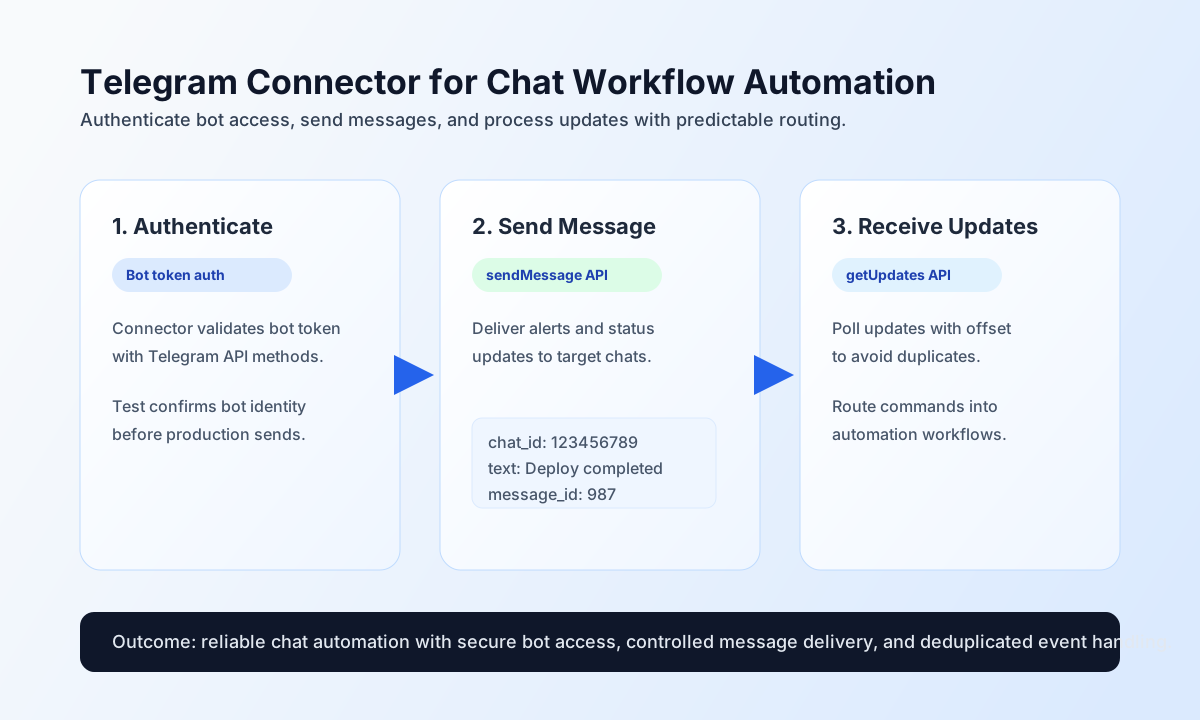
Configure bot access
Configure the connector with your Telegram bot token so workflow runs can authenticate against Telegram APIs without embedding credentials in each step payload. This keeps bot credentials centralized and easier to rotate.
| Parameter | Required | Description |
|---|---|---|
bot_token | Yes (for test) | Bot token from @BotFather. Stored as integration configuration, not callData. |
timeout_seconds | No | Request timeout in seconds (default 30). |
Authentication uses the bot token in the URL path (https://api.telegram.org/bot{token}/{method}). Run test after configuration to confirm bot identity via getMe.
Send chat messages with send
Use send to call any Bot API write method (default sendMessage). Pass method parameters in data or body. Routing keys method, endpoint, and body are stripped from the payload sent to Telegram.
Payload aliases: endpoint for method; body for data.
const baseUrl = "https://api.example.com/api/v1";
const tenantId = "<TENANT_ID>";
const apiKey = "<API_KEY>";

async function sendTelegramMessage(integrationId: string) {
  const response = await fetch(`${baseUrl}/integrations/${encodeURIComponent(integrationId)}/execute`, {
    method: "POST",
    headers: {
      "X-API-Key": apiKey,
      "X-Tenant-ID": tenantId,
      "Content-Type": "application/json",
    },
    body: JSON.stringify({
      operation: "send",
      method: "sendMessage",
      data: {
        chat_id: "123456789",
        text: "Deployment completed successfully in production.",
        parse_mode: "HTML"
      }
    }),
  });
  if (!response.ok) throw new Error(`Request failed: ${response.status}`);
  const payload = await response.json();
  return payload.data;
}
curl -X POST "https://api.example.com/api/v1/integrations/<ENTITY_ID>/execute" \
-H "X-API-Key: <API_KEY>" \
-H "X-Tenant-ID: <TENANT_ID>" \
-H "Content-Type: application/json" \
-d '{
"operation": "send",
"method": "sendMessage",
"data": {
"chat_id": "123456789",
"text": "Deployment completed successfully in production.",
"parse_mode": "HTML"
}
}'
{
  "success": true,
  "data": {
    "message_count": 1,
    "data": {
      "message_id": 987,
      "chat": { "id": 123456789 },
      "text": "Deployment completed successfully in production."
    },
    "response": {
      "ok": true,
      "result": {
        "message_id": 987,
        "chat": { "id": 123456789 },
        "text": "Deployment completed successfully in production."
      }
    }
  }
}
Retrieve updates with receive
Use receive to call Bot API read methods (default getUpdates). Pass parameters in data or query. When neither is provided, an empty JSON array is posted (legacy parity). Array result values are unwrapped into data.
{
  "operation": "receive",
  "method": "getUpdates",
  "data": {
    "offset": 0,
    "limit": 20
  }
}
{
  "success": true,
  "data": {
    "message_count": 1,
    "data": [
      {
        "update_id": 600001,
        "message": { "text": "/status" }
      }
    ],
    "total_size": 1
  }
}
Bidirectional sync
Run optional outbound send and/or inbound receive legs in one call. Omit empty legs; each non-empty leg uses the same callData shape as standalone send/receive.
{
  "operation": "sync",
  "outbound": {
    "method": "sendMessage",
    "data": { "chat_id": "123456789", "text": "Sync ping" }
  },
  "inbound": {
    "method": "getUpdates",
    "data": { "limit": 10 }
  }
}
{
  "success": true,
  "data": {
    "message_count": 2,
    "results": {
      "outbound": { "success": true, "data": { "message_count": 1, "data": {}, "response": { "ok": true } } },
      "inbound": { "success": true, "data": { "message_count": 1, "data": [], "total_size": 1 } }
    }
  }
}
Batch send and receive
batch runs multiple send or receive sub-operations sequentially. Each item uses operation or type (send default) and data (or top-level fields when data is omitted). Unsupported operation types fail that item with an error string. Overall success is true when at least one item succeeds.
{
  "operation": "batch",
  "operations": [
    {
      "operation": "send",
      "data": { "method": "sendMessage", "data": { "chat_id": "1", "text": "A" } }
    },
    {
      "operation": "receive",
      "data": { "method": "getUpdates", "data": { "limit": 5 } }
    }
  ]
}
Connection test
test validates bot_token (generic Configuration validation failed when missing) and calls getMe.
{
  "operation": "test"
}
{
  "success": true,
  "data": {
    "message": "Telegram connection test successful",
    "details": {
      "api_base_url": "https://api.telegram.org/bot",
      "bot_id": 123456789,
      "bot_username": "my_bot"
    }
  }
}
Reliability guidance
Most production issues come from invalid bot tokens, chat access restrictions, and update reprocessing. If requests fail, validate token correctness first, then confirm chat permissions, and finally enforce update offset tracking to prevent duplicate handling.
The connector applies local throttling once per operation invocation (30 requests/second baseline, matching legacy). For high-volume bots, respect Telegram rate limits and move heavy processing out of the immediate send/poll loop.