TimescaleDB Connector Guide
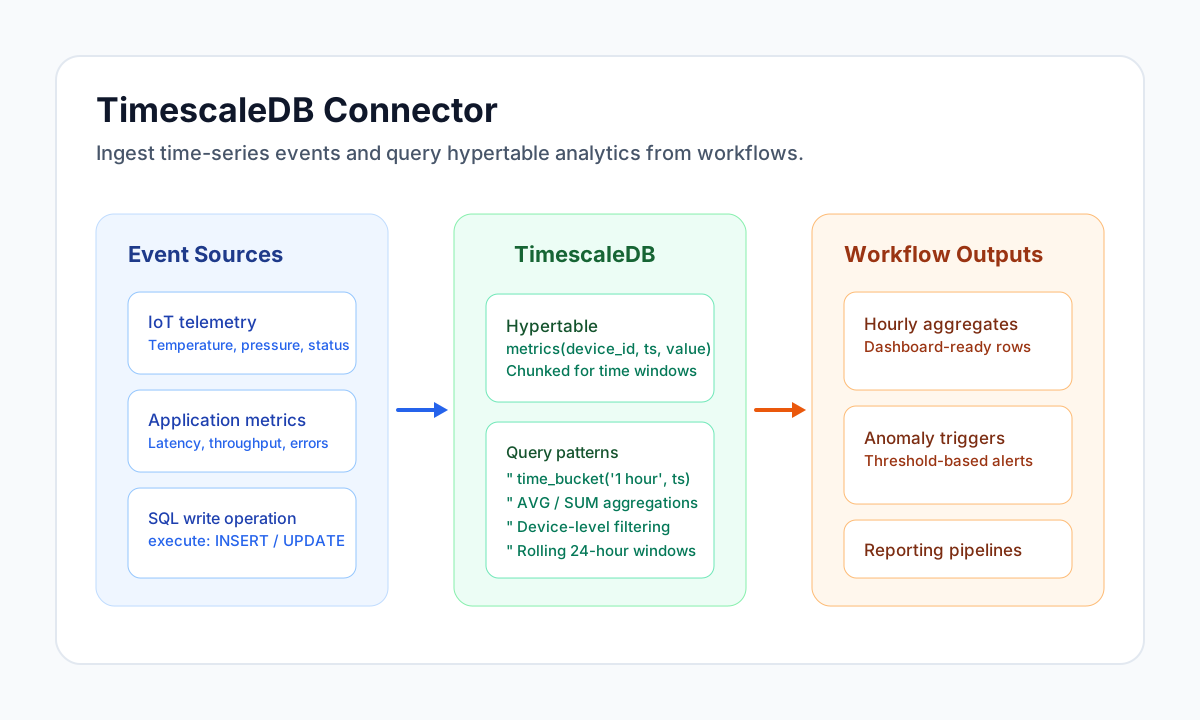
The TimescaleDB connector lets Tealfabric workflows write and read time-series data using PostgreSQL-compatible SQL. It is designed for telemetry ingestion, operational dashboards, and periodic analytics where reliable query execution and predictable schema usage are critical.
Document information
| Field | Value |
|---|---|
| Canonical URL | /docs/04_connecting-systems/connectors/t/timescaledb |
| Version (published date) | 2026-05-08 |
| Tags | connectors, reference, timescaledb |
| Connector ID | timescaledb-1.0.0 |
Configure database access
Set host, username, password, and database_name to the TimescaleDB instance your workflow should use. Keep credentials in connector configuration so they are stored securely and never hardcoded in workflow steps.
host(required): TimescaleDB hostname or IP address.username(required): database user for connector access.password(required): password for the database user.database_name(required): target database.port(optional): defaults to5432.ssl_mode(optional): transport security mode (disable,require,verify-ca,verify-full).ssl_ca_pem(optional): CA certificate in PEM format; required whenssl_modeisverify-caorverify-full.timeout_seconds(optional): connection timeout; defaults to30.
Use ssl_mode: disable when non-encrypted transport is intentionally allowed.
Use ssl_mode: require for encrypted transport without certificate verification.
Use ssl_mode: verify-ca or ssl_mode: verify-full with ssl_ca_pem to validate TLS trust.
PostgreSQL query parameters use numbered placeholders ($1, $2, $3) or named placeholders (:device_id) that the connector rewrites to positional bindings.
Run test before scheduling production workflows so connectivity and authentication issues are detected early.
Write time-series rows with send
Use send for SQL statements that modify data, such as INSERT, UPDATE, or DELETE. Parameterized SQL is recommended to keep queries safe and reusable across environments.
const baseUrl = "https://api.example.com/api/v1";
const tenantId = "<TENANT_ID>";
const apiKey = "<API_KEY>";

async function insertTelemetryRow(integrationId: string) {
  const response = await fetch(`${baseUrl}/integrations/${encodeURIComponent(integrationId)}/execute`, {
    method: "POST",
    headers: {
      "X-API-Key": apiKey,
      "X-Tenant-ID": tenantId,
      "Content-Type": "application/json",
    },
    body: JSON.stringify({
      operation: "send",
      query: "INSERT INTO metrics(device_id, ts, temperature_c) VALUES ($1, $2, $3)",
      params: ["device-17", "2026-05-08T20:17:00Z", 24.6]
    }),
  });
  if (!response.ok) throw new Error(`Request failed: ${response.status}`);
  return response.json();
}
curl -X POST "https://api.example.com/api/v1/integrations/<ENTITY_ID>/execute" \
-H "X-API-Key: <API_KEY>" \
-H "X-Tenant-ID: <TENANT_ID>" \
-H "Content-Type: application/json" \
-d '{
"operation": "send",
"query": "INSERT INTO metrics(device_id, ts, temperature_c) VALUES ($1, $2, $3)",
"params": ["device-17", "2026-05-08T20:17:00Z", 24.6]
}'
{
  "success": true,
  "data": {
    "message_count": 1,
    "data": {
      "affected_rows": 1
    }
  }
}
Read aggregates with receive
Use receive for SELECT statements, including hypertable and time_bucket analytics. Keeping reads in this operation makes workflows easier to reason about and avoids accidental writes.
const baseUrl = "https://api.example.com/api/v1";
const tenantId = "<TENANT_ID>";
const apiKey = "<API_KEY>";

async function queryHourlyAverages(integrationId: string) {
  const response = await fetch(`${baseUrl}/integrations/${encodeURIComponent(integrationId)}/execute`, {
    method: "POST",
    headers: {
      "X-API-Key": apiKey,
      "X-Tenant-ID": tenantId,
      "Content-Type": "application/json",
    },
    body: JSON.stringify({
      operation: "receive",
      query: `
        SELECT time_bucket('1 hour', ts) AS bucket_start,
               AVG(temperature_c) AS avg_temp_c
        FROM metrics
        WHERE device_id = $1
          AND ts >= NOW() - INTERVAL '24 hours'
        GROUP BY bucket_start
        ORDER BY bucket_start DESC
      `,
      params: ["device-17"]
    }),
  });
  if (!response.ok) throw new Error(`Request failed: ${response.status}`);
  const payload = await response.json();
  return payload.data?.data ?? [];
}
curl -X POST "https://api.example.com/api/v1/integrations/<ENTITY_ID>/execute" \
-H "X-API-Key: <API_KEY>" \
-H "X-Tenant-ID: <TENANT_ID>" \
-H "Content-Type: application/json" \
-d '{
"operation": "receive",
"query": "SELECT time_bucket('\''1 hour'\'', ts) AS bucket_start, AVG(temperature_c) AS avg_temp_c FROM metrics WHERE device_id = $1 AND ts >= NOW() - INTERVAL '\''24 hours'\'' GROUP BY bucket_start ORDER BY bucket_start DESC",
"params": ["device-17"]
}'
{
  "success": true,
  "data": {
    "message_count": 1,
    "data": [
      {
        "bucket_start": "2026-05-08T19:00:00Z",
        "avg_temp_c": 24.2
      }
    ]
  }
}
Transactional reads with sync
Use sync when a single SQL statement should run inside BEGIN/COMMIT and return result rows (for example, a SELECT with side-effect functions or a WITH pipeline that must be atomic).
{
  "operation": "sync",
  "query": "SELECT device_id, MAX(temperature_c) AS peak_c FROM metrics WHERE ts >= NOW() - INTERVAL '1 hour' GROUP BY device_id",
  "params": []
}
Batch writes with batch
Use batch to run multiple SQL statements in one transaction. Empty query entries are skipped. The connector returns the sum of rowCount across all statements.
{
  "operation": "batch",
  "queries": [
    {
      "query": "INSERT INTO metrics(device_id, ts, temperature_c) VALUES ($1, $2, $3)",
      "params": ["device-17", "2026-05-08T20:17:00Z", 24.6]
    },
    {
      "query": "UPDATE devices SET last_seen = $1 WHERE device_id = $2",
      "params": ["2026-05-08T20:17:00Z", "device-17"]
    }
  ]
}
Validate connectivity with test
test validates required configuration fields and runs SELECT version() against the configured database.
{
  "operation": "test"
}
{
  "success": true,
  "data": {
    "message": "TimescaleDB connection test successful",
    "details": {
      "host": "timescale.example.com",
      "database": "telemetry",
      "version": "PostgreSQL 16.2 on x86_64-pc-linux-gnu, compiled by gcc ..."
    }
  }
}
Reliability guidance
Most production issues are caused by invalid credentials, unreachable hosts, SQL syntax errors, or timeouts on large queries. Add response checks in every workflow step and retry transient failures with exponential backoff.
To keep performance stable, index high-cardinality filter fields, use appropriate hypertable chunk intervals, and limit query windows where possible. These practices reduce query latency and keep ingestion workflows predictable.
Related resources
Use the Timescale documentation for schema design, hypertable strategy, and long-term performance tuning recommendations.