TikTok API Connector Guide
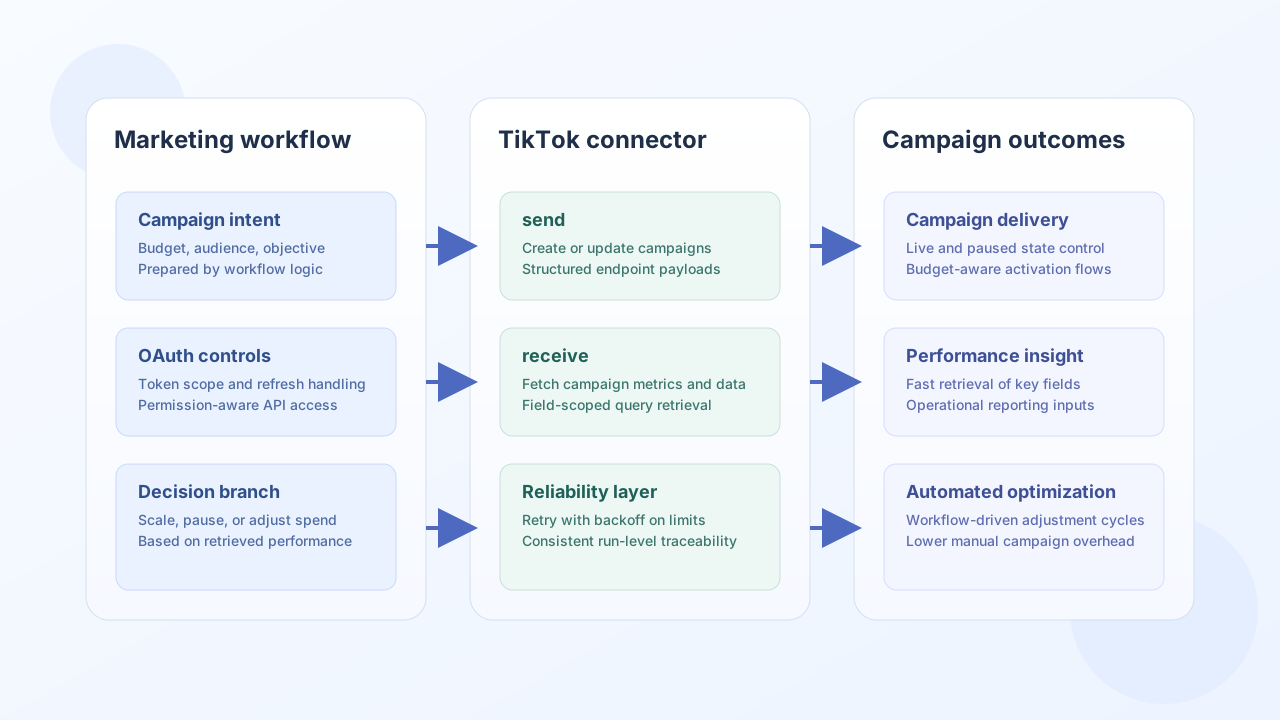
The TikTok API connector helps Tealfabric workflows manage campaign operations and retrieve ad delivery data through TikTok APIs. It is useful for marketing automation scenarios where campaign lifecycle events need to trigger downstream business actions.
Document information
| Field | Value |
|---|---|
| Canonical URL | /docs/04_connecting-systems/connectors/t/tiktok |
| Version (published date) | 2026-05-08 |
| Tags | connectors, reference, tiktok |
| Connector ID | tiktok-1.0.0 |
Configuration and OAuth setup
Configure your TikTok app credentials and redirect URI so the connector can authenticate and refresh access tokens correctly. Use scopes aligned to your use case and avoid over-permissioned app access.
client_id(required): TikTok app client ID.client_secret(required): TikTok app client secret.redirect_uri(required): OAuth callback URL configured in TikTok app settings.access_token(optional): active OAuth access token.refresh_token(optional): token used to refresh access.scope(optional): permission scopes, such as ads read or campaign management scopes.timeout_seconds(optional): request timeout.
Complete OAuth authorization before production usage:
https://www.tiktok.com/v2/auth/authorize/?client_key=<API_KEY>&redirect_uri=<REDIRECT_URI>&response_type=code&scope=<SCOPES>
After token exchange and storage, run test to confirm connection health.
Create campaign resources with send
Use send to create or update campaign-side resources such as campaigns and ads. Keep identifiers explicit, and match payload fields to the endpoint schema used by your TikTok account tier.
const baseUrl = "https://api.example.com/api/v1";
const tenantId = "<TENANT_ID>";
const apiKey = "<API_KEY>";

async function createCampaign(integrationId: string) {
  const response = await fetch(`${baseUrl}/integrations/${encodeURIComponent(integrationId)}/execute`, {
    method: "POST",
    headers: {
      "X-API-Key": apiKey,
      "X-Tenant-ID": tenantId,
      "Content-Type": "application/json",
    },
    body: JSON.stringify({
      operation: "send",
      endpoint: "campaign/create/",
      method: "POST",
      data: {
        advertiser_id: "<ENTITY_ID>",
        campaign_name: "Q2 Product Launch",
        budget_mode: "BUDGET_MODE_DAY",
        budget: 100.0,
        operation_status: "ENABLE",
      },
    }),
  });
  if (!response.ok) throw new Error(`Request failed: ${response.status}`);
  const payload = await response.json();
  return payload.data;
}
curl -X POST "https://api.example.com/api/v1/integrations/<ENTITY_ID>/execute" \
-H "X-API-Key: <API_KEY>" \
-H "X-Tenant-ID: <TENANT_ID>" \
-H "Content-Type: application/json" \
-d '{
"operation": "send",
"endpoint": "campaign/create/",
"method": "POST",
"data": {
"advertiser_id": "<ENTITY_ID>",
"campaign_name": "Q2 Product Launch",
"budget_mode": "BUDGET_MODE_DAY",
"budget": 100.0,
"operation_status": "ENABLE"
}
}'
{
  "success": true,
  "data": {
    "message_count": 1,
    "data": {
      "code": 0,
      "message": "OK",
      "data": {
        "campaign_id": "<ENTITY_ID>",
        "campaign_name": "Q2 Product Launch",
        "operation_status": "ENABLE"
      }
    },
    "response": {
      "code": 0,
      "message": "OK",
      "data": {
        "campaign_id": "<ENTITY_ID>",
        "campaign_name": "Q2 Product Launch",
        "operation_status": "ENABLE"
      }
    }
  }
}
Retrieve campaign data with receive
Use receive to pull campaign and ad metrics into workflow logic for reporting, budget checks, and automated optimization steps. Request only the fields you need to keep responses efficient.
const baseUrl = "https://api.example.com/api/v1";
const tenantId = "<TENANT_ID>";
const apiKey = "<API_KEY>";

async function listCampaigns(integrationId: string) {
  const response = await fetch(`${baseUrl}/integrations/${encodeURIComponent(integrationId)}/execute`, {
    method: "POST",
    headers: {
      "X-API-Key": apiKey,
      "X-Tenant-ID": tenantId,
      "Content-Type": "application/json",
    },
    body: JSON.stringify({
      operation: "receive",
      endpoint: "campaign/get/",
      query: {
        advertiser_id: "<ENTITY_ID>",
        fields: "[\"campaign_id\",\"campaign_name\",\"budget\"]",
        page_size: 10,
      },
    }),
  });
  if (!response.ok) throw new Error(`Request failed: ${response.status}`);
  const payload = await response.json();
  return payload.data ?? [];
}
curl -X POST "https://api.example.com/api/v1/integrations/<ENTITY_ID>/execute" \
-H "X-API-Key: <API_KEY>" \
-H "X-Tenant-ID: <TENANT_ID>" \
-H "Content-Type: application/json" \
-d '{
"operation": "receive",
"endpoint": "campaign/get/",
"query": {
"advertiser_id": "<ENTITY_ID>",
"fields": "[\"campaign_id\",\"campaign_name\",\"budget\"]",
"page_size": 10
}
}'
{
  "success": true,
  "data": {
    "message_count": 1,
    "data": [
      {
        "campaign_id": "<ENTITY_ID>",
        "campaign_name": "Q2 Product Launch",
        "budget": 100.0
      }
    ],
    "total_size": 1
  }
}
Test connection with test
Use test to validate OAuth app configuration (client_id, client_secret, redirect_uri) and confirm the stored access token by calling GET user/info/. Non-test operations require only a valid access_token.
curl -X POST "https://api.example.com/api/v1/integrations/<ENTITY_ID>/execute" \
  -H "X-API-Key: <API_KEY>" \
  -H "X-Tenant-ID: <TENANT_ID>" \
  -H "Content-Type: application/json" \
  -d '{"operation": "test"}'
{
  "success": true,
  "data": {
    "message": "TikTok connection test successful",
    "details": {
      "api_base_url": "https://open.tiktokapis.com/v2"
    }
  }
}
Bidirectional sync with sync
Use sync to run optional outbound (send) and/or inbound (receive) legs in one call. Empty outbound/inbound objects are skipped (PHP empty() semantics).
{
  "operation": "sync",
  "outbound": {
    "endpoint": "campaign/create/",
    "method": "POST",
    "data": { "advertiser_id": "<ENTITY_ID>", "campaign_name": "Sync Campaign" }
  },
  "inbound": {
    "endpoint": "campaign/get/",
    "query": { "advertiser_id": "<ENTITY_ID>", "page_size": 5 }
  }
}
Batch operations with batch
Use batch to run multiple send or receive sub-operations sequentially. Unsupported operation types are rejected per item; partial success is allowed (success is true when at least one sub-operation succeeds).
{
  "operation": "batch",
  "operations": [
    { "operation": "receive", "data": { "endpoint": "campaign/get/", "query": { "advertiser_id": "<ENTITY_ID>" } } },
    { "operation": "send", "data": { "endpoint": "campaign/create/", "method": "POST", "data": { "advertiser_id": "<ENTITY_ID>", "campaign_name": "Batch Campaign" } } }
  ]
}
Reliability guidance
Most production issues come from expired tokens, missing scopes, and rate-limited calls on high-volume endpoints. Validate OAuth refresh behavior, request only required fields and scopes, and apply retry with backoff for transient API throttling.
These practices help keep ad automation stable and auditable as campaign volume grows.