Outlook API Connector Guide
The Outlook API connector enables Tealfabric workflows to send messages and retrieve mailbox data through Microsoft Graph. It is commonly used for customer communication automation, inbox triage, and event-driven workflow routing.
Document information
| Field | Value |
|---|---|
| Canonical URL | /docs/04_connecting-systems/connectors/o/outlook-api |
| Version (published date) | 2026-05-08 |
| Tags | connectors, reference, outlook-api |
| Connector ID | outlook-api-1.0.0 |
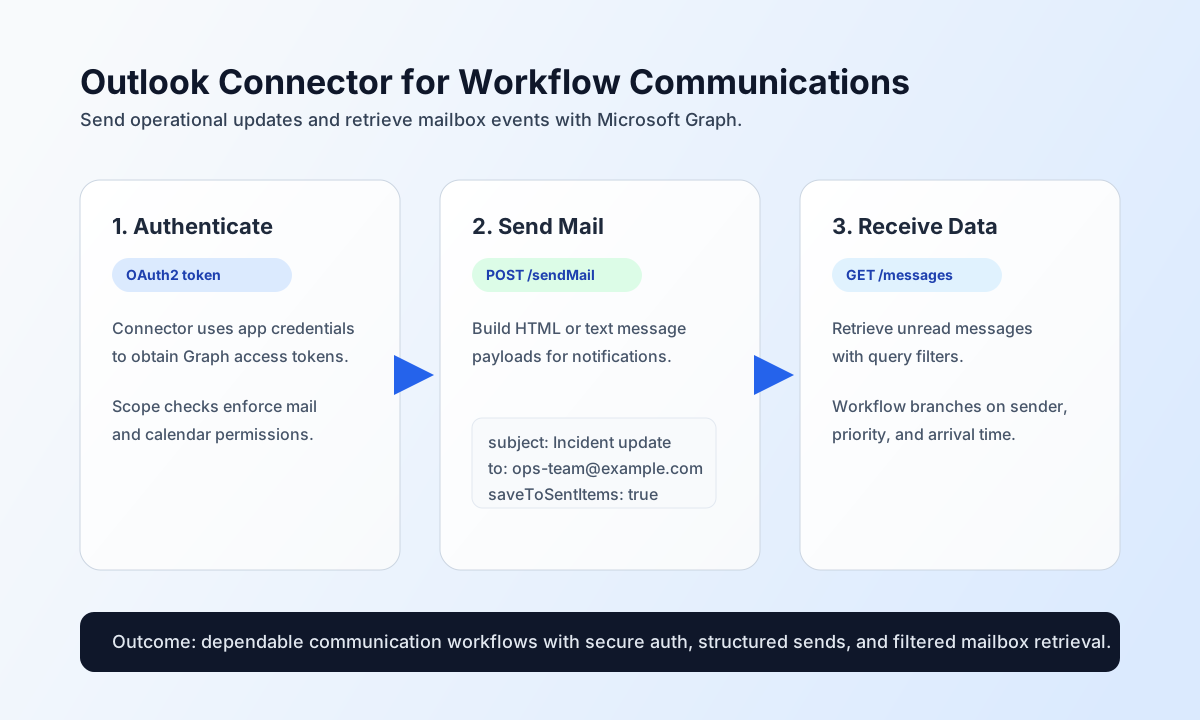
Configure OAuth2 access and mail defaults
Configure the connector with your Microsoft Entra app credentials so workflows can authenticate and call Microsoft Graph endpoints safely. This keeps credentials out of step payloads and supports stable long-running automation.
Required settings are client_id, client_secret, redirect_uri, smtp_host, and from_email. Optional values include access_token, refresh_token, scope, and SMTP tuning (smtp_port, from_name, use_tls). Full configuration validation runs only on test (matching legacy testConnection); send/receive/sync/batch require a valid access_token and surface Graph errors at request time.
After configuration, run test to verify token and tenant access before production traffic.
Send mail with send
Use send for outbound email operations when workflows need to notify users, escalate incidents, or confirm transactional events. Keep message payloads explicit so support teams can trace generated communications.
const baseUrl = "https://api.example.com/api/v1";
const tenantId = "<TENANT_ID>";
const apiKey = "<API_KEY>";

async function sendIncidentMail(integrationId: string) {
  const response = await fetch(`${baseUrl}/integrations/${encodeURIComponent(integrationId)}/execute`, {
    method: "POST",
    headers: {
      "X-API-Key": apiKey,
      "X-Tenant-ID": tenantId,
      "Content-Type": "application/json",
    },
    body: JSON.stringify({
      operation: "send",
      endpoint: "me/sendMail",
      method: "POST",
      data: {
        message: {
          subject: "Incident update: checkout latency",
          body: {
            contentType: "HTML",
            content: "<p>We are investigating elevated checkout latency and will share the next update in 30 minutes.</p>"
          },
          toRecipients: [
            { emailAddress: { address: "ops-team@example.com" } }
          }
        },
        saveToSentItems: true
      }
    }),
  });
  if (!response.ok) throw new Error(`Request failed: ${response.status}`);
  return response.json();
}
curl -X POST "https://api.example.com/api/v1/integrations/<ENTITY_ID>/execute" \
-H "X-API-Key: <API_KEY>" \
-H "X-Tenant-ID: <TENANT_ID>" \
-H "Content-Type: application/json" \
-d '{
"operation": "send",
"endpoint": "me/sendMail",
"method": "POST",
"data": {
"message": {
"subject": "Incident update: checkout latency",
"body": {
"contentType": "HTML",
"content": "<p>We are investigating elevated checkout latency and will share the next update in 30 minutes.</p>"
},
"toRecipients": [
{ "emailAddress": { "address": "ops-team@example.com" } }
]
},
"saveToSentItems": true
}
}'
{
  "success": true,
  "data": {
    "message_count": 1,
    "method": "graph_api"
  }
}
For Graph proxy sends (no to/recipient), the response nests the Graph payload under data.data and data.response:
{
  "success": true,
  "data": {
    "message_count": 1,
    "data": { "id": "AAMkAGI2..." },
    "response": { "id": "AAMkAGI2..." }
  }
}
Retrieve mailbox data with receive
Use receive to pull unread messages, calendar events, or contacts for workflow conditions and operational visibility. Include query filters ($filter, $top, $select) to keep responses focused and performant.
If a Graph message includes body.content, uniqueBody.content, or attachment contentBytes larger than MAIL_BODY_INLINE_MAX_BYTES (default 51200 UTF-8 bytes), that string is written under .cache/mail-bodies/ and replaced with content_path / contentBytes_path plus *_bytes and *_spooled. Use read_file on those paths for the full part.
const baseUrl = "https://api.example.com/api/v1";
const tenantId = "<TENANT_ID>";
const apiKey = "<API_KEY>";

async function listUnreadMessages(integrationId: string) {
  const response = await fetch(`${baseUrl}/integrations/${encodeURIComponent(integrationId)}/execute`, {
    method: "POST",
    headers: {
      "X-API-Key": apiKey,
      "X-Tenant-ID": tenantId,
      "Content-Type": "application/json",
    },
    body: JSON.stringify({
      operation: "receive",
      endpoint: "me/messages",
      query: {
        "top": 20,
        "filter": "isRead eq false",
        "select": "id,subject,from,receivedDateTime"
      }
    }),
  });
  if (!response.ok) throw new Error(`Request failed: ${response.status}`);
  return response.json();
}
curl -X POST "https://api.example.com/api/v1/integrations/<ENTITY_ID>/execute" \
  -H "X-API-Key: <API_KEY>" \
  -H "X-Tenant-ID: <TENANT_ID>" \
  -H "Content-Type: application/json" \
  -d '{
    "operation": "receive",
    "endpoint": "me/messages",
    "query": {
      "$top": 20,
      "$filter": "isRead eq false",
      "$select": "id,subject,from,receivedDateTime"
    }
  }'
{
  "success": true,
  "data": {
    "message_count": 1,
    "data": [
      {
        "id": "AAMkAGI2...",
        "subject": "Escalation: checkout latency",
        "receivedDateTime": "2026-05-08T15:45:00Z"
      }
    ],
    "total_size": 1
  }
}
Verify connectivity with test
Use test to validate OAuth app settings (client_id, client_secret, redirect_uri), mail defaults (smtp_host, from_email), and the stored access_token via GET me. On invalid configuration, the connector returns Configuration validation failed (legacy-compatible).
{
  "success": true,
  "data": {
    "message": "Outlook API connection test successful",
    "details": {
      "api_base_url": "https://graph.microsoft.com/v1.0",
      "user_id": "6d8e...",
      "smtp_host": "smtp.office365.com"
    }
  }
}
Reliability guidance
Most failures are caused by expired tokens, missing delegated permissions, or throttling. If operations fail, validate token freshness, confirm required scopes (for example Mail.Send and Mail.Read), and add exponential backoff for Graph 429 responses.
For stable production behavior, keep message retrieval filtered, avoid oversized batch reads, and validate send payload shape before execution. These practices improve throughput and reduce intermittent workflow retries.