Oracle Field Service Connector Guide
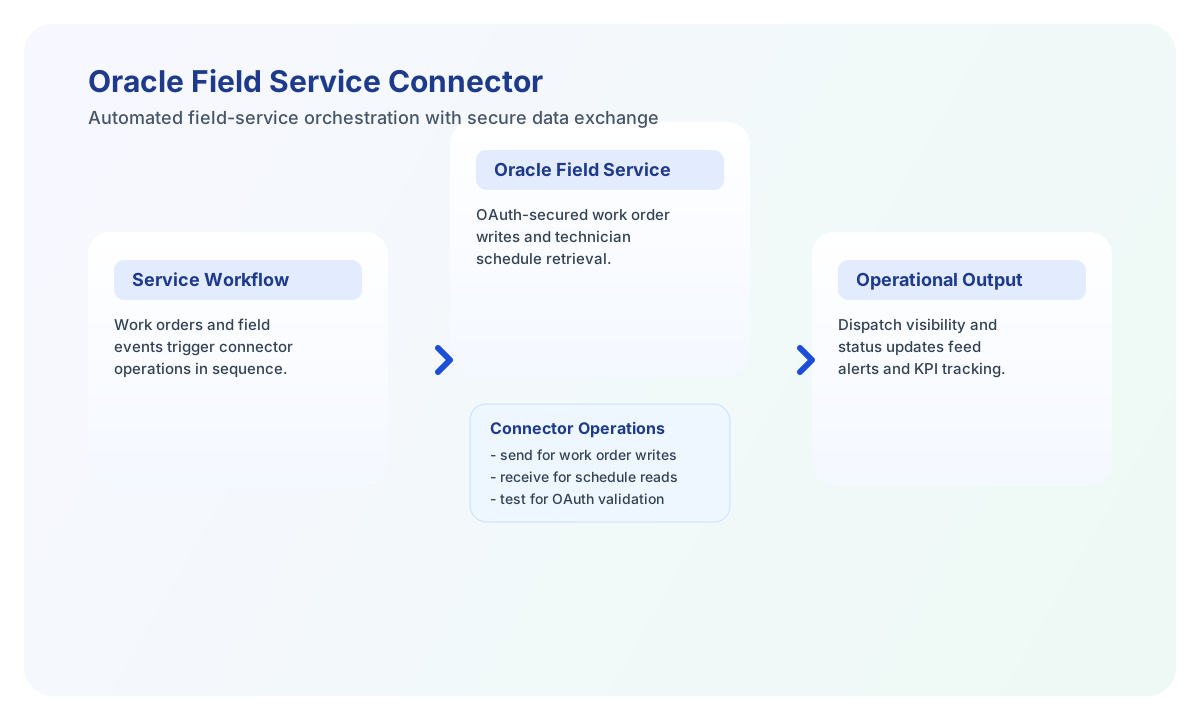
The Oracle Field Service connector allows Tealfabric workflows to manage work orders, appointments, and technician operations through Oracle Field Service APIs. It is designed for service operations teams that need reliable field execution data inside automated business workflows.
Document information
| Field | Value |
|---|---|
| Canonical URL | /docs/04_connecting-systems/connectors/o/oracle-field-service |
| Version (published date) | 2026-05-08 |
| Tags | connectors, reference, oracle-field-service |
| Connector ID | oracle-field-service-1.0.0 |
Configure Oracle Field Service access
Set base_url, client_id, and client_secret from your Oracle Field Service OAuth application, and confirm the app has permissions for the entities your workflows need. The connector uses OAuth2 Client Credentials and obtains a bearer token at {base_url}/oauth/token for each execution.
Use timeout_seconds for heavier queries, especially when workflows read many appointments or update high-volume service records. Run test before production rollout to verify that tenant access and API permissions are valid.
Configuration parameters:
base_url(required): Oracle Field Service instance base URL.client_id(required): OAuth2 client identifier.client_secret(required): OAuth2 client secret.timeout_seconds(optional): Request timeout in seconds; default is30.
API calls are routed to {base_url}/api/{endpoint} with a bearer token. Pass the path segment after /api/ as endpoint (for example workOrders, not the full URL).
Create and update records with send
Use send for write operations such as creating work orders or updating appointment status. send requires endpoint and defaults to HTTP POST when method is omitted. Provide the JSON body in data.
const baseUrl = "https://api.example.com/api/v1";
const tenantId = "<TENANT_ID>";
const apiKey = "<API_KEY>";

async function createWorkOrder(integrationId: string) {
  const response = await fetch(`${baseUrl}/integrations/${encodeURIComponent(integrationId)}/execute`, {
    method: "POST",
    headers: {
      "X-API-Key": apiKey,
      "X-Tenant-ID": tenantId,
      "Content-Type": "application/json",
    },
    body: JSON.stringify({
      operation: "send",
      endpoint: "workOrders",
      method: "POST",
      data: {
        workOrderNumber: "WO-22051",
        customerId: "CUST-8821",
        description: "Install replacement router",
        priority: "High",
        scheduledStart: "2026-05-09T09:00:00Z",
        scheduledEnd: "2026-05-09T11:00:00Z",
        technicianId: "TECH-1007"
      }
    }),
  });
  if (!response.ok) throw new Error(`Request failed: ${response.status}`);
  return response.json();
}
curl -X POST "https://api.example.com/api/v1/integrations/<ENTITY_ID>/execute" \
-H "X-API-Key: <API_KEY>" \
-H "X-Tenant-ID: <TENANT_ID>" \
-H "Content-Type: application/json" \
-d '{
"operation": "send",
"endpoint": "workOrders",
"method": "POST",
"data": {
"workOrderNumber": "WO-22051",
"customerId": "CUST-8821",
"description": "Install replacement router",
"priority": "High",
"scheduledStart": "2026-05-09T09:00:00Z",
"scheduledEnd": "2026-05-09T11:00:00Z",
"technicianId": "TECH-1007"
}
}'
{
  "success": true,
  "data": {
    "message": "Oracle Field Service operation completed successfully",
    "result": {
      "id": "WO-22051",
      "status": "Created"
    }
  }
}
Retrieve field operations data with receive
Use receive to query work orders, technician schedules, and appointment states. receive performs HTTP GET against {base_url}/api/{endpoint} and accepts optional query parameters for filters and pagination.
{
  "operation": "receive",
  "endpoint": "appointments",
  "query": {
    "technicianId": "TECH-1007",
    "startTime": "2026-05-09T00:00:00Z",
    "limit": "25"
  }
}
receive returns normalized output:
{
  "success": true,
  "data": {
    "message": "Oracle Field Service data retrieved successfully",
    "work_order_count": 2,
    "items": [
      {
        "workOrderId": "WO-22051",
        "startTime": "2026-05-09T09:00:00Z",
        "endTime": "2026-05-09T11:00:00Z",
        "status": "Scheduled"
      },
      {
        "workOrderId": "WO-22052",
        "startTime": "2026-05-09T13:00:00Z",
        "endTime": "2026-05-09T14:30:00Z",
        "status": "Scheduled"
      }
    ]
  }
}
When the API response includes an items array, the connector returns that array. Otherwise it wraps the response object in a single-element items array.
Run arbitrary methods with execute
Use execute when you need full control over HTTP method and body. execute defaults to HTTP GET when method is omitted. Provide the JSON body in body or data.
{
  "operation": "execute",
  "endpoint": "workOrders/WO-22051",
  "method": "PATCH",
  "body": {
    "status": "In Progress",
    "technicianId": "TECH-1007"
  }
}
Validate setup with test
test obtains an OAuth token and probes api/workOrders (legacy path composition: {base_url}/api/api/workOrders). On success it returns connection metadata including work_orders_found.
{
  "success": true,
  "data": {
    "message": "Oracle Field Service connection test successful",
    "details": {
      "base_url": "https://your-instance.oraclecloud.com",
      "work_orders_found": 12
    }
  }
}
Reliability guidance
Most integration issues come from OAuth credential errors, missing entity permissions, or API throttling under burst traffic. Keep OAuth secrets rotated, validate entity access at setup time, and apply retries with exponential backoff for transient failures.
For production stability, use selective fields, page large queries, and always check success before triggering downstream automations. This keeps field-service orchestration predictable and auditable.