Oracle Database Connector Guide
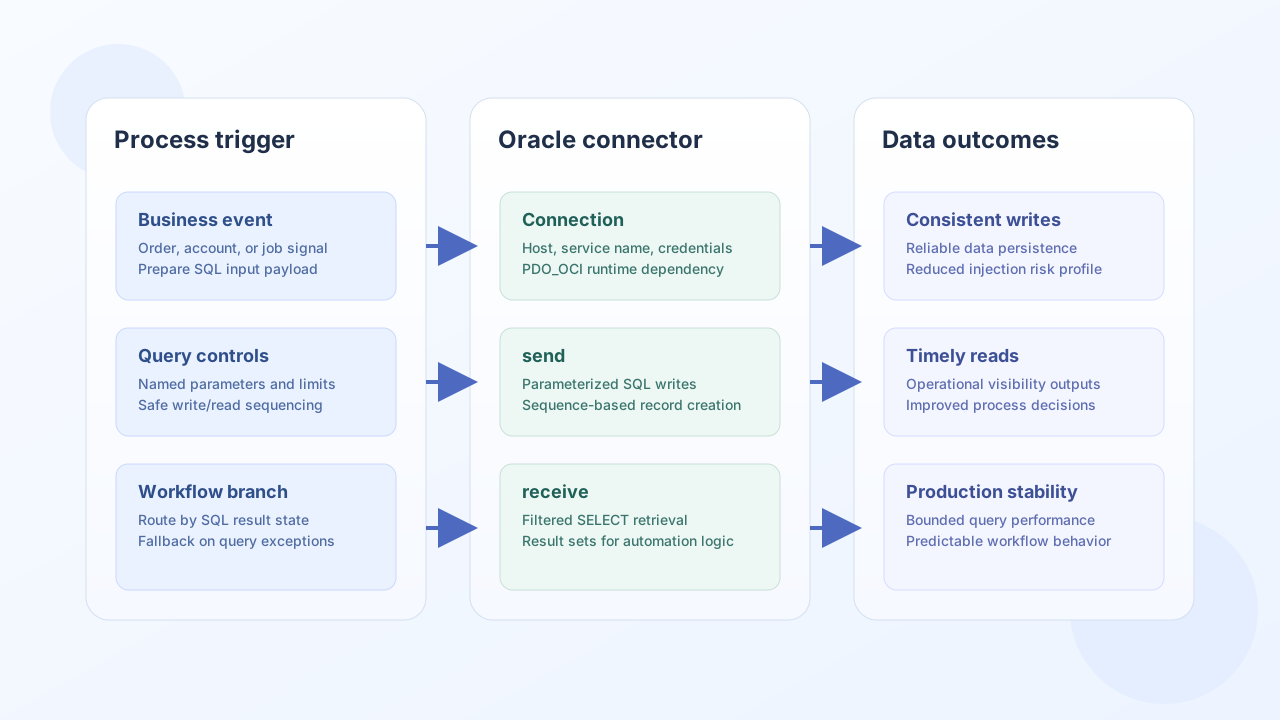
The Oracle Database connector lets Tealfabric workflows write and read operational data from Oracle-backed systems. It supports parameterized SQL execution so teams can automate updates, reporting, and synchronization tasks safely.
Document information
| Field | Value |
|---|---|
| Canonical URL | /docs/04_connecting-systems/connectors/o/oracle |
| Version (published date) | 2026-05-08 |
| Tags | connectors, reference, oracle |
| Connector ID | oracle-1.0.0 |
Configuration and connection setup
Configure host, credentials, and database identity so the connector can establish a stable Oracle session for each workflow run. Use least-privilege database users and production-grade connection settings where possible.
host(required): Oracle server hostname or IP.username(required): Oracle database user.password(required): password for the user.database_name(required): SID or service name.port(optional): default1521.ssl_mode(optional): connection encryption policy.timeout_seconds(optional): connection timeout.
Oracle connectivity requires an Oracle database client library in runtime environments that execute this connector.
Write records with send
Use send for INSERT, UPDATE, or DELETE operations tied to workflow outcomes. Oracle SQL should use named bind variables (for example :order_id) to improve query safety and maintainability.
const baseUrl = "https://api.example.com/api/v1";
const tenantId = "<TENANT_ID>";
const apiKey = "<API_KEY>";

async function insertOrderRecord(integrationId: string) {
  const response = await fetch(`${baseUrl}/integrations/${encodeURIComponent(integrationId)}/execute`, {
    method: "POST",
    headers: {
      "X-API-Key": apiKey,
      "X-Tenant-ID": tenantId,
      "Content-Type": "application/json",
    },
    body: JSON.stringify({
      operation: "send",
      query: "INSERT INTO orders (id, customer_id, amount, created_at) VALUES (order_seq.NEXTVAL, :customer_id, :amount, SYSDATE)",
      params: {
        ":customer_id": "CUST-2001",
        ":amount": 420.0,
      },
    }),
  });
  if (!response.ok) throw new Error(`Request failed: ${response.status}`);
  return response.json();
}
curl -X POST "https://api.example.com/api/v1/integrations/<ENTITY_ID>/execute" \
-H "X-API-Key: <API_KEY>" \
-H "X-Tenant-ID: <TENANT_ID>" \
-H "Content-Type: application/json" \
-d '{
"operation": "send",
"query": "INSERT INTO orders (id, customer_id, amount, created_at) VALUES (order_seq.NEXTVAL, :customer_id, :amount, SYSDATE)",
"params": {
":customer_id": "CUST-2001",
":amount": 420.0
}
}'
{
  "success": true,
  "affected_rows": 1
}
Retrieve data with receive
Use receive for SELECT queries that drive workflow decisions, reporting, or downstream synchronization. Scope results with filters and size limits to keep performance stable.
const baseUrl = "https://api.example.com/api/v1";
const tenantId = "<TENANT_ID>";
const apiKey = "<API_KEY>";

async function fetchRecentOrders(integrationId: string) {
  const response = await fetch(`${baseUrl}/integrations/${encodeURIComponent(integrationId)}/execute`, {
    method: "POST",
    headers: {
      "X-API-Key": apiKey,
      "X-Tenant-ID": tenantId,
      "Content-Type": "application/json",
    },
    body: JSON.stringify({
      operation: "receive",
      query: "SELECT id, customer_id, amount FROM orders WHERE created_at >= :start_date FETCH FIRST 20 ROWS ONLY",
      params: {
        ":start_date": "2026-05-01",
      },
    }),
  });
  if (!response.ok) throw new Error(`Request failed: ${response.status}`);
  const payload = await response.json();
  return payload.data ?? [];
}
curl -X POST "https://api.example.com/api/v1/integrations/<ENTITY_ID>/execute" \
-H "X-API-Key: <API_KEY>" \
-H "X-Tenant-ID: <TENANT_ID>" \
-H "Content-Type: application/json" \
-d '{
"operation": "receive",
"query": "SELECT id, customer_id, amount FROM orders WHERE created_at >= :start_date FETCH FIRST 20 ROWS ONLY",
"params": {
":start_date": "2026-05-01"
}
}'
{
  "success": true,
  "total_size": 2,
  "data": [
    {"id": 1001, "customer_id": "CUST-2001", "amount": 420.0},
    {"id": 1002, "customer_id": "CUST-2002", "amount": 180.0}
  ]
}
Reliability guidance
Most Oracle integration issues come from connection misconfiguration, missing runtime extensions, and unbounded queries. Validate connectivity with test, enforce named bind variables, and cap result sets to avoid long-running reads under load.
These controls keep workflow data operations consistent and production-safe.