OData Connector Guide
The OData connector helps Tealfabric workflows read and write entities in OData-compliant services. It is useful when business data must be synchronized across systems that expose standardized OData entity sets and query conventions.
Document information
| Field | Value |
|---|---|
| Canonical URL | /docs/04_connecting-systems/connectors/o/odata |
| Version (published date) | 2026-05-08 |
| Tags | connectors, reference, odata |
| Connector ID | odata-1.0.0 |
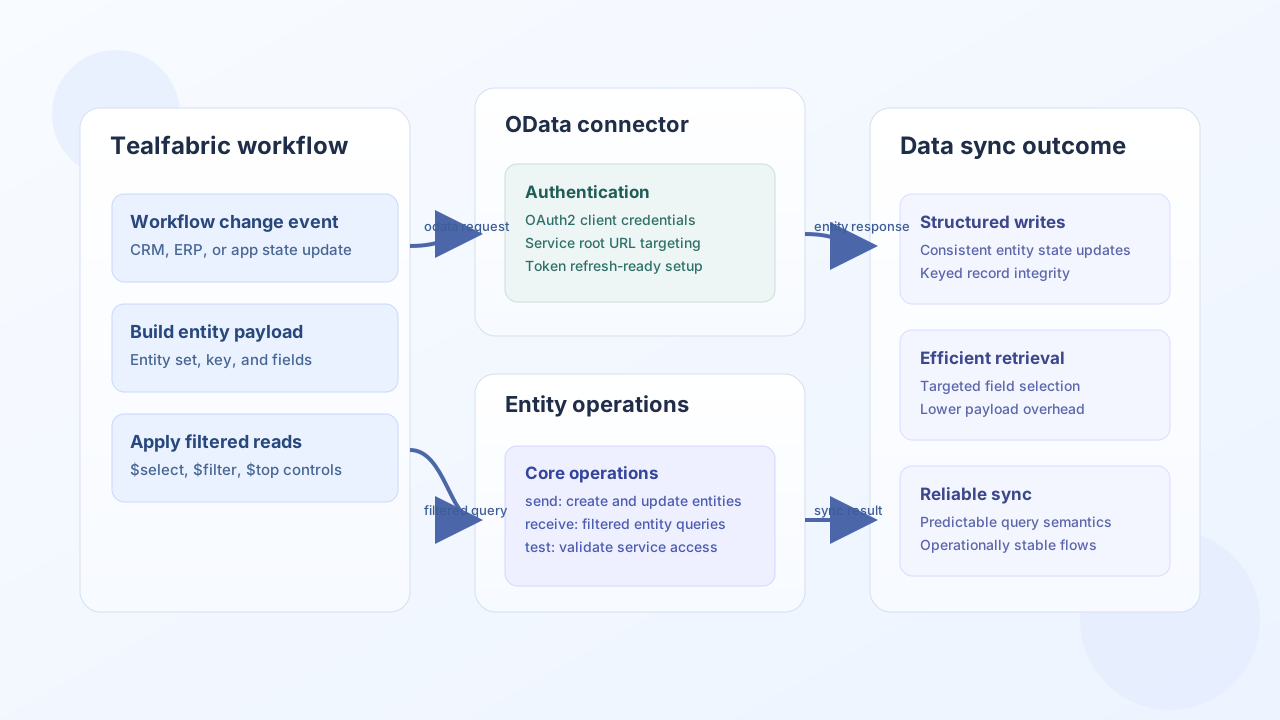
Configuration and authentication
Configure this connector with your service root URL and OAuth2 client credentials where required by the provider. Keep token configuration environment-specific, and run test before production use to confirm base URL and authorization behavior.
client_id(required): OAuth2 client ID.client_secret(required): OAuth2 client secret.redirect_uri(required): Redirect URI registered with your provider.base_url(required): OData service root URL (typically ends with/).scope,auth_url,token_url(optional): OAuth2 overrides for custom providers.timeout_seconds(optional): Request timeout in seconds.
Create or update entities with send
Use send to create new records or update existing ones in an OData entity set. Keep payload schemas aligned to the target entity model and use stable entity keys for updates.
const baseUrl = "https://api.example.com/api/v1";
const tenantId = "<TENANT_ID>";
const apiKey = "<API_KEY>";

async function createCustomerEntity(integrationId: string) {
  const response = await fetch(`${baseUrl}/integrations/${encodeURIComponent(integrationId)}/execute`, {
    method: "POST",
    headers: {
      "X-API-Key": apiKey,
      "X-Tenant-ID": tenantId,
      "Content-Type": "application/json",
    },
    body: JSON.stringify({
      operation: "send",
      endpoint: "Customers",
      method: "POST",
      data: {
        CustomerId: "<ENTITY_ID>",
        FirstName: "Jordan",
        LastName: "Miles",
        Email: "jordan.miles@example.com",
      },
    }),
  });
  if (!response.ok) throw new Error(`Request failed: ${response.status}`);
  const payload = await response.json();
  return payload.data;
}
curl -X POST "https://api.example.com/api/v1/integrations/<ENTITY_ID>/execute" \
-H "X-API-Key: <API_KEY>" \
-H "X-Tenant-ID: <TENANT_ID>" \
-H "Content-Type: application/json" \
-d '{
"operation": "send",
"endpoint": "Customers",
"method": "POST",
"data": {
"CustomerId": "<ENTITY_ID>",
"FirstName": "Jordan",
"LastName": "Miles",
"Email": "jordan.miles@example.com"
}
}'
{
  "success": true,
  "data": {
    "CustomerId": "<ENTITY_ID>",
    "FirstName": "Jordan",
    "LastName": "Miles"
  }
}
Query entities with receive
Use receive to pull entity sets or single records using OData query parameters like $select, $filter, and $top. Keep queries selective to reduce payload size and improve workflow performance.
const baseUrl = "https://api.example.com/api/v1";
const tenantId = "<TENANT_ID>";
const apiKey = "<API_KEY>";

async function listActiveCustomers(integrationId: string) {
  const response = await fetch(`${baseUrl}/integrations/${encodeURIComponent(integrationId)}/execute`, {
    method: "POST",
    headers: {
      "X-API-Key": apiKey,
      "X-Tenant-ID": tenantId,
      "Content-Type": "application/json",
    },
    body: JSON.stringify({
      operation: "receive",
      endpoint: "Customers",
      query: {
        select: "CustomerId,FirstName,LastName,Email",
        filter: "IsActive eq true",
        top: 20,
        orderby: "LastName asc",
      },
    }),
  });
  if (!response.ok) throw new Error(`Request failed: ${response.status}`);
  const payload = await response.json();
  return payload.data ?? [];
}
curl -X POST "https://api.example.com/api/v1/integrations/<ENTITY_ID>/execute" \
-H "X-API-Key: <API_KEY>" \
-H "X-Tenant-ID: <TENANT_ID>" \
-H "Content-Type: application/json" \
-d '{
"operation": "receive",
"endpoint": "Customers",
"query": {
"select": "CustomerId,FirstName,LastName,Email",
"filter": "IsActive eq true",
"top": 20,
"orderby": "LastName asc"
}
}'
{
  "success": true,
  "total_size": 2,
  "data": [
    {
      "CustomerId": "<ENTITY_ID>",
      "FirstName": "Jordan",
      "LastName": "Miles",
      "Email": "jordan.miles@example.com"
    },
    {
      "CustomerId": "<ENTITY_ID>",
      "FirstName": "Alex",
      "LastName": "Rivera",
      "Email": "alex.rivera@example.com"
    }
  ]
}
Reliability guidance
Most OData issues come from token expiration, invalid entity keys, or incorrect query syntax. Validate query clauses against service metadata, keep token refresh behavior configured, and log endpoint plus key values for failed write attempts. These controls make OData-based synchronization reliable in production.