Oracle NetSuite Connector Guide
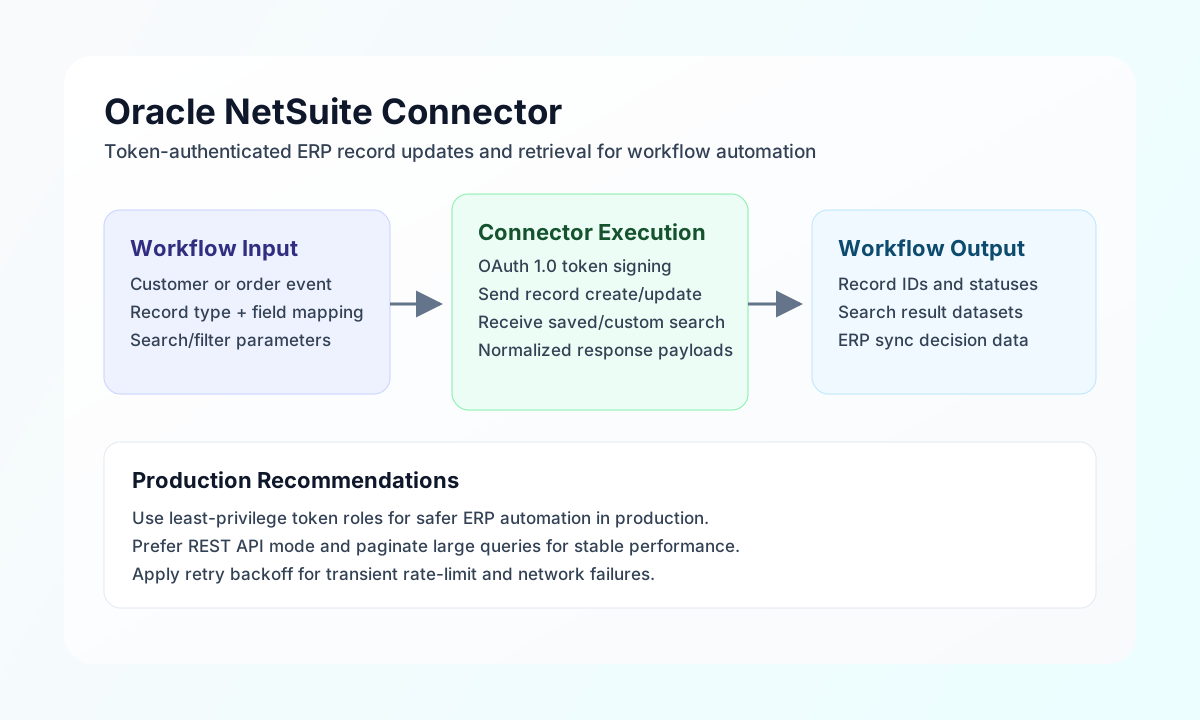
The Oracle NetSuite connector lets Tealfabric workflows create, update, and query ERP records through NetSuite SuiteTalk REST APIs. It is typically used for order synchronization, customer updates, finance operations, and workflow-triggered back-office automation.
Document information
| Field | Value |
|---|---|
| Canonical URL | /docs/04_connecting-systems/connectors/o/oracle-netsuite |
| Version (published date) | 2026-05-08 |
| Tags | connectors, reference, oracle-netsuite |
| Connector ID | oracle-netsuite-1.0.0 |
Configuration and authentication
Configure the connector with your NetSuite account and token-based authentication (OAuth 1.0 TBA, HMAC-SHA256) credentials so workflow requests can be signed securely. Required values are account_id, consumer_key, consumer_secret, token_id, and token_secret. Optional values include api_type (rest recommended; stored for compatibility but only REST is implemented) and timeout_seconds (default 60).
All REST calls target https://{account_id}.suitetalk.api.netsuite.com/services/rest/. After setup, run test to verify account access and request signing before production jobs.
Create or update records with send
Use send to create or update records such as customers, invoices, or sales orders. method defaults to POST when omitted. Provide the JSON body in data; when data is omitted, non-routing top-level fields are sent as the request body (legacy parity). Empty bodies are omitted for POST/PUT/PATCH.
const baseUrl = "https://api.example.com/api/v1";
const tenantId = "<TENANT_ID>";
const apiKey = "<API_KEY>";

async function createCustomer(integrationId: string) {
  const response = await fetch(`${baseUrl}/integrations/${encodeURIComponent(integrationId)}/execute`, {
    method: "POST",
    headers: {
      "X-API-Key": apiKey,
      "X-Tenant-ID": tenantId,
      "Content-Type": "application/json",
    },
    body: JSON.stringify({
      operation: "send",
      record_type: "customer",
      method: "POST",
      data: {
        companyName: "Tealfabric Retail LLC",
        email: "ap@tealfabric-retail.example",
        phone: "+1-555-0144",
        subsidiary: { id: 1 }
      }
    }),
  });
  if (!response.ok) throw new Error(`Request failed: ${response.status}`);
  return response.json();
}
curl -X POST "https://api.example.com/api/v1/integrations/<ENTITY_ID>/execute" \
-H "X-API-Key: <API_KEY>" \
-H "X-Tenant-ID: <TENANT_ID>" \
-H "Content-Type: application/json" \
-d '{
"operation": "send",
"record_type": "customer",
"method": "POST",
"data": {
"companyName": "Tealfabric Retail LLC",
"email": "ap@tealfabric-retail.example",
"phone": "+1-555-0144",
"subsidiary": { "id": 1 }
}
}'
{
  "success": true,
  "data": {
    "message": "Oracle NetSuite operation completed successfully",
    "result": {}
  }
}
Query records with receive
Use receive to fetch records by type, optional record_id, and optional query map (for example limit, offset, fields per NetSuite REST API). The connector returns items from result.items when present, otherwise [result].
const baseUrl = "https://api.example.com/api/v1";
const tenantId = "<TENANT_ID>";
const apiKey = "<API_KEY>";

async function fetchCustomer(integrationId: string, recordId: string) {
  const response = await fetch(`${baseUrl}/integrations/${encodeURIComponent(integrationId)}/execute`, {
    method: "POST",
    headers: {
      "X-API-Key": apiKey,
      "X-Tenant-ID": tenantId,
      "Content-Type": "application/json",
    },
    body: JSON.stringify({
      operation: "receive",
      record_type: "customer",
      record_id: recordId
    }),
  });
  if (!response.ok) throw new Error(`Request failed: ${response.status}`);
  return response.json();
}
curl -X POST "https://api.example.com/api/v1/integrations/<ENTITY_ID>/execute" \
-H "X-API-Key: <API_KEY>" \
-H "X-Tenant-ID: <TENANT_ID>" \
-H "Content-Type: application/json" \
-d '{
"operation": "receive",
"record_type": "customer",
"query": {
"limit": 25,
"offset": 0
}
}'
{
  "success": true,
  "data": {
    "message": "Oracle NetSuite data retrieved successfully",
    "record_count": 1,
    "items": [
      {
        "id": "12345",
        "companyName": "Tealfabric Retail LLC"
      }
    ]
  }
}
Execute SuiteTalk REST calls with execute
Use execute for arbitrary SuiteTalk REST paths when you need a configurable HTTP method and JSON body. method defaults to GET when omitted. Provide the body in body or data (alias). Paths are relative to services/rest/ (for example query/v1/suiteql).
{
  "operation": "execute",
  "endpoint": "query/v1/suiteql",
  "method": "POST",
  "body": {
    "q": "SELECT id, companyname FROM customer WHERE ROWNUM <= 5"
  }
}
{
  "success": true,
  "data": {
    "message": "Oracle NetSuite method executed successfully",
    "result": {}
  }
}
Validate connectivity with test
Use test to validate required configuration and OAuth TBA signing against GET record/v1/metadata-catalog. When required credentials are missing, the connector returns Configuration validation failed (legacy parity). Non-test operations do not pre-validate configuration.
{
  "operation": "test"
}
{
  "success": true,
  "data": {
    "message": "Oracle NetSuite connection test successful",
    "details": {
      "account_id": "TSTDRV123456",
      "api_type": "rest"
    }
  }
}
Reliability guidance
Most failures are caused by invalid token credentials, insufficient token role permissions, or mismatched record field names. Validate with test, verify role access for each operation, and confirm fields against your NetSuite configuration.
For stable production performance, prefer REST API mode, paginate large queries, and apply exponential backoff for 429 responses. These practices keep ERP automations dependable and easier to support.