OpenSearch Connector Guide
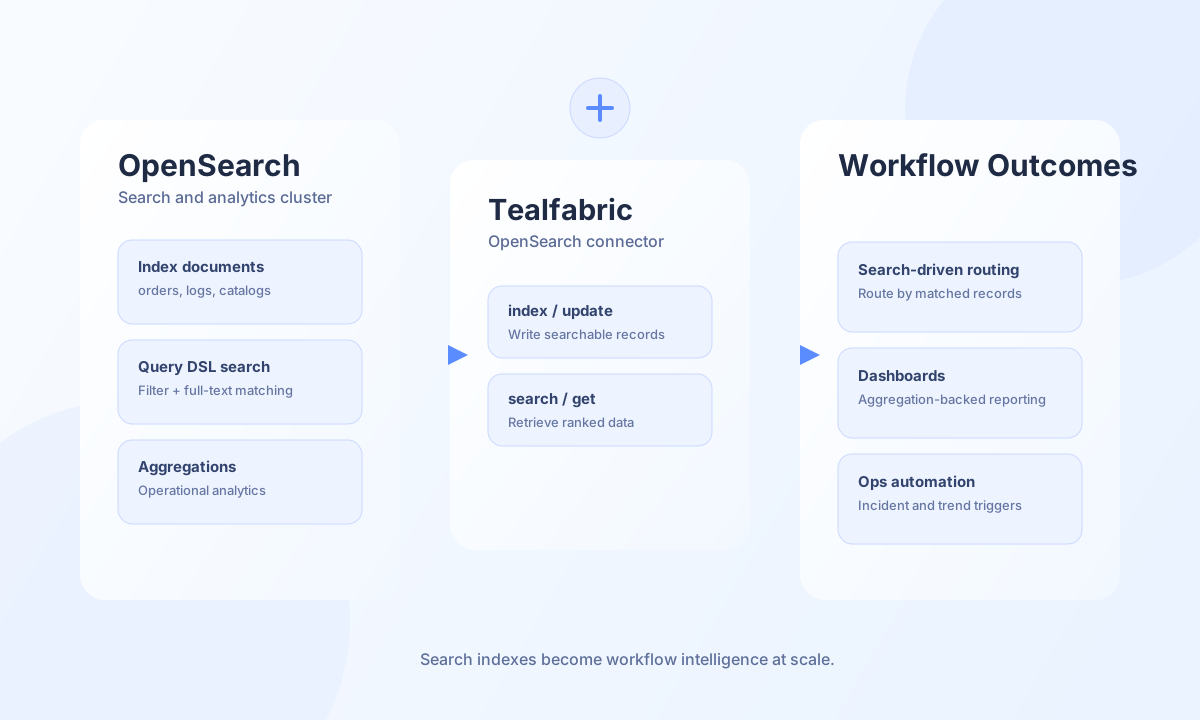
The OpenSearch connector lets Tealfabric workflows index, query, and manage search documents in OpenSearch clusters. It is ideal for use cases such as catalog search, log enrichment, and analytics pipelines that depend on fast full-text retrieval and structured filtering.
Document information
| Field | Value |
|---|---|
| Canonical URL | /docs/04_connecting-systems/connectors/o/opensearch |
| Version (published date) | 2026-05-08 |
| Tags | connectors, reference, opensearch |
| Connector ID | opensearch-1.0.0 |
Configuration and access
Before using the connector, confirm the OpenSearch endpoint and the authentication mode required by your cluster. Basic authentication and API key authentication are both supported, and production environments should keep SSL verification enabled. Ensure target indices and mappings are already created for predictable write and query behavior.
endpoint_url(required): OpenSearch endpoint URL.username(optional): Username for basic auth.password(optional): Password for basic auth.api_key(optional): API key credential alternative.timeout_seconds(optional): Request timeout in seconds, default30.verify_ssl(optional): SSL certificate verification, defaulttrue.
Index documents with index
Use index to write documents that workflows need to search later. Stable IDs and consistent field naming make updates and analytics simpler across environments.
const baseUrl = "https://api.example.com/api/v1";
const tenantId = "<TENANT_ID>";
const apiKey = "<API_KEY>";

async function indexOrderDocument(integrationId: string) {
  const response = await fetch(`${baseUrl}/integrations/${encodeURIComponent(integrationId)}/execute`, {
    method: "POST",
    headers: {
      "X-API-Key": apiKey,
      "X-Tenant-ID": tenantId,
      "Content-Type": "application/json",
    },
    body: JSON.stringify({
      operation: "index",
      index: "orders",
      id: "<ENTITY_ID>",
      document: {
        order_id: "<ENTITY_ID>",
        customer_name: "Acme Retail",
        total_amount: 482.5,
        status: "processing",
      },
    }),
  });
  if (!response.ok) throw new Error(`Request failed: ${response.status}`);
  const payload = await response.json();
  return payload.data;
}
curl -X POST "https://api.example.com/api/v1/integrations/<ENTITY_ID>/execute" \
-H "X-API-Key: <API_KEY>" \
-H "X-Tenant-ID: <TENANT_ID>" \
-H "Content-Type: application/json" \
-d '{
"operation": "index",
"index": "orders",
"id": "<ENTITY_ID>",
"document": {
"order_id": "<ENTITY_ID>",
"customer_name": "Acme Retail",
"total_amount": 482.5,
"status": "processing"
}
}'
{
  "success": true,
  "data": {
    "document_count": 1,
    "result": {
      "_index": "orders",
      "_id": "<ENTITY_ID>",
      "_version": 1,
      "result": "created"
    },
    "data": {
      "_index": "orders",
      "_id": "<ENTITY_ID>",
      "_version": 1,
      "result": "created"
    }
  }
}
Search with Query DSL using search
Use search to retrieve relevant records with full-text, filters, and optional aggregations. Keep query payloads explicit and tested, especially when workflows depend on exact result ordering and counts.
const baseUrl = "https://api.example.com/api/v1";
const tenantId = "<TENANT_ID>";
const apiKey = "<API_KEY>";

async function searchProcessingOrders(integrationId: string) {
  const response = await fetch(`${baseUrl}/integrations/${encodeURIComponent(integrationId)}/execute`, {
    method: "POST",
    headers: {
      "X-API-Key": apiKey,
      "X-Tenant-ID": tenantId,
      "Content-Type": "application/json",
    },
    body: JSON.stringify({
      operation: "search",
      index: "orders",
      query: {
        bool: {
          must: [{ match: { customer_name: "Acme" } }],
          filter: [{ term: { status: "processing" } }],
        },
      },
      aggs: {
        status_counts: { terms: { field: "status.keyword" } },
      },
      size: 10,
      from: 0,
    }),
  });
  if (!response.ok) throw new Error(`Request failed: ${response.status}`);
  const payload = await response.json();
  return payload.data?.hits ?? [];
}
curl -X POST "https://api.example.com/api/v1/integrations/<ENTITY_ID>/execute" \
-H "X-API-Key: <API_KEY>" \
-H "X-Tenant-ID: <TENANT_ID>" \
-H "Content-Type: application/json" \
-d '{
"operation": "search",
"index": "orders",
"query": {
"bool": {
"must": [{"match": {"customer_name": "Acme"}}],
"filter": [{"term": {"status": "processing"}}]
}
},
"aggs": {
"status_counts": {"terms": {"field": "status.keyword"}}
},
"size": 10,
"from": 0
}'
{
  "success": true,
  "data": {
    "document_count": 1,
    "total": 1,
    "hits": [
      {
        "_id": "<ENTITY_ID>",
        "_source": {
          "customer_name": "Acme Retail",
          "status": "processing"
        }
      }
    ],
    "data": {
      "took": 3,
      "hits": {
        "total": { "value": 1, "relation": "eq" },
        "hits": [
          {
            "_id": "<ENTITY_ID>",
            "_source": {
              "customer_name": "Acme Retail",
              "status": "processing"
            }
          }
        ]
      }
    }
  }
}
Test connectivity with test
Use test to validate endpoint_url and authentication against the cluster root (GET /). The connector returns cluster name and version details on success.
{
  "success": true,
  "data": {
    "message": "OpenSearch connection test successful",
    "details": {
      "endpoint": "https://opensearch.example.com:9200",
      "cluster_name": "opensearch-cluster",
      "version": "2.11.0"
    }
  }
}
Reliability guidance
Most runtime issues come from missing indices, mapping mismatches, or malformed Query DSL payloads. Validate index mappings before writes, use bounded pagination for large searches, and apply backoff for transient timeouts and throttling responses. These controls keep search-driven workflows stable in production.