Odoo Connector Guide
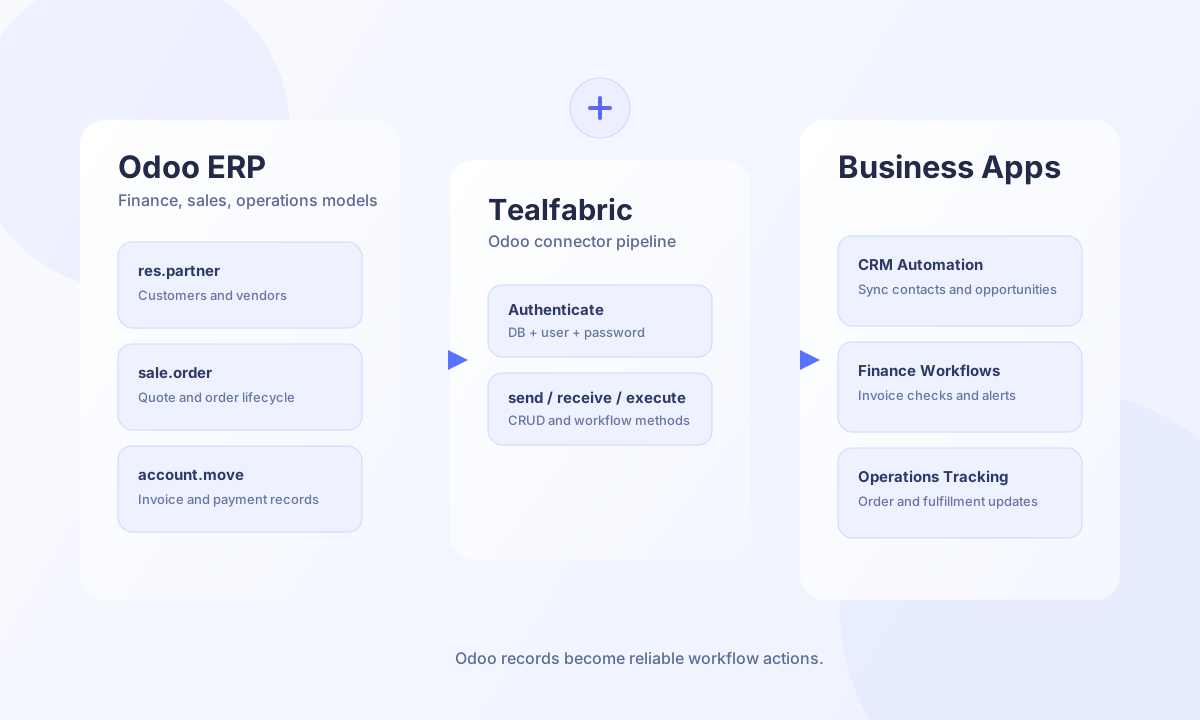
The Odoo connector helps you run ERP-driven workflows in Tealfabric by creating records, querying business objects, and triggering model actions in Odoo. It is a strong fit for finance, sales, and operations teams that need reliable synchronization between Odoo and other business systems.
Document information
| Field | Value |
|---|---|
| Canonical URL | /docs/04_connecting-systems/connectors/o/odoo |
| Version (published date) | 2026-05-08 |
| Tags | connectors, reference, odoo |
| Connector ID | odoo-1.0.0 |
When to use this connector
Use this connector when your workflows need to manage Odoo records such as customers, sales orders, invoices, or inventory entities. The connector supports common CRUD patterns and model-level actions, so you can keep operational data consistent without manual re-entry. A clear mapping between Odoo fields and downstream systems will keep integrations stable as modules evolve.
Prerequisites and configuration
Before creating the integration, confirm your Odoo base URL, target database name, and API user credentials. A dedicated API user with least-privilege permissions is recommended so access scope is controlled and auditable. Most deployments should use jsonrpc for compatibility and performance, while xmlrpc remains available for legacy environments.
base_url(required): Odoo instance URL, for examplehttps://odoo.example.com.database(required): Odoo database name.username(required): Odoo user account used for connector operations.password(required): Odoo password for that user.api_type(optional):jsonrpc(default) posts JSON-RPC to/jsonrpc.xmlrpcposts XML-RPC method calls to/xmlrpc/2/commonand/xmlrpc/2/object.timeout_seconds(optional): Request timeout in seconds, default30.
Create or update records with send
Use send to create, update, or delete model records. Keep model names and field keys aligned with your Odoo module definitions to avoid write failures and unexpected data shape changes.
const baseUrl = "https://api.example.com/api/v1";
const tenantId = "<TENANT_ID>";
const apiKey = "<API_KEY>";

async function upsertCustomer(integrationId: string) {
  const response = await fetch(`${baseUrl}/integrations/${encodeURIComponent(integrationId)}/execute`, {
    method: "POST",
    headers: {
      "X-API-Key": apiKey,
      "X-Tenant-ID": tenantId,
      "Content-Type": "application/json",
    },
    body: JSON.stringify({
      operation: "send",
      model: "res.partner",
      method: "create",
      data: {
        name: "Acme Distribution",
        email: "ops@acme.example",
        phone: "+1-555-0135",
        is_company: true,
        customer_rank: 1,
      },
    }),
  });
  if (!response.ok) throw new Error(`Request failed: ${response.status}`);
  const payload = await response.json();
  const recordId = payload?.data?.record_id;
  if (!recordId) throw new Error("Missing Odoo record ID");
  return recordId as number;
}
curl -X POST "https://api.example.com/api/v1/integrations/<ENTITY_ID>/execute" \
-H "X-API-Key: <API_KEY>" \
-H "X-Tenant-ID: <TENANT_ID>" \
-H "Content-Type: application/json" \
-d '{
"operation": "send",
"model": "res.partner",
"method": "create",
"data": {
"name": "Acme Distribution",
"email": "ops@acme.example",
"phone": "+1-555-0135",
"is_company": true,
"customer_rank": 1
}
}'
{
  "success": true,
  "data": {
    "message": "Odoo record CREATEd successfully",
    "record_id": 4821,
    "result": 4821
  }
}
Query records with receive
Use receive to read one record or fetch a filtered result set with Odoo domain expressions. This operation is ideal for nightly syncs, status checks, and incremental exports when paired with limits and offsets.
const baseUrl = "https://api.example.com/api/v1";
const tenantId = "<TENANT_ID>";
const apiKey = "<API_KEY>";

async function listOpenInvoices(integrationId: string) {
  const response = await fetch(`${baseUrl}/integrations/${encodeURIComponent(integrationId)}/execute`, {
    method: "POST",
    headers: {
      "X-API-Key": apiKey,
      "X-Tenant-ID": tenantId,
      "Content-Type": "application/json",
    },
    body: JSON.stringify({
      operation: "receive",
      model: "account.move",
      domain: [
        ["move_type", "=", "out_invoice"],
        ["state", "=", "posted"],
        ["payment_state", "!=", "paid"],
      },
      fields: ["id", "name", "invoice_date", "amount_total", "payment_state"],
      limit: 20,
      offset: 0,
    }),
  });
  if (!response.ok) throw new Error(`Request failed: ${response.status}`);
  const payload = await response.json();
  return payload?.data?.records ?? [];
}
curl -X POST "https://api.example.com/api/v1/integrations/<ENTITY_ID>/execute" \
-H "X-API-Key: <API_KEY>" \
-H "X-Tenant-ID: <TENANT_ID>" \
-H "Content-Type: application/json" \
-d '{
"operation": "receive",
"model": "account.move",
"domain": [
["move_type", "=", "out_invoice"],
["state", "=", "posted"],
["payment_state", "!=", "paid"]
],
"fields": ["id", "name", "invoice_date", "amount_total", "payment_state"],
"limit": 20,
"offset": 0
}'
{
  "success": true,
  "data": {
    "message": "Odoo records retrieved successfully",
    "record_count": 2,
    "records": [
      {
        "id": 901,
        "name": "INV/2026/00091",
        "invoice_date": "2026-05-01",
        "amount_total": 1280.0,
        "payment_state": "not_paid"
      }
    ]
  }
}
Trigger workflow methods with execute
Use execute when you need to run model methods such as confirming a sales order or posting an invoice. Method execution should only be used after validating record state and access rights, because Odoo business rules can reject invalid transitions. Pass explicit args/kwargs; the connector also accepts legacy ids and maps it to args: [ids] when args is omitted.
curl -X POST "https://api.example.com/api/v1/integrations/<ENTITY_ID>/execute" \
  -H "X-API-Key: <API_KEY>" \
  -H "X-Tenant-ID: <TENANT_ID>" \
  -H "Content-Type: application/json" \
  -d '{
    "operation": "execute",
    "model": "sale.order",
    "method": "action_confirm",
    "args": [[456]]
  }'
{
  "success": true,
  "data": {
    "message": "Odoo method executed successfully",
    "result": true
  }
}
Reliability and troubleshooting
Most production issues come from authentication scope, model permissions, or invalid field names. Test connectivity with the test operation before release, paginate large queries, and use retries with backoff for transient network or timeout errors. These controls keep your Odoo workflows predictable as data volume and module complexity grow.