OAuth 2.0 Authorization Server Connector Guide
The OAuth 2.0 Authorization Server connector helps you authenticate Tealfabric workflows against OAuth-compliant identity providers. It supports common token workflows such as authorization URL generation, token exchange, refresh, and token revocation.
Document information
| Field | Value |
|---|---|
| Canonical URL | /docs/04_connecting-systems/connectors/o/oauth2-authorization-server |
| Version (published date) | 2026-05-08 |
| Tags | connectors, reference, oauth2-authorization-server |
| Connector ID | oauth2-authorization-server-1.0.0 |
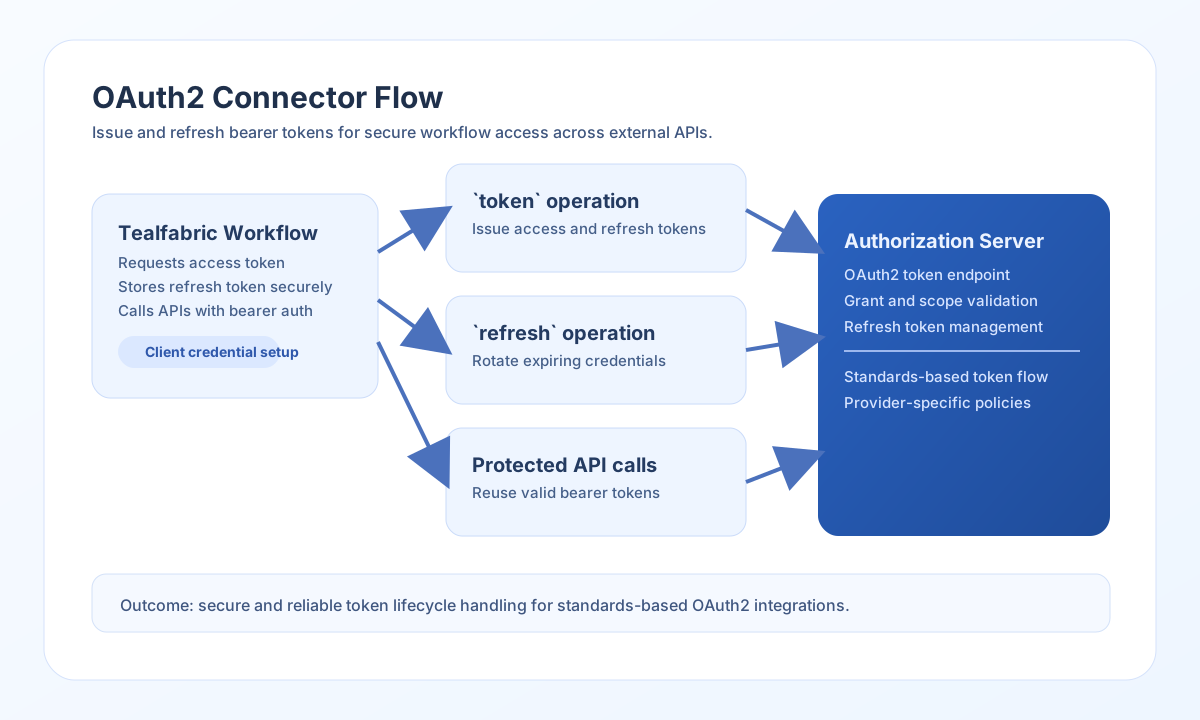
Configure OAuth endpoints and client credentials
Set authorization_url and token_url from your provider documentation, then add client_id and client_secret for your registered OAuth application. If you use Authorization Code flow, set a matching redirect_uri and confirm it is allowed by your provider.
Use scope to request only the permissions your workflow needs, and set timeout_seconds if your token endpoint can respond slowly. Scope is sent on token requests from connector configuration, not per-call scope fields.
Run test after configuration to verify client credentials against the token endpoint before connecting production traffic.
Start authorization with authorize
Use authorize to generate the provider authorization URL for the browser redirect step. Include state to protect against CSRF; when omitted, the connector generates a random 16-byte hex value.
const baseUrl = "https://api.example.com/api/v1";
const tenantId = "<TENANT_ID>";
const apiKey = "<API_KEY>";

async function createAuthorizationUrl(integrationId: string) {
  const response = await fetch(`${baseUrl}/integrations/${encodeURIComponent(integrationId)}/execute`, {
    method: "POST",
    headers: {
      "X-API-Key": apiKey,
      "X-Tenant-ID": tenantId,
      "Content-Type": "application/json",
    },
    body: JSON.stringify({
      operation: "authorize",
      redirect_uri: "https://app.example.com/oauth/callback",
      scope: "read write",
      state: "<ENTITY_ID>"
    }),
  });
  if (!response.ok) throw new Error(`Request failed: ${response.status}`);
  return response.json();
}
curl -X POST "https://api.example.com/api/v1/integrations/<ENTITY_ID>/execute" \
-H "X-API-Key: <API_KEY>" \
-H "X-Tenant-ID: <TENANT_ID>" \
-H "Content-Type: application/json" \
-d '{
"operation": "authorize",
"redirect_uri": "https://app.example.com/oauth/callback",
"scope": "read write",
"state": "<ENTITY_ID>"
}'
{
  "success": true,
  "data": {
    "message": "OAuth2 authorization URL generated",
    "authorization_url": "https://auth.example.com/authorize?response_type=code&client_id=<ENTITY_ID>&redirect_uri=https%3A%2F%2Fapp.example.com%2Foauth%2Fcallback&scope=read+write&state=<ENTITY_ID>",
    "state": "<ENTITY_ID>"
  }
}
Exchange credentials for tokens with token
Use token for Authorization Code and Client Credentials grants. For Authorization Code flow, pass code and optional redirect_uri (falls back to configured redirect_uri). Default grant_type is authorization_code.
const baseUrl = "https://api.example.com/api/v1";
const tenantId = "<TENANT_ID>";
const apiKey = "<API_KEY>";

async function requestClientCredentialsToken(integrationId: string) {
  const response = await fetch(`${baseUrl}/integrations/${encodeURIComponent(integrationId)}/execute`, {
    method: "POST",
    headers: {
      "X-API-Key": apiKey,
      "X-Tenant-ID": tenantId,
      "Content-Type": "application/json",
    },
    body: JSON.stringify({
      operation: "token",
      grant_type: "client_credentials"
    }),
  });
  if (!response.ok) throw new Error(`Request failed: ${response.status}`);
  return response.json();
}
curl -X POST "https://api.example.com/api/v1/integrations/<ENTITY_ID>/execute" \
-H "X-API-Key: <API_KEY>" \
-H "X-Tenant-ID: <TENANT_ID>" \
-H "Content-Type: application/json" \
-d '{
"operation": "token",
"grant_type": "client_credentials"
}'
{
  "success": true,
  "data": {
    "message": "OAuth2 token obtained successfully",
    "token": {
      "access_token": "<ENTITY_ID>",
      "token_type": "Bearer",
      "expires_in": 3600,
      "scope": "read write"
    }
  }
}
Refresh tokens with refresh
Use refresh when your provider issues refresh tokens and your workflow must continue without user re-authentication. Always store rotated refresh tokens when your provider returns a replacement.
const baseUrl = "https://api.example.com/api/v1";
const tenantId = "<TENANT_ID>";
const apiKey = "<API_KEY>";

async function refreshAccessToken(integrationId: string, refreshToken: string) {
  const response = await fetch(`${baseUrl}/integrations/${encodeURIComponent(integrationId)}/execute`, {
    method: "POST",
    headers: {
      "X-API-Key": apiKey,
      "X-Tenant-ID": tenantId,
      "Content-Type": "application/json",
    },
    body: JSON.stringify({
      operation: "refresh",
      refresh_token: refreshToken
    }),
  });
  if (!response.ok) throw new Error(`Request failed: ${response.status}`);
  return response.json();
}
curl -X POST "https://api.example.com/api/v1/integrations/<ENTITY_ID>/execute" \
-H "X-API-Key: <API_KEY>" \
-H "X-Tenant-ID: <TENANT_ID>" \
-H "Content-Type: application/json" \
-d '{
"operation": "refresh",
"refresh_token": "<ENTITY_ID>"
}'
{
  "success": true,
  "data": {
    "message": "OAuth2 token refreshed successfully",
    "token": {
      "access_token": "<ENTITY_ID>",
      "token_type": "Bearer",
      "expires_in": 3600,
      "refresh_token": "<ENTITY_ID>",
      "scope": "read write"
    }
  }
}
Revoke tokens with revoke
Use revoke to invalidate an access or refresh token. By default the connector posts to the configured token_url with /token replaced by /revoke; override with revoke_url when your provider uses a different revocation endpoint.
curl -X POST "https://api.example.com/api/v1/integrations/<ENTITY_ID>/execute" \
  -H "X-API-Key: <API_KEY>" \
  -H "X-Tenant-ID: <TENANT_ID>" \
  -H "Content-Type: application/json" \
  -d '{
    "operation": "revoke",
    "token": "<ENTITY_ID>",
    "token_type_hint": "access_token"
  }'
{
  "success": true,
  "data": {
    "message": "OAuth2 token revoked successfully"
  }
}
Validate configuration with test
Use test to confirm authorization_url, token_url, client_id, and client_secret are set and that a client_credentials token request succeeds.
curl -X POST "https://api.example.com/api/v1/integrations/<ENTITY_ID>/execute" \
  -H "X-API-Key: <API_KEY>" \
  -H "X-Tenant-ID: <TENANT_ID>" \
  -H "Content-Type: application/json" \
  -d '{ "operation": "test" }'
{
  "success": true,
  "data": {
    "message": "OAuth2 Authorization Server connection test successful",
    "details": {
      "authorization_url": "https://auth.example.com/authorize",
      "token_url": "https://auth.example.com/token"
    }
  }
}
Reliability and security guidance
Most OAuth failures come from mismatched redirect URIs, invalid client credentials, or scopes not granted to the client. Verify these values at the provider level before debugging workflow logic.
For secure production operation, use HTTPS endpoints only, rotate secrets regularly, request minimum scopes, and include state in authorization flows to reduce CSRF risk. This keeps token-based integrations stable and defensible.