Okta Connector Guide
The Okta connector helps Tealfabric workflows manage identities, user lifecycle actions, and group membership through the Okta Management API. It is commonly used for onboarding automation, access policy enforcement, and account state synchronization across systems.
Document information
| Field | Value |
|---|---|
| Canonical URL | /docs/04_connecting-systems/connectors/o/okta |
| Version (published date) | 2026-05-08 |
| Tags | connectors, reference, okta |
| Connector ID | okta-1.0.0 |
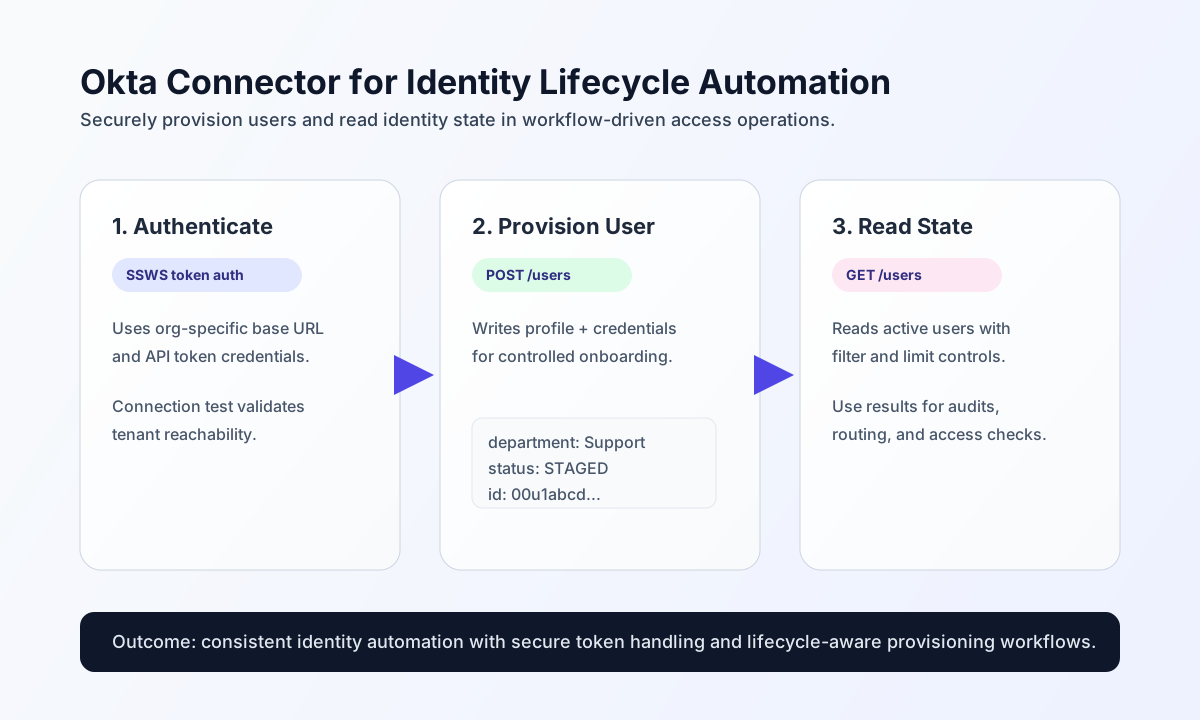
Configure authentication and organization access
Set up the connector with your organization URL and API token so workflow steps can authenticate securely against the correct Okta tenant. This avoids embedding privileged credentials in each operation payload.
Required settings are base_url (for example https://yourcompany.okta.com) and api_token. Optional timeout_seconds can be increased for larger identity operations. Run test after setup to verify token validity, network access, and tenant targeting before production rollout.
API paths are relative to /api/v1/ (for example users, not api/v1/users). The connector prepends api/v1/ when it is missing from endpoint.
Create or update users with send
Use send for user and group write operations such as provisioning accounts, profile updates, and assignment workflows. Keep request payloads explicit and deterministic so retries do not create inconsistent identity states.
const baseUrl = "https://api.example.com/api/v1";
const tenantId = "<TENANT_ID>";
const apiKey = "<API_KEY>";

async function createOktaUser(integrationId: string) {
  const response = await fetch(`${baseUrl}/integrations/${encodeURIComponent(integrationId)}/execute`, {
    method: "POST",
    headers: {
      "X-API-Key": apiKey,
      "X-Tenant-ID": tenantId,
      "Content-Type": "application/json",
    },
    body: JSON.stringify({
      operation: "send",
      endpoint: "users",
      method: "POST",
      data: {
        profile: {
          firstName: "Casey",
          lastName: "Jordan",
          email: "casey.jordan@example.com",
          login: "casey.jordan@example.com",
          department: "Support"
        },
        credentials: {
          password: {
            value: "ReplaceWithSecureSecret123!"
          }
        }
      }
    }),
  });
  if (!response.ok) throw new Error(`Request failed: ${response.status}`);
  return response.json();
}
curl -X POST "https://api.example.com/api/v1/integrations/<ENTITY_ID>/execute" \
-H "X-API-Key: <API_KEY>" \
-H "X-Tenant-ID: <TENANT_ID>" \
-H "Content-Type: application/json" \
-d '{
"operation": "send",
"endpoint": "users",
"method": "POST",
"data": {
"profile": {
"firstName": "Casey",
"lastName": "Jordan",
"email": "casey.jordan@example.com",
"login": "casey.jordan@example.com",
"department": "Support"
},
"credentials": {
"password": {
"value": "ReplaceWithSecureSecret123!"
}
}
}
}'
{
  "success": true,
  "data": {
    "message": "Okta operation completed successfully",
    "result": {
      "id": "00u1abcdEFGH2345i6p7",
      "status": "STAGED",
      "profile": {
        "email": "casey.jordan@example.com"
      }
    }
  }
}
Retrieve users and groups with receive
Use receive to list or inspect identity resources for approvals, audits, and access reviews. For large directories, apply limit and cursor-based pagination so each run stays predictable.
const baseUrl = "https://api.example.com/api/v1";
const tenantId = "<TENANT_ID>";
const apiKey = "<API_KEY>";

async function listActiveUsers(integrationId: string) {
  const response = await fetch(`${baseUrl}/integrations/${encodeURIComponent(integrationId)}/execute`, {
    method: "POST",
    headers: {
      "X-API-Key": apiKey,
      "X-Tenant-ID": tenantId,
      "Content-Type": "application/json",
    },
    body: JSON.stringify({
      operation: "receive",
      endpoint: "users",
      query: {
        filter: 'status eq "ACTIVE"',
        limit: 50
      }
    }),
  });
  if (!response.ok) throw new Error(`Request failed: ${response.status}`);
  return response.json();
}
curl -X POST "https://api.example.com/api/v1/integrations/<ENTITY_ID>/execute" \
-H "X-API-Key: <API_KEY>" \
-H "X-Tenant-ID: <TENANT_ID>" \
-H "Content-Type: application/json" \
-d '{
"operation": "receive",
"endpoint": "users",
"query": {
"filter": "status eq \"ACTIVE\"",
"limit": 50
}
}'
{
  "success": true,
  "data": {
    "message": "Okta data retrieved successfully",
    "item_count": 1,
    "items": [
      {
        "id": "00u1abcdEFGH2345i6p7",
        "status": "ACTIVE",
        "profile": {
          "email": "casey.jordan@example.com"
        }
      }
    ]
  }
}
Reliability and security guidance
Most production issues come from revoked tokens, endpoint mismatches, and rate-limit bursts. If requests fail, validate base_url, confirm token status in Okta, and add exponential backoff logic for 429 responses.
Because API tokens can grant broad access, store them in secure integration settings and rotate them on a regular schedule. Combined with consistent pagination and lifecycle-aware user handling, this keeps identity automations stable and auditable.