OpenText Vendor Invoice Management Connector Guide
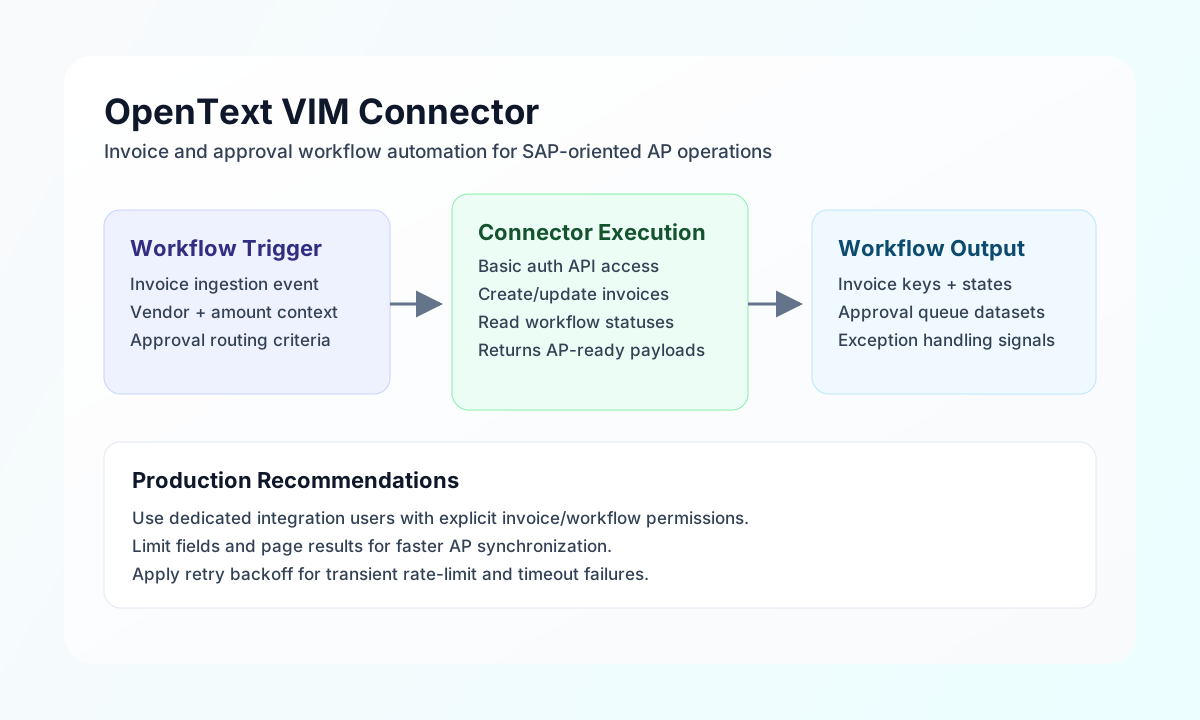
The OpenText VIM connector lets Tealfabric workflows create, update, and retrieve invoice and workflow entities in OpenText Vendor Invoice Management. It is commonly used for AP intake automation, approval-state synchronization, and invoice exception handling in SAP-oriented finance environments.
Document information
| Field | Value |
|---|---|
| Canonical URL | /docs/04_connecting-systems/connectors/o/opentext-vim |
| Version (published date) | 2026-05-08 |
| Tags | connectors, reference, opentext-vim |
| Connector ID | opentext-vim-1.0.0 |
Configuration and authentication
Configure the connector with your OpenText VIM base URL and API user credentials so workflow requests can authenticate consistently. Use a dedicated service account with least-privilege access to invoice and workflow entities.
Required values are base_url, username, and password. You can optionally set timeout_seconds for longer-running invoice processing calls. After setup, run test before enabling scheduled production automations.
Requests are routed to {base_url}/api/{endpoint} with HTTP Basic authentication.
Create or update invoices with send
Use send for write operations such as creating invoices or updating workflow state. send requires endpoint (path after /api/) and defaults to HTTP POST when method is omitted.
const baseUrl = "https://api.example.com/api/v1";
const tenantId = "<TENANT_ID>";
const apiKey = "<API_KEY>";

async function createInvoice(integrationId: string) {
  const response = await fetch(`${baseUrl}/integrations/${encodeURIComponent(integrationId)}/execute`, {
    method: "POST",
    headers: {
      "X-API-Key": apiKey,
      "X-Tenant-ID": tenantId,
      "Content-Type": "application/json",
    },
    body: JSON.stringify({
      operation: "send",
      endpoint: "invoices",
      method: "POST",
      data: {
        invoiceNumber: "INV-2026-0091",
        vendorId: "VEND-8402",
        invoiceDate: "2026-05-08",
        dueDate: "2026-06-07",
        amount: 1845.2,
        currency: "USD",
        status: "PendingApproval"
      }
    }),
  });
  if (!response.ok) throw new Error(`Request failed: ${response.status}`);
  return response.json();
}
curl -X POST "https://api.example.com/api/v1/integrations/<ENTITY_ID>/execute" \
-H "X-API-Key: <API_KEY>" \
-H "X-Tenant-ID: <TENANT_ID>" \
-H "Content-Type: application/json" \
-d '{
"operation": "send",
"endpoint": "invoices",
"method": "POST",
"data": {
"invoiceNumber": "INV-2026-0091",
"vendorId": "VEND-8402",
"invoiceDate": "2026-05-08",
"dueDate": "2026-06-07",
"amount": 1845.2,
"currency": "USD",
"status": "PendingApproval"
}
}'
{
  "success": true,
  "data": {
    "message": "OpenText VIM operation completed successfully",
    "result": {
      "invoiceNumber": "INV-2026-0091",
      "status": "PendingApproval"
    }
  }
}
Retrieve invoices and workflows with receive
Use receive to fetch invoice and workflow data. receive requires endpoint and issues GET {base_url}/api/{endpoint}. Pass optional filters as a query object.
const baseUrl = "https://api.example.com/api/v1";
const tenantId = "<TENANT_ID>";
const apiKey = "<API_KEY>";

async function listPendingInvoices(integrationId: string) {
  const response = await fetch(`${baseUrl}/integrations/${encodeURIComponent(integrationId)}/execute`, {
    method: "POST",
    headers: {
      "X-API-Key": apiKey,
      "X-Tenant-ID": tenantId,
      "Content-Type": "application/json",
    },
    body: JSON.stringify({
      operation: "receive",
      endpoint: "invoices",
      query: {
        status: "PendingApproval",
        limit: "25",
        offset: "0"
      }
    }),
  });
  if (!response.ok) throw new Error(`Request failed: ${response.status}`);
  return response.json();
}
curl -X POST "https://api.example.com/api/v1/integrations/<ENTITY_ID>/execute" \
-H "X-API-Key: <API_KEY>" \
-H "X-Tenant-ID: <TENANT_ID>" \
-H "Content-Type: application/json" \
-d '{
"operation": "receive",
"endpoint": "invoices",
"query": {
"status": "PendingApproval",
"limit": "25",
"offset": "0"
}
}'
{
  "success": true,
  "data": {
    "message": "OpenText VIM data retrieved successfully",
    "invoice_count": 1,
    "items": [
      {
        "invoiceNumber": "INV-2026-0091",
        "vendorId": "VEND-8402",
        "invoiceDate": "2026-05-08",
        "amount": 1845.2,
        "status": "PendingApproval"
      }
    ]
  }
}
Execute arbitrary API methods with execute
Use execute when you need an explicit HTTP method (default GET) and JSON body from body or data.
{
  "operation": "execute",
  "endpoint": "workflows/123/approve",
  "method": "POST",
  "body": {
    "comment": "Approved by automation"
  }
}
Test connection with test
test validates base_url, username, and password, then calls GET api/invoices.
{
  "success": true,
  "data": {
    "message": "OpenText VIM connection test successful",
    "details": {
      "base_url": "https://your-instance.opentext.com",
      "invoices_found": 12
    }
  }
}
Reliability guidance
Most production issues come from authentication failures, missing entity permissions, or malformed query parameters. Validate with test, verify API user access for invoice/workflow entities, and log rejected payloads for rapid troubleshooting.
For resilient AP automation, page large result sets, apply retry backoff for 429 responses, and keep workflow status transitions explicit in update calls. These practices improve reliability and auditability.