Workday HCM Connector Guide
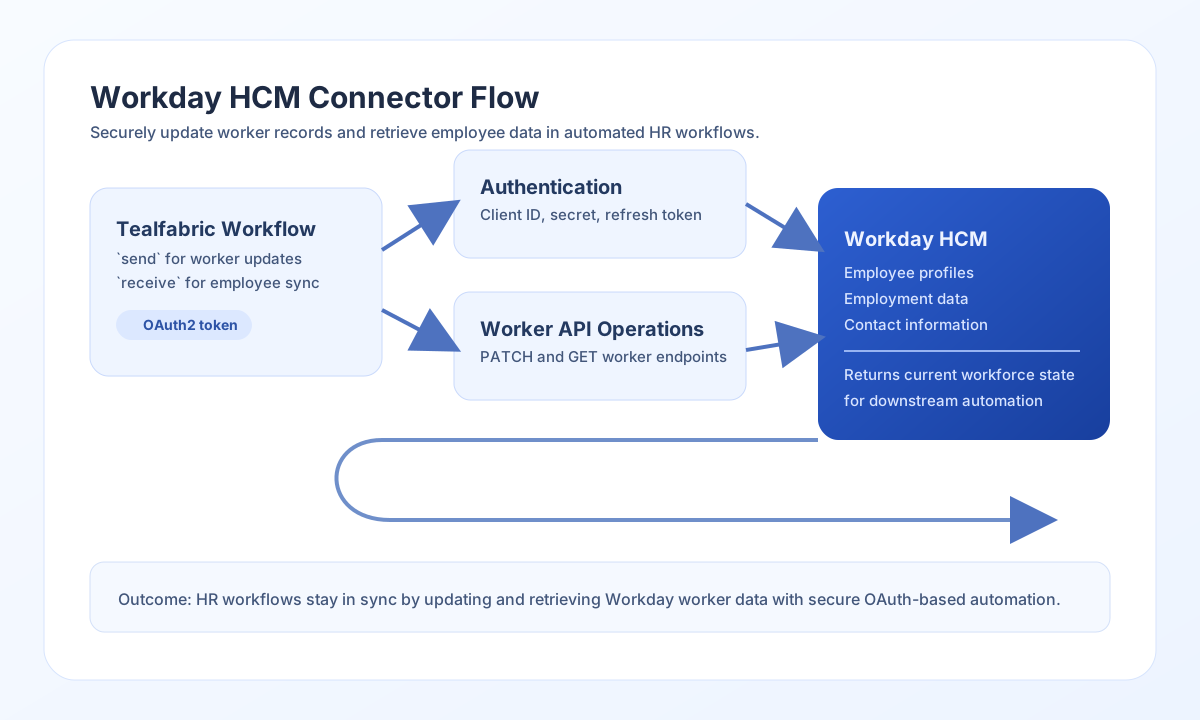
The Workday HCM connector lets Tealfabric workflows create and retrieve workforce records through Workday APIs. It is useful for HR onboarding, employee profile synchronization, and people-operations reporting where your workflow needs secure access to Workday tenant data.
Document information
| Field | Value |
|---|---|
| Canonical URL | /docs/04_connecting-systems/connectors/w/workday-hcm |
| Version (published date) | 2026-05-08 |
| Tags | connectors, reference, workday-hcm |
| Connector ID | workday-hcm-1.0.0 |
Configure authentication
Set base_url to your Workday instance URL and tenant_name to the exact tenant identifier used by your Workday environment. Add client_id and client_secret from your registered OAuth2 application so the connector can request access tokens for API operations.
Use refresh_token when your setup requires long-lived delegated access, and set timeout_seconds for expected API latency. The connector automatically refreshes tokens when possible, which keeps long-running HR automations stable.
Update worker records with send
Use send for create or update operations, such as updating worker contact details or employment attributes. This pattern is common when an upstream system needs to keep Workday employee records current.
const baseUrl = "https://api.example.com/api/v1";
const tenantId = "<TENANT_ID>";
const apiKey = "<API_KEY>";

async function updateWorkerEmail(integrationId: string) {
  const response = await fetch(`${baseUrl}/integrations/${encodeURIComponent(integrationId)}/execute`, {
    method: "POST",
    headers: {
      "X-API-Key": apiKey,
      "X-Tenant-ID": tenantId,
      "Content-Type": "application/json",
    },
    body: JSON.stringify({
      operation: "send",
      endpoint: "workers/<ENTITY_ID>/contact-information",
      method: "PATCH",
      data: {
        workEmail: "alex.taylor@example.com"
      }
    }),
  });
  if (!response.ok) throw new Error(`Request failed: ${response.status}`);
  return response.json();
}
curl -X POST "https://api.example.com/api/v1/integrations/<ENTITY_ID>/execute" \
-H "X-API-Key: <API_KEY>" \
-H "X-Tenant-ID: <TENANT_ID>" \
-H "Content-Type: application/json" \
-d '{
"operation": "send",
"endpoint": "workers/<ENTITY_ID>/contact-information",
"method": "PATCH",
"data": {
"workEmail": "alex.taylor@example.com"
}
}'
{
  "success": true,
  "data": {
    "message": "Workday HCM operation completed successfully",
    "result": {
      "workerId": "<ENTITY_ID>",
      "workEmail": "alex.taylor@example.com",
      "status": "updated"
    }
  }
}
Retrieve worker data with receive
Use receive to read employee records, employment data, or report outputs for downstream workflows. This is useful for synchronization jobs, analytics pipelines, and approval processes that rely on current HR data.
const baseUrl = "https://api.example.com/api/v1";
const tenantId = "<TENANT_ID>";
const apiKey = "<API_KEY>";

async function getActiveWorkers(integrationId: string) {
  const response = await fetch(`${baseUrl}/integrations/${encodeURIComponent(integrationId)}/execute`, {
    method: "POST",
    headers: {
      "X-API-Key": apiKey,
      "X-Tenant-ID": tenantId,
      "Content-Type": "application/json",
    },
    body: JSON.stringify({
      operation: "receive",
      endpoint: "workers",
      query: {
        status: "active",
        limit: 25
      }
    }),
  });
  if (!response.ok) throw new Error(`Request failed: ${response.status}`);
  return response.json();
}
curl -X POST "https://api.example.com/api/v1/integrations/<ENTITY_ID>/execute" \
-H "X-API-Key: <API_KEY>" \
-H "X-Tenant-ID: <TENANT_ID>" \
-H "Content-Type: application/json" \
-d '{
"operation": "receive",
"endpoint": "workers",
"query": {
"status": "active",
"limit": 25
}
}'
receive supports query as either an object or a raw query string. When the Workday response includes Report_Entry, the connector normalizes rows into data.items.
{
  "success": true,
  "data": {
    "message": "Workday HCM data retrieved successfully",
    "record_count": 2,
    "items": [
      {
        "workerId": "W-10021",
        "name": "Alex Taylor",
        "status": "active"
      },
      {
        "workerId": "W-10022",
        "name": "Sam Rivera",
        "status": "active"
      }
    ]
  }
}
Run arbitrary methods with execute
Use execute when you need full control over HTTP method and body (body or data).
{
  "operation": "execute",
  "endpoint": "ccx/api/v1/workers/<ENTITY_ID>",
  "method": "PATCH",
  "body": {
    "worker": {
      "workEmail": "alex.taylor@example.com"
    }
  }
}
Validate setup with test
test validates OAuth credentials by requesting ccx/service/customreport2/{tenant_name}/RaaS and returns connection metadata in data.details.
Reliability guidance
Most integration failures are caused by invalid OAuth credentials, expired refresh tokens, or insufficient Workday API permissions. Confirm credentials and scope first, then validate endpoint and payload structure for the operation you are running.
For production reliability, use least-privilege OAuth scopes, add retry with backoff for transient rate-limit responses, and monitor timeout behavior on large report queries. This keeps Workday automations predictable as workforce data volume grows.