Workday Connector Guide
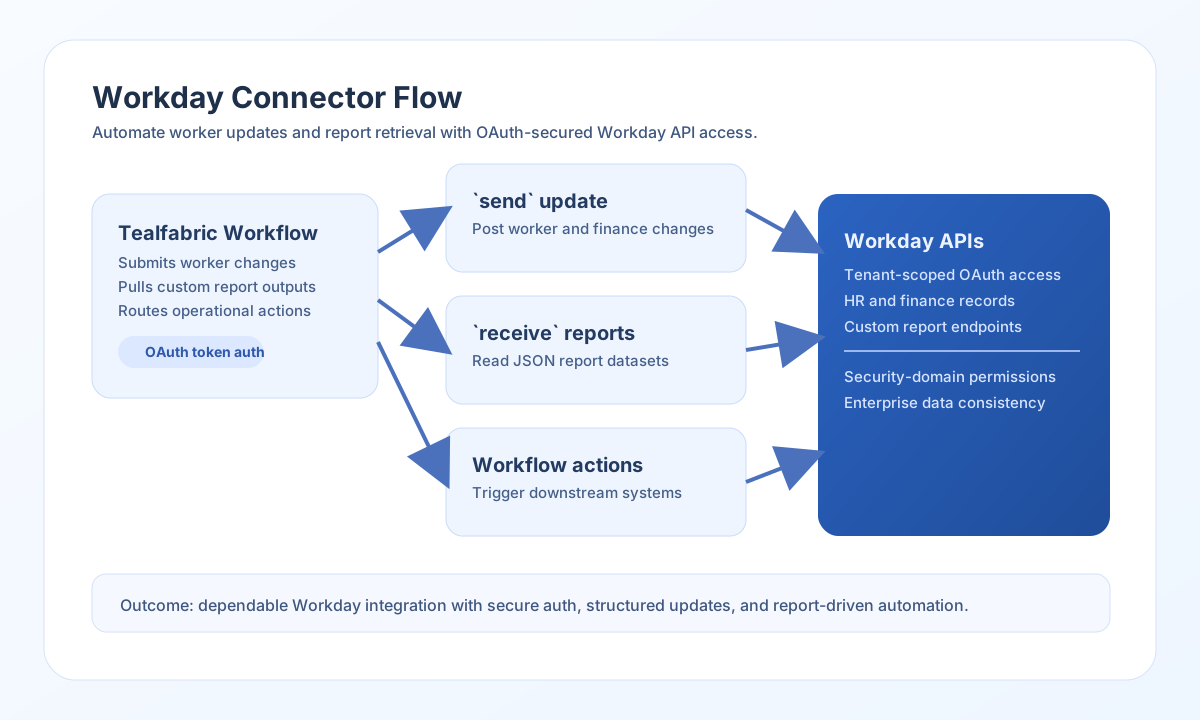
The Workday connector lets Tealfabric workflows exchange HR and finance data with Workday APIs. It supports OAuth-based authentication and common integration patterns such as submitting updates and retrieving report outputs.
Document information
| Field | Value |
|---|---|
| Canonical URL | /docs/04_connecting-systems/connectors/w/workday |
| Version (published date) | 2026-05-08 |
| Tags | connectors, reference, workday |
| Connector ID | workday-1.0.0 |
Configure OAuth credentials
Set base_url to your Workday tenant endpoint and configure client_id, client_secret, and redirect_uri from your Workday OAuth app. If you already have tokens from a completed consent flow, provide access_token and refresh_token so the connector can call APIs immediately.
Use scope values that match your required Workday domains and set timeout_seconds for larger report payloads. Run test to confirm authentication before enabling production jobs.
Submit updates with send
Use send when your workflow needs to create or update Workday entities through exposed API endpoints. Keep request payloads aligned to your tenant’s expected object model and security domain permissions.
const baseUrl = "https://api.example.com/api/v1";
const tenantId = "<TENANT_ID>";
const apiKey = "<API_KEY>";

async function submitWorkerUpdate(integrationId: string) {
  const response = await fetch(`${baseUrl}/integrations/${encodeURIComponent(integrationId)}/execute`, {
    method: "POST",
    headers: {
      "X-API-Key": apiKey,
      "X-Tenant-ID": tenantId,
      "Content-Type": "application/json",
    },
    body: JSON.stringify({
      operation: "send",
      endpoint: "ccx/api/v1/workers",
      method: "POST",
      data: {
        worker_id: "<ENTITY_ID>",
        business_title: "Senior Analyst",
        work_email: "riley.chen@example.com"
      }
    }),
  });
  if (!response.ok) throw new Error(`Request failed: ${response.status}`);
  return response.json();
}
curl -X POST "https://api.example.com/api/v1/integrations/<ENTITY_ID>/execute" \
-H "X-API-Key: <API_KEY>" \
-H "X-Tenant-ID: <TENANT_ID>" \
-H "Content-Type: application/json" \
-d '{
"operation": "send",
"endpoint": "ccx/api/v1/workers",
"method": "POST",
"data": {
"worker_id": "<ENTITY_ID>",
"business_title": "Senior Analyst",
"work_email": "riley.chen@example.com"
}
}'
{
  "success": true,
  "data": {
    "worker_id": "<ENTITY_ID>",
    "status": "updated"
  }
}
Retrieve reports with receive
Use receive to fetch Workday report outputs and filtered datasets for downstream processing. This pattern is commonly used for payroll validation, org synchronization, and HR analytics workflows.
const baseUrl = "https://api.example.com/api/v1";
const tenantId = "<TENANT_ID>";
const apiKey = "<API_KEY>";

async function fetchWorkerReport(integrationId: string) {
  const response = await fetch(`${baseUrl}/integrations/${encodeURIComponent(integrationId)}/execute`, {
    method: "POST",
    headers: {
      "X-API-Key": apiKey,
      "X-Tenant-ID": tenantId,
      "Content-Type": "application/json",
    },
    body: JSON.stringify({
      operation: "receive",
      endpoint: "ccx/service/customreport2/HR/Active_Workers",
      query: {
        format: "json",
        worker_type: "Employee"
      }
    }),
  });
  if (!response.ok) throw new Error(`Request failed: ${response.status}`);
  return response.json();
}
curl -X POST "https://api.example.com/api/v1/integrations/<ENTITY_ID>/execute" \
-H "X-API-Key: <API_KEY>" \
-H "X-Tenant-ID: <TENANT_ID>" \
-H "Content-Type: application/json" \
-d '{
"operation": "receive",
"endpoint": "ccx/service/customreport2/HR/Active_Workers",
"query": {
"format": "json",
"worker_type": "Employee"
}
}'
{
  "success": true,
  "message_count": 1,
  "data": [
    {
      "Worker_ID": "<ENTITY_ID>",
      "Worker_Name": "Riley Chen",
      "Business_Title": "Senior Analyst"
    }
  ]
}
Reliability guidance
Most failures are caused by OAuth scope mismatches, incorrect tenant endpoints, or report-level permissions. Validate security domains and report accessibility with your Workday administrator before production rollout.
For reliable processing, monitor API rate limits, paginate large report outputs where available, and implement retry/backoff for temporary failures. This keeps HR and finance automation stable under load.