Web Page Fetcher Connector Guide
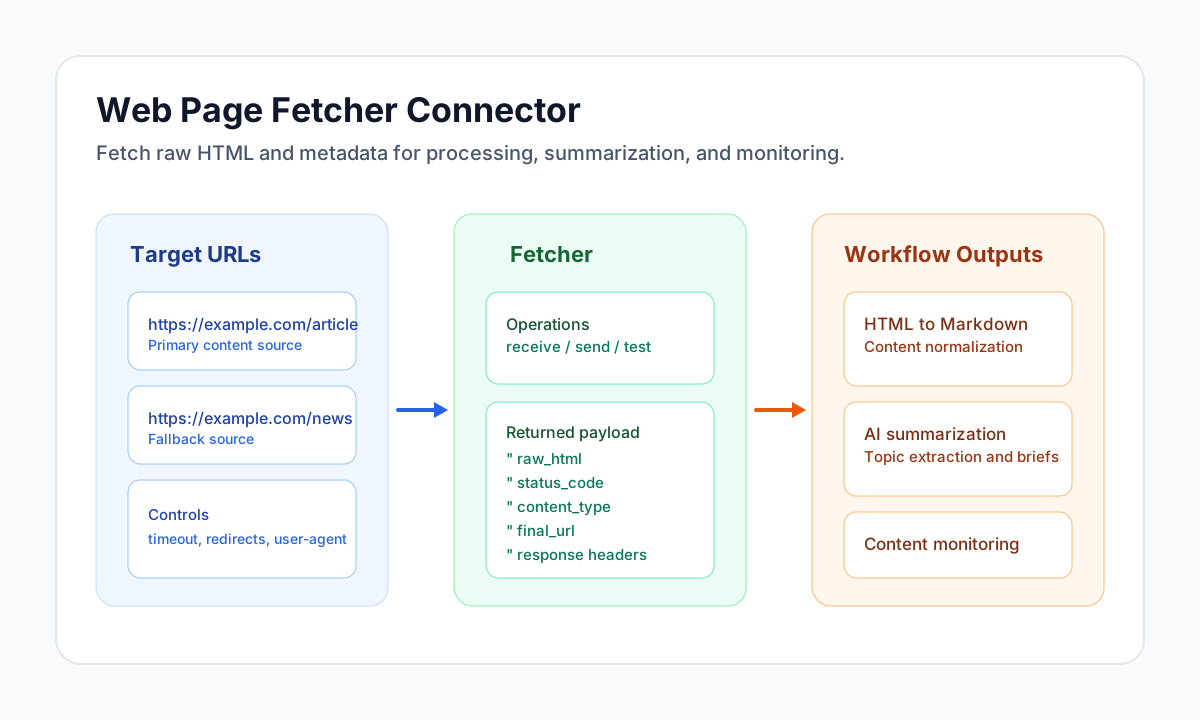
The Web Page Fetcher connector retrieves full HTML content and response metadata from public URLs so your workflows can process web pages reliably. It is commonly used for content extraction, monitoring, and AI summarization pipelines where you need the original page markup before transformation.
Document information
| Field | Value |
|---|---|
| Canonical URL | /docs/04_connecting-systems/connectors/w/web-page-fetcher |
| Version (published date) | 2026-05-08 |
| Tags | connectors, reference, web-page-fetcher |
| Connector ID | web-page-fetcher-1.0.0 |
Configure safe page retrieval
Set default_url when your workflow repeatedly fetches the same source and use per-run url (or target_url) overrides for dynamic targets. Keep timeout_seconds, redirect settings, and user_agent aligned with the source site requirements to reduce fetch failures.
Use follow_redirects and max_redirects carefully so shortlink and canonical URL flows resolve correctly without creating long redirect chains. Set max_redirects to 0 to disable redirect following (matches libcurl behavior). Run the test operation before production scheduling to verify baseline connectivity.
| Parameter | Default | Effect |
|---|---|---|
default_url | "" | Optional fallback URL when call data omits url/target_url. |
timeout_seconds | 30 | Full-request timeout per HTTP hop (GET or redirect follow). |
user_agent | Tealfabric-WebPageFetcher/1.0.0 | Sent on every request. |
follow_redirects | true | When false or max_redirects is 0, 3xx responses are returned without following Location. |
max_redirects | 5 | Maximum redirect hops when following is enabled. |
Fetch HTML with receive (or send)
Use receive to fetch a page and return raw_html, status metadata, and final URL details under data. The send operation is an alias with the same behavior. Provide url or target_url in call data (top-level or nested under data); otherwise the connector uses default_url from integration configuration.
receive/send fail with HTTP error {status} when the final response status is 400 or higher.
const baseUrl = "https://api.example.com/api/v1";
const tenantId = "<TENANT_ID>";
const apiKey = "<API_KEY>";

async function fetchArticleHtml(integrationId: string) {
  const response = await fetch(`${baseUrl}/integrations/${encodeURIComponent(integrationId)}/execute`, {
    method: "POST",
    headers: {
      "X-API-Key": apiKey,
      "X-Tenant-ID": tenantId,
      "Content-Type": "application/json",
    },
    body: JSON.stringify({
      operation: "receive",
      url: "https://example.com/article"
    }),
  });
  if (!response.ok) throw new Error(`Request failed: ${response.status}`);
  return response.json();
}
curl -X POST "https://api.example.com/api/v1/integrations/<ENTITY_ID>/execute" \
-H "X-API-Key: <API_KEY>" \
-H "X-Tenant-ID: <TENANT_ID>" \
-H "Content-Type: application/json" \
-d '{
"operation": "receive",
"url": "https://example.com/article"
}'
{
  "success": true,
  "data": {
    "url": "https://example.com/article",
    "final_url": "https://example.com/article",
    "status_code": 200,
    "content_type": "text/html; charset=UTF-8",
    "headers": {
      "content-type": "text/html; charset=UTF-8"
    },
    "raw_html": "<!doctype html>...",
    "html_length": 52341
  },
  "metadata": {
    "processing_time_ms": 842
  }
}
Validate configuration with test
Use test to confirm integration configuration. When default_url is unset, the connector returns success with guidance to set default_url or pass url in call data. When default_url is set, the connector performs one GET and returns data.details with status_code even for HTTP 4xx/5xx responses (network and validation failures still return success: false).
const baseUrl = "https://api.example.com/api/v1";
const tenantId = "<TENANT_ID>";
const apiKey = "<API_KEY>";

async function testWebFetcher(integrationId: string) {
  const response = await fetch(`${baseUrl}/integrations/${encodeURIComponent(integrationId)}/execute`, {
    method: "POST",
    headers: {
      "X-API-Key": apiKey,
      "X-Tenant-ID": tenantId,
      "Content-Type": "application/json",
    },
    body: JSON.stringify({
      operation: "test"
    }),
  });
  if (!response.ok) throw new Error(`Request failed: ${response.status}`);
  return response.json();
}
curl -X POST "https://api.example.com/api/v1/integrations/<ENTITY_ID>/execute" \
-H "X-API-Key: <API_KEY>" \
-H "X-Tenant-ID: <TENANT_ID>" \
-H "Content-Type: application/json" \
-d '{
"operation": "test"
}'
{
  "success": true,
  "data": {
    "message": "Web page fetch test successful",
    "details": {
      "url": "https://example.com/",
      "final_url": "https://example.com/",
      "status_code": 200,
      "content_type": "text/html; charset=UTF-8"
    }
  },
  "metadata": {
    "processing_time_ms": 512
  }
}
Build reliable content pipelines
A common pattern is fetching data.raw_html, converting it with an HTML-to-Markdown step, and then sending normalized text into classification or summarization workflows. This separation keeps extraction consistent and makes downstream prompt behavior more predictable.
For production reliability, handle non-200 responses on receive/send, enforce allowlists for target domains, and monitor repeated timeout or redirect failures. The backend-next runtime additionally blocks private-network and localhost destinations via SSRF guardrails before each HTTP hop.