WooCommerce Connector Guide
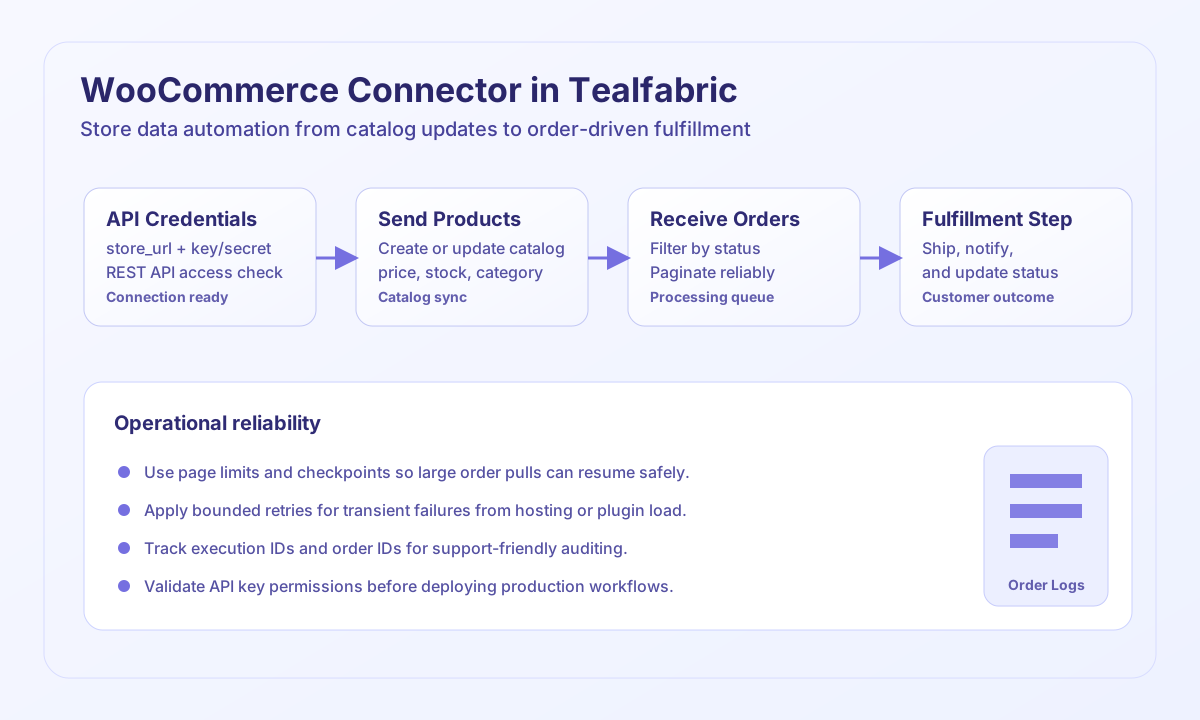
The WooCommerce connector lets Tealfabric workflows create and retrieve commerce data from WooCommerce stores through the REST API. It is well suited for catalog synchronization, order processing automation, and back-office integrations that need reliable inventory and order state updates.
Document information
| Field | Value |
|---|---|
| Canonical URL | /docs/04_connecting-systems/connectors/w/woocommerce |
| Version (published date) | 2026-05-08 |
| Tags | connectors, reference, woocommerce |
| Connector ID | woocommerce-1.0.0 |
When to use this connector
Use this connector when workflows must push product changes, read current orders, or coordinate fulfillment based on WooCommerce status updates. It is a good fit for operations teams that need consistent data movement between storefront systems and internal platforms. Production reliability improves when you design each flow with explicit retries and pagination controls.
Prerequisites
Before configuring the connector, create WooCommerce REST API credentials and confirm that the key has the permissions your workflow requires. Verify the store_url is reachable from the environment running Tealfabric and that WordPress REST endpoints are enabled. Define an ownership model for key rotation and operational monitoring before enabling high-throughput jobs.
Configuration
Store these values in the integration profile so they can be reused by each execution.
store_url(required): Base store URL, for examplehttps://yourstore.com.consumer_key(required): WooCommerce API consumer key.consumer_secret(required): WooCommerce API consumer secret.timeout_seconds(optional): Request timeout in seconds; default is30.
Create a product with send
The send operation is commonly used for product upserts from ERP or catalog sources. Use a minimal payload and stable category mapping to keep sync behavior predictable.
const baseUrl = "https://api.example.com/api/v1";
const tenantId = "<TENANT_ID>";
const apiKey = "<API_KEY>";

type ProductResult = {
  id?: number;
  name?: string;
  price?: string;
};

async function createProduct(integrationId: string): Promise<ProductResult> {
  const response = await fetch(
    `${baseUrl}/integrations/${encodeURIComponent(integrationId)}/execute`,
    {
      method: "POST",
      headers: {
        "X-API-Key": apiKey,
        "X-Tenant-ID": tenantId,
        "Content-Type": "application/json",
      },
      body: JSON.stringify({
        operation: "send",
        endpoint: "products",
        method: "POST",
        data: {
          name: "Tealfabric Bottle",
          type: "simple",
          regular_price: "24.99",
          description: "Insulated stainless-steel bottle.",
          categories: [{ id: 12 }],
        },
      }),
    }
  );

  if (!response.ok) throw new Error(`Request failed: ${response.status}`);
  const payload = (await response.json()) as { data?: ProductResult };
  if (!payload.data) throw new Error("Missing product payload");
  return payload.data;
}
curl -X POST "https://api.example.com/api/v1/integrations/<ENTITY_ID>/execute" \
-H "X-API-Key: <API_KEY>" \
-H "X-Tenant-ID: <TENANT_ID>" \
-H "Content-Type: application/json" \
-d '{
"operation": "send",
"endpoint": "products",
"method": "POST",
"data": {
"name": "Tealfabric Bottle",
"type": "simple",
"regular_price": "24.99",
"description": "Insulated stainless-steel bottle.",
"categories": [{ "id": 12 }]
}
}'
{
  "success": true,
  "data": {
    "id": 5721,
    "name": "Tealfabric Bottle",
    "price": "24.99"
  }
}
Retrieve processing orders with receive
Use receive to pull orders that require action, such as fulfillment or fraud review. Combining status filters with page controls keeps jobs efficient and easier to rerun safely.
const baseUrl = "https://api.example.com/api/v1";
const tenantId = "<TENANT_ID>";
const apiKey = "<API_KEY>";

type WooOrder = {
  id?: number;
  status?: string;
  total?: string;
};

async function listProcessingOrders(integrationId: string): Promise<WooOrder[]> {
  const response = await fetch(
    `${baseUrl}/integrations/${encodeURIComponent(integrationId)}/execute`,
    {
      method: "POST",
      headers: {
        "X-API-Key": apiKey,
        "X-Tenant-ID": tenantId,
        "Content-Type": "application/json",
      },
      body: JSON.stringify({
        operation: "receive",
        endpoint: "orders",
        query: {
          per_page: 20,
          page: 1,
          status: "processing",
        },
      }),
    }
  );

  if (!response.ok) throw new Error(`Request failed: ${response.status}`);
  const payload = (await response.json()) as { data?: WooOrder[] };
  if (!payload.data) throw new Error("Missing order payload");
  return payload.data;
}
curl -X POST "https://api.example.com/api/v1/integrations/<ENTITY_ID>/execute" \
-H "X-API-Key: <API_KEY>" \
-H "X-Tenant-ID: <TENANT_ID>" \
-H "Content-Type: application/json" \
-d '{
"operation": "receive",
"endpoint": "orders",
"query": {
"per_page": 20,
"page": 1,
"status": "processing"
}
}'
{
  "success": true,
  "data": [
    {
      "id": 100245,
      "status": "processing",
      "total": "49.98"
    }
  ],
  "total_size": 1
}
Reliability guidance
WooCommerce performance and rate behavior can vary by hosting and plugin stack, so monitor response time and transient errors in production. Use pagination and bounded retry logic to keep long-running jobs predictable and resumable. Validate API key permissions before deployment so operational failures do not block checkout, fulfillment, or customer service workflows.