Word File Connector Guide
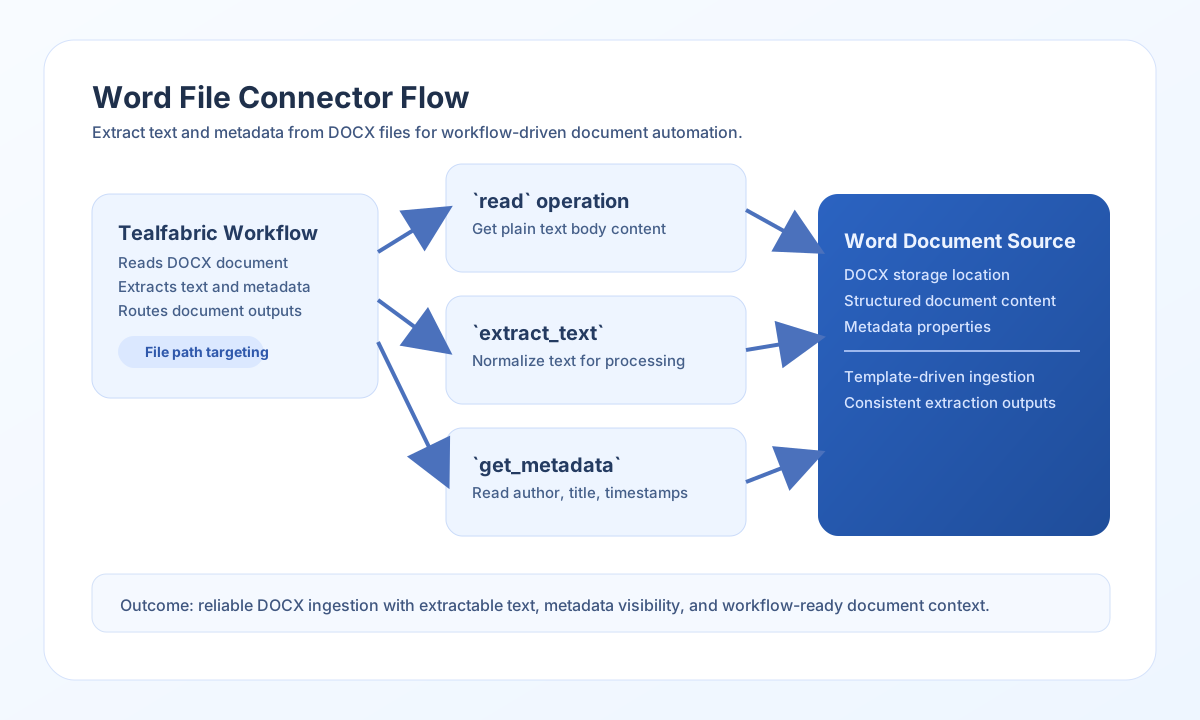
The Word File connector lets Tealfabric workflows read .docx documents from tenant storage, extract plain text, and retrieve document metadata. It is useful for document ingestion pipelines, compliance checks, and content processing automations.
Document information
| Field | Value |
|---|---|
| Canonical URL | /docs/04_connecting-systems/connectors/w/word-file |
| Version (published date) | 2026-05-08 |
| Tags | connectors, reference, word-file |
| Connector ID | word-file-1.0.0 |
Configure file targeting
Set filename to the target .docx file and use path when the file is stored in a subdirectory under tenant storage (storage/tenantdata/{tenant_id}/[path/]{filename}). Keep file naming consistent across workflows so document routing and audit trails are easier to maintain.
filename(required): Word file name, for examplecandidate-profile.docx.path(optional): relative folder under tenant storage, for examplehr/intake.
Run test after configuration to verify that the connector can access the file location before enabling production workflows.
Read document text with read
Use read when your workflow needs the document body content for parsing or downstream enrichment. This operation is an alias for extract_text and is a good fit for resume processing, contract indexing, or policy review pipelines.
const baseUrl = "https://api.example.com/api/v1";
const tenantId = "<TENANT_ID>";
const apiKey = "<API_KEY>";

async function readWordFile(integrationId: string) {
  const response = await fetch(`${baseUrl}/integrations/${encodeURIComponent(integrationId)}/execute`, {
    method: "POST",
    headers: {
      "X-API-Key": apiKey,
      "X-Tenant-ID": tenantId,
      "Content-Type": "application/json",
    },
    body: JSON.stringify({
      operation: "read",
      filename: "candidate-profile.docx",
      path: "hr/intake"
    }),
  });
  if (!response.ok) throw new Error(`Request failed: ${response.status}`);
  return response.json();
}
curl -X POST "https://api.example.com/api/v1/integrations/<ENTITY_ID>/execute" \
-H "X-API-Key: <API_KEY>" \
-H "X-Tenant-ID: <TENANT_ID>" \
-H "Content-Type: application/json" \
-d '{
"operation": "read",
"filename": "candidate-profile.docx",
"path": "hr/intake"
}'
{
  "success": true,
  "data": {
    "message": "Text extracted successfully",
    "text": "Candidate Summary: ...",
    "paragraphs": ["Candidate Summary:", "..."],
    "word_count": 42,
    "character_count": 256
  }
}
Targeted extraction operations
Use extract_text when you need the same output as read (both are aliases). Use get_metadata for Dublin Core properties from docProps/core.xml (title, author, created/modified timestamps). Run test during setup to confirm the configured file exists, is readable, and opens as a valid DOCX ZIP archive.
Retrieve metadata with get_metadata
Use get_metadata when your workflow needs document properties such as title, author, and modification timestamps. Metadata checks help with retention policies, routing rules, and quality controls.
const baseUrl = "https://api.example.com/api/v1";
const tenantId = "<TENANT_ID>";
const apiKey = "<API_KEY>";

async function getWordMetadata(integrationId: string) {
  const response = await fetch(`${baseUrl}/integrations/${encodeURIComponent(integrationId)}/execute`, {
    method: "POST",
    headers: {
      "X-API-Key": apiKey,
      "X-Tenant-ID": tenantId,
      "Content-Type": "application/json",
    },
    body: JSON.stringify({
      operation: "get_metadata",
      filename: "candidate-profile.docx",
      path: "hr/intake"
    }),
  });
  if (!response.ok) throw new Error(`Request failed: ${response.status}`);
  return response.json();
}
curl -X POST "https://api.example.com/api/v1/integrations/<ENTITY_ID>/execute" \
-H "X-API-Key: <API_KEY>" \
-H "X-Tenant-ID: <TENANT_ID>" \
-H "Content-Type: application/json" \
-d '{
"operation": "get_metadata",
"filename": "candidate-profile.docx",
"path": "hr/intake"
}'
{
  "success": true,
  "data": {
    "message": "Metadata read successfully",
    "metadata": {
      "title": "Candidate Profile",
      "author": "Talent Operations",
      "subject": "",
      "keywords": "",
      "created": "2026-01-15T10:00:00Z",
      "modified": "2026-05-08T17:42:00Z",
      "last_modified_by": "Talent Operations"
    }
  }
}
Limitations and reliability guidance
This connector supports .docx files only (not legacy .doc). Text is extracted from <w:t> nodes in word/document.xml (matching legacy PHP xpath('//w:t') behavior for typical documents). Complex formatting, tables, headers, and footers may not be fully represented in extracted text.
Most connector errors come from missing files, incorrect paths, or unsupported formats. Confirm .docx extension and storage path values before running extraction workflows. Use test before extraction, keep path conventions consistent, and handle unsuccessful responses before dependent workflow steps.